Category: TeamKinetic Features Page 8 of 10

There are a wide array of TeamKinetic features, that’s why we try to explain what each area of the system does, why you use it, and how to use it most effectively.

If there’s something we haven’t covered, let us know!

What essential technology do you need to take care of your volunteers?

Technology picture

As a purveyor of volunteer management software, you would not be surprised to hear me evangelise about the importance of technology in volunteer management and the potential opportunities for efficiency, scale and reduced operating costs. In this article, I want to explore what technologies we think are important now and will be important in the future, but more importantly than the technology itself. I want to look at how the technology works with the human experience to build stronger more coherent communities.

I don’t need to tell the readers of this blog, that volunteers and volunteer management do not easily fit into any single box. Unlike employees, the relationship between volunteers and the organisations they give their time to is unique and comes with its own set of unique risks and considerations. So what technologies can you leverage to make your volunteer management more effective?

HR Software

Let’s start with the dry and boring, but essential and important stuff. Did you know that only 5% of charities currently have and use HR software? That means 95% of charities are not safeguarding their volunteers. That is a massive number who may be leaving themselves exposed to GDPR and data-breach fines.

Organisations, big and small, must ensure they fulfil their duty of care to their volunteers. They need to keep them safe and ensure they are appropriately trained and inducted. They also need to make sure only people with the appropriate skills and training are allowed to access certain higher-risk roles. Some voluntary opportunities carry significant risks for the volunteer, the service users and the organisation itself, and these risks need to be mitigated.

To ensure an organisation is compliant with employment law, health and safety law and GDPR, HR software provides a methodology to track and report on an ever-changing workforce. From general trends on the demographics of your volunteers, how many men, women etc, to which of my volunteer’s criminal records check is coming up for renewal.

Having all your volunteer records available, searchable and customisable means you can quickly identify training needs, skills gaps and individuals who may pose a potential risk to the organisation or have the ability to do more for the organisation.

Volunteers are not employees! So the data you hold on them is different to that you might have on your paid staff. Under GDPR you must have a valid reason for holding data that might be considered personal or sensitive. Volunteers can be deployed across various business areas and as such certain information will be required to be shared with managers, employees and partners about that volunteer so that they can be deployed safely and appropriately.

Your HR software needs to be flexible enough to deal with the unique nature of volunteers whilst being robust enough to protect the individuals and the organisation.

The question we ask organisations to consider: is your HR system the right place for your volunteer’s data? If not what are your options?

Brokerage

Great! you have a list of potential volunteers, you know a little about them; their demographic information, maybe a little history on their experiences. What do you do next?

Getting the right people into the right roles is the difference between a successful volunteer programme and a failed volunteer programme. How effective your brokerage is, determines how well volunteers are matched. We think the key elements of effective digital brokerage are:

  • High-quality information so volunteers and organisations can make informed judgements on what suits them and what they want to do.
  • Effective search and filter tools, that enable users to quickly find what is important to them presented in a way that lets them scan large volumes of information quickly. Time, location, keyword, accessibility are all the types of key data points users want to be able to refine their search criteria by.
  • Opportunity brokerage that gives the volunteer ownership of their experience but that also allows organisations to check and limit opportunities based on experience, skills, qualifications and available references.
  • Matching people to opportunities means you need to have what people are looking for. This involves doing two things, having enough opportunities that your volunteers have lots of choices and having real insight into what your volunteers are searching for.
  • Having enough opportunities to create real choice is a challenge, especially when you first get going, so a system that can pull opportunity data from other sources would be useful.
  • Being able to share your opportunities across other national brokerage sites via API‘s

Understanding your volunteers and what they are looking for, means you can inform your opportunity providers on what they should be offering, and what keywords they should be used to describe their offer so people can find them.

Do you need brokerage..? Is your brokerage resource-intensive and require your staff to spend too much time data inputting?

Customer Relationship Software (CRM)

I appreciate volunteers are not customers! And they are not Employees! But they do occupy a space in between these two entities. They do have a choice over how they spend their time, they need to be looked after like you would regular customers. So how do you do this?

An effective CRM provides a set of tools that allows you to communicate and measure the effectiveness of those communications with your customers.

Being able to create lists of volunteers based on experience, demographic information or skill and qualification means you can target emails, newsletters or SMS text messages. Tracking the impact of these communications in regards to the performance of your opportunities enables you to understand which of your communications are most effective and perhaps why.

A CRM will provide you with a method for tracking interactions, identifying volunteers who are suited to certain opportunities and will make it easy to use the digital communication tools to reach out to these people.

36% of potential volunteers experienced barriers to volunteering due to potential communication issues, e.g. a lack of response to their application, or lack of clarity and understanding about the role. Could your customer relationship management be limiting the number of volunteers your organisation receives?

Should your volunteers be in your customer relationship software, or is there somewhere else they might be better placed..?

Social

Whatever your view on social media, you can’t ignore it if you are looking to engage an audience.

Social media provides a range of potential benefits for organisations and provides a powerful method of growing your audience via volunteer’s social groups and followers. Sharing opportunities and experiences that you are passionate about with your social media audience will improve your opportunity engagement.

Looking at how you integrate social features into your volunteer’s experience will enhance retention and make your programme more sustainable, help build a feeling of community and allow you to share incentives and future opportunities. Can you use technology that allows you to create groups and communities?

Existing applications such as Facebook, What’s App, Twitter and Linked In all provide tools, but you must also consider that these services have some hidden costs in their use. How exposed are your uses to their data being used by these large organisations, do you as an organisation have the control you need over these external applications to protect your users and your organisation’s reputation, do you want to share all your user’s data with these 3rd party social networks?

It’s important to know your volunteer demographics well enough to be able to target them effectively on social media. The top social media platform used differs by generation – Gen Z (19 and under) use YouTube, Twitter, and Snapchat the most, while the older generations (20 – 70+) spend most of their time on Facebook. (Mintel 2019)

You want to take advantage of the benefits of social media and the potential for your work to become a viral sensation without the inherent risks these platforms pose. You must invest time in developing your organisation’s online persona, growing an engaged audience on the platforms that you identify as appropriate for your volunteers and managing that profile to ensure you stay relevant. To do this requires considerable staff resource and knowledge of the platform to use it effectively.

Wouldn’t it be amazing if you could find a way to generate social content and link to your accounts.? Would it also be great if your volunteers and providers can share and engage socially as well.?

TeamKinetic

Our ambition at TeamKinetic was to develop a platform that allowed a volunteer manager to take advantage of all the above technology in one place. A platform that was specially designed for working with the unique considerations that arise with volunteers.

TeamKinetic is volunteer-centric – built to make the life of the volunteer as easy as possible. Built to allow volunteers to take ownership of their experiences, to take advantage of their social media and allow them to easily communicate with opportunity providers and other volunteers.

Designed for the entire volunteer life-cycle: from recruitment, through onboarding to deployment, and then with tools that would lead to better volunteer retention. TeamKinetic provides a framework of checks and balances to ensure the volunteers are safe, the wider service users are safe, and the organisation can meet its legal responsibilities and deliver high-quality, insight-driven experiences for its volunteers.

TeamKinetic is built on the principals of open data, with tools that allow the linking and sharing of certain data. This approach means organisations can use TeamKinetic in isolation or as a ‘best in category’ tool or they can link it to other software they use to create a more complete picture of their business. Simple to use features allow data and reporting exports as well as built-in data sharing functions. This allows quick and simple sharing with other brokers and applications.

For most organisations, having multiple applications, software and systems can be too complicated and expensive. TeamKinetic’s ambition is to provide all these services, and the ability to link to more as required, in a specialised volunteer management product. Our hope is that it is both cost-effective and feature-rich. This approach means you can have an ‘available any time’, web-based service that has a free mobile application, powerful data tools, customisable design features, and is built for the express job of managing volunteers. A service that is updated and improved every year at a cost that will not break the bank.

Finally, as a specialist in this sector, TeamKinetic has vast experience in how to use the available technology to get the very best from your volunteers. Our extensive support means volunteer managers can get good advice from both TeamKinetic and other volunteer managers who use the TeamKinetic system, sharing good practice and learning from each other. TeamKinetic’s value does not end with its software. Its true value is in shared best practice and the use of high-quality data that allows all our customers to look at ways in which they can improve their volunteers’ experiences.

If you want to see how TeamKinetic can help you, please feel free to get in touch here. We would love to give you the tour and show you how TeamKinetic could change your world. Just get in touch and we can arrange a 30-minute demo and 30-day free trial, so you can see for yourself how much more you might be able to do.

Do-it_logo

Goodbye Do-It.org, we’ll miss you!

Do-it_logo

It is with some sadness that TeamKinetic and Do-it.org will no longer be working together. Users who take advantage of the link between the two applications will no longer be able to share opportunities to Do-it after Friday 27th September.

For those who do use this feature, you may have noticed over the last few months it had become a little unstable and prone to misbehaving. Do-it has decided that they no longer wanted to support this feature and it will be removed on Friday the 27th September. It would be safe to assume all existing opportunities will be removed though we strongly suggest you check if this could affect you after the 27th.

Do-it.org did not provide detail as to why they no longer wanted to support the TeamKinetic link, but we know they continue to review their platform and develop their technology and sometimes these types of features are no longer a priority for an organisation to support. We thank Do-it for their support over the last 3 years and wish them all the very best, moving forward.

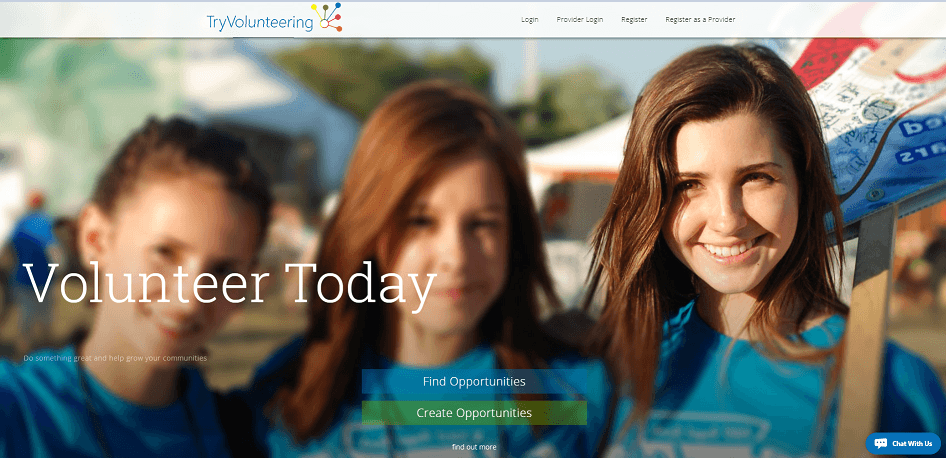
All our customers will still be able to link their opportunities to our own free national platform at TryVolunteering.com, which will continue to give you extra reach and exposure. We recommend always sharing with TryVolunteering if you can.

TeamKinetic customers in Wales and Scotland can also continue to link with Volunteering-wales.net and VolunteerScotland.

TeamKinetic continues to look at how we can use our data to benefit the volunteer sector and stand by our ‘open data’ principals. We will continue to explore opportunities to work with partners to grow volunteer participation and we hope those customers who used this feature are able to work with us as we look at new partners for them to share their opportunities with.

If you have any questions as to how this might impact you, please don’t hesitate to get in touch via email, twitter, facebook or give us a call here in the office.

The Volunteer Opportunity Guide

Volunteers

Volunteering contributed 17.1bn to the economy in 2016/ 2017 representing 0.85% GDP. The voluntary sector had 870,000 workers in 2018 with an estimated value of voluntary activity being 23.9bn. Opportunities created by providers and organisations are allowing these figures grow even more everyday!

A Small Thanks From TeamKinetic

TeamKinetic is proud of the organisations we works with. So we thought it was only right to give a little shout out to some of these organisations and the opportunities they have on offer.

Many of these organisations vary in size, but the one thing they have in common is that they are all dedicated to helping people find volunteering opportunities that interest and challenge the volunteer.

What these organisations provide that many lack is the freedom for the volunteer to register and find opportunities in seconds. Whether its skill based, long term, one off, or more micro volunteering oriented opportunities for those people wanting to help but unable to commit to anything long term due to work and other life commitments.

So let’s find out more about these organisations and what they do around the community!

Humanity Road

HR

Humanity Road was founded in 2010 by Chris Thompson and Cat Graham. Both twin sisters who created the organisation to connect people, animals and emergency officials with help resources when disaster strikes.

Every year, Humanity Road volunteers help thousands of people around the world impacted by disaster. In 2016, the disaster desk was active for 3,878 hours. Volunteers responded to 105 events in 45 countries, and total volunteer hours of service topped 11,000 hours.

What makes humanity road different is that almost all their opportunities are flexible and can be done from the comfort of your home. Opportunities like this are great for people wanting to help but are time poor.

Liverpool FC Foundation

LFC

The LFC Foundation is the official charity of Liverpool Football Club. Their mission is to bring together the LFC family to create life changing opportunities for children and young people. The charity was formed in 2010 as a financially independent organisation to harness the power and passion their fans and supporters have to improve the lives of others.

The Liverpool foundation run a number of amazing events and days that volunteers can really get stuck into. Some of these opportunities include Respect4All Programme. Which is the LFC Foundation’s disability and inclusion project. Moreover the LFC Foundation make all the volunteers feel part of their community, something I experienced first hand!

University of East London

UEL

UEL connects students to professional, career-led volunteering opportunities with charities, public sector organisations and other non-for-profit organisations across London. They Focus on volunteering that align with students career aspirations, interests and availability. They define volunteering as “time willingly given for the common good and without financial gain. It is enriching and contributes to personal development and/ or career aspirations

The university offers opportunities all across the city which vary in skill, commitment and type. The opportunities provided by the university have allowed students to feel part of the community and gain experience they might have not had the opportunity to do so in the past. Volunteering at university allows students to develop new skills that benefit them once they leave.

Glasgow Life Events

GlasgowLife

Glasgow Life is part of the city wide partnership which aims to develop volunteering opportunities and to grow volunteering skills. Additionally each year Glasgow Life provides numerous rewarding, safe, and supported opportunities for volunteers. Some being one-off major events, to more regular activities in libraries, museums, and community facilities throughout the city with around 1500 people currently involved as volunteers in Glasgow Life activities.

Glasgow Life have hosted a number of world class events including the Athletics Indoor European Championships. Events like this bring the city together and offer a number of opportunities for people to get stuck in. The great thing about Glasgow Life is that, there is no shortage of fun and rewarding opportunities.

Volunteering Wales

Volunteering Wales

Volunteering Wales provides an integrated programme of volunteering support that aims to help more people get involved in volunteering. Benefiting their community and for their own personal development, and to help volunteering organisations to recruit and support their volunteers.

Volunteering Wales offer thousands of opportunities across Wales, working with various providers. Enabling potential volunteers to be able to select from a wide variety of activities, that they may wish to be apart of. In addition previous events have included fund raising events in support of the Samaritans and other charities.

Volunteering Wales enables younger people to get involved with volunteering. Providing a platform which connects younger people to opportunities they may have never thought about doing before, leading to the development of their social skills and creating new friends in volunteering along the way.

YHA

YHA believe that everyone should have the opportunity to discover, explore and experience something new – and what better way than through volunteering. Youth hostels offer a place to stay, a warm and safe welcome, accessible and flexible accommodation, activities and education packages and best of all they are open to everyone, whatever age or where they are from.

YHA have an extensive list of opportunities available from caretaking opportunities to hostel placement opportunities. Together with placement opportunities available in the city, country or in coastal areas across Britain. Hostel and student placements are perfect if you would like to gain hospitality experience, complete a work placement as part of your course of study, or to simply get away from home and lend a hand.

YHA opportunities provide unbelievable experience’s for those who may have came from harder upbringings and poorer family backgrounds. YHA is a unique organisation because they allow the opportunity to stay somewhere quite amazing. I stayed at the Snowdon Bryn Gwnant hostel, which is amazing and in a truly beautiful location!

Manchester VIP

MCRVIP

Manchester VIP identifies, trains, and deploys volunteers to support sport and physical activity across Manchester. Recruiting people from all backgrounds and developing their skills signposting them to opportunities within sports events, sports clubs, local communities and schools.

MCRVIP unites people together in a common cause; museum workers, park maintenance, city cleaning, library workers, or even athletics coaching. Their platform is bringing everyone together, showcasing masses of opportunities for people to get involved with across Manchester. Manchester volunteers feel part of something larger and their retention rate is phenomenal.

TK

TeamKinetic is massively thankful to be able to supply these wonderful organisations with our volunteering management software. We recognise and understand the value of volunteers, and so we support the opportunities, providers and volunteers that are contributing to the voluntary sector.

Review TeamKinetic
here

Reporting and Insight with TeamKinetic

We have some pretty extensive reporting and filtering tools in TeamKinetic so we thought it was time we talked about them a little. We have also published a full list of the reports that we will endeavour to keep updated as new ones are added.

Most of our reporting and insight tools still live in the reporting tab but there are little nuggets of useful information you can use to gain insight sprinkled throughout the application.

First lets go through the major reports available from the Reporting > Reports & Analysis menu.

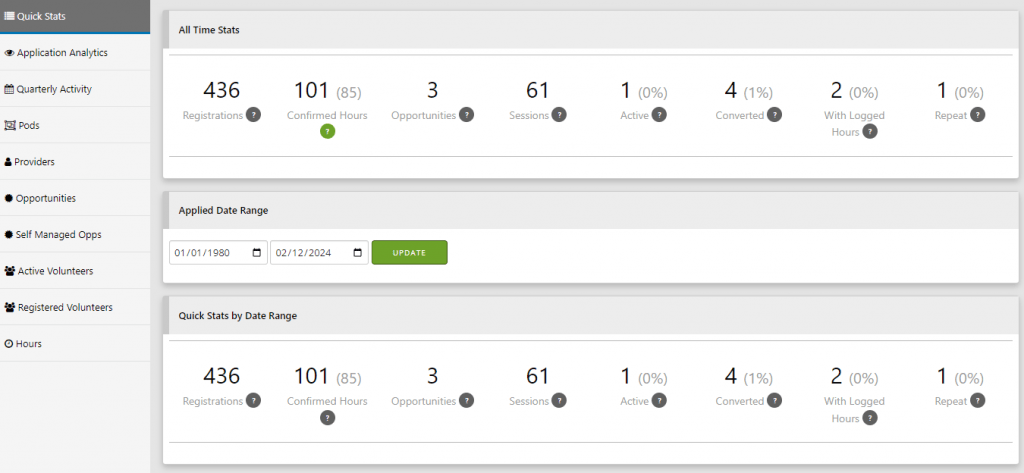
This area is split into themed sections. Each section is limited by the entered dates, although there are some all time stats at the top of the page.

The all time totals give a very clear overview of your volunteer program and can be used to identify possible issues for volunteers being able to join opportunities. The figures from left to right follow the flow of volunteers through the system, from registering, joining opps, attending and logging hours to repeat volunteers that have joined multiple opportunities. The closer these numbers are to each other the better your programme is performing and the higher your retention and engagement rates.

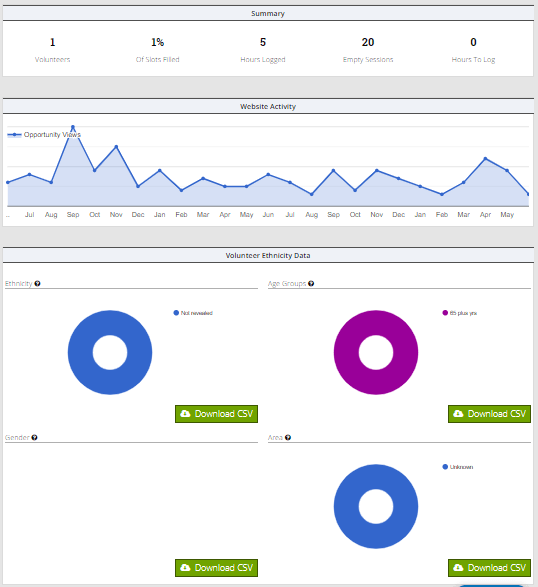
Quick Stats gives you the number of registrations, active volunteers that have been on at least one opportunity session, number of logged hours, number of opportunities that have an available session, total sessions and the average age of volunteers. All these figures are restricted by the date range selected and give you a smaller window on the all time figures.

The analytics data lets you see how many people are visiting your application, you can drag across the graph to zoom in on any period and roll your mouse over any point to get more information. Watching your traffic ebb and flow can help you gauge the effectiveness of any promotions or engagement activities you have been running.

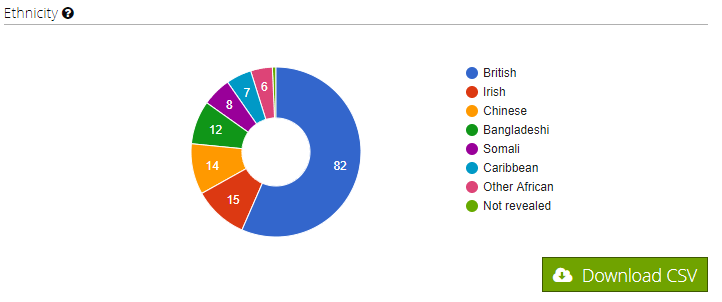
The volunteer section breaks down your volunteers; you can view them by ethnicity, age, location, group membership and others. In all cases you can roll over the charts to get more information and also download each report individually for offline analysis.

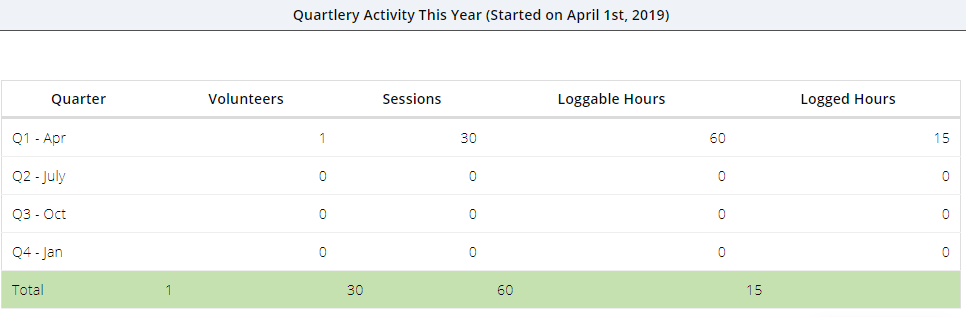
The quarterly report is a handy tool that summarises volunteers, hours, and sessions into the regular yearly quarters, starting each year in April. For many charities and organisations these are the key figures they need to report each quarter or year. These figures are not affected by the selected date range instead they also show the current and previous year totals.

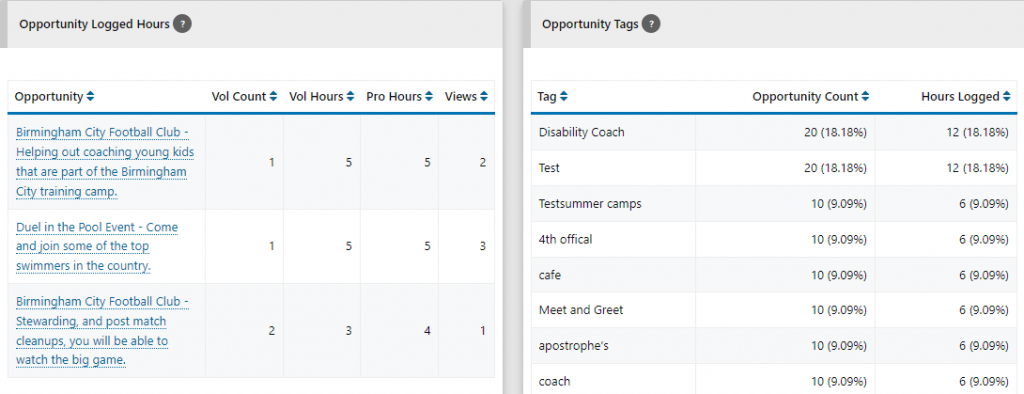
The opportunity reports give you all the information you need about your opportunities, their distribution, performance etc.

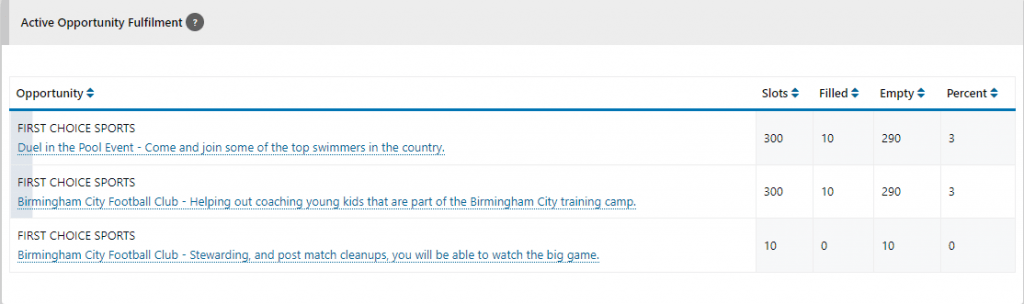
The website search chart tells you what your volunteers are searching for which can help focus and drive your provider and opportunity recruitment. The tag count table shows you which opportunity tags are proving the most popular, both in terms of how often they are used and how many hours are logged against opportunities with that tag. The fulfilment table gives you the insight you need to discover which opportunities are under performing and which are flying. This can help drive your advice and procedures for creating opportunities and enable you to identify the possible reasons that some opportunities fail to excite or attract volunteers.

You’ll find lots of charts and graphs with all the

You can find out quickly which sessions are under-subscribed, how many TeamLeaders are signed up for a session, and which volunteers are due where. The view is ordered by session date by default but you can re-order by opportunity or number of empty slots. If you need to know whats going on at any one time, this is the report you need.

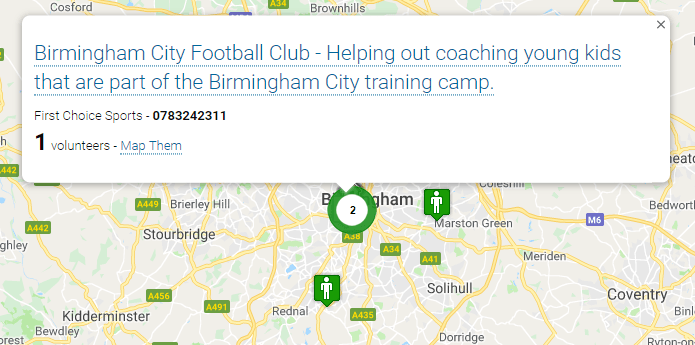
The mapping reports are great fun but also impart some important qualitative data. You can map out all your volunteers and opportunities and get a good feel for the reach of your programme and where it is having the most impact. You can quickly identify the hubs of volunteering activity.

Finally for the main reporting area, if you want to interrogate your data offline you can use the download data area to grab all your volunteer, provider and opportunity data as CSVs. If you want to extract particular information our enterprise version also includes API access so you can export data to your chosen CRM or in house systems.

As well as the reports found here the administrator dashboard contains some useful insight and tools for guiding your actions.

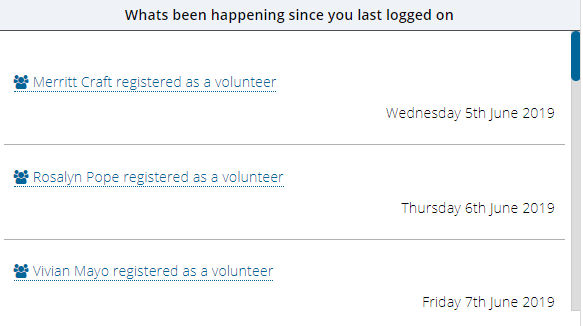
The summary tab shows the most important daily tasks you’ll need to keep on top of, such as authorising new volunteers and opportunities, but it also provides a scrollable aggregated list of whats happened since you last logged on. This includes registrations, new opportunities, logged hours and many other events.

The activity tab separates out the events that have happened in the last 30 days to help you keep on top of your programme.

The tasks tab tries to identify potential issues before they become real issues; hours that have not been verified and providers and opportunities that are under performing or not engaged.

Administrators will also find reports that are scoped just to the volunteer or opportunity being managed. So when viewing an opportunity you’ll see how many times it has been viewed by a volunteer, or you can see how many hours a volunteer has logged in different groups or categories when viewing their profile.

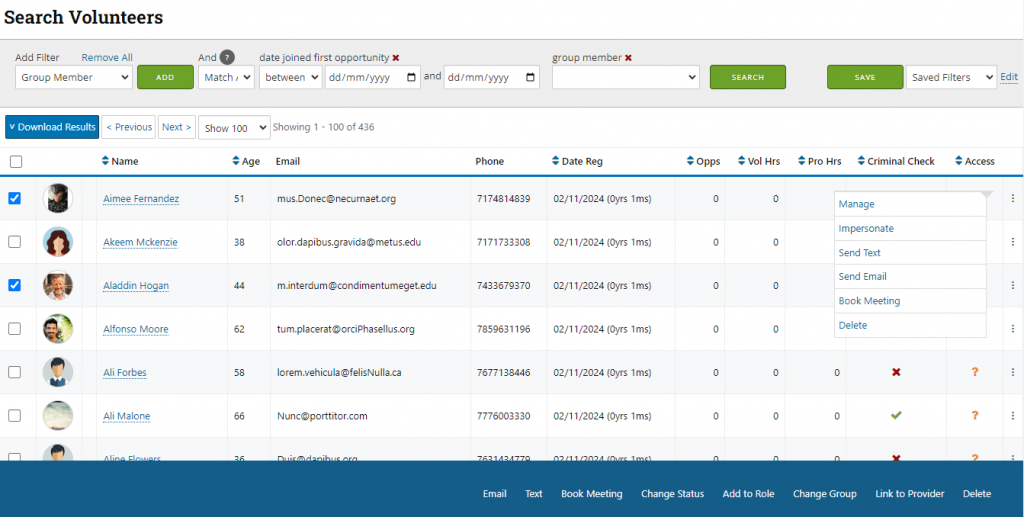
We have also added some great filtering and searching tools for volunteers and opportunities which you can save and use again and again to build your own custom report. You can layer different filters on top of one another and use an AND/OR clause to really drill down on your volunteers or opportunities.

If you’ve got this far, well done and thanks for staying with me! If you find you cant get what you need from our reporting, or you have very specific questions that need an answer, we can also build custom reports that you can access anytime from your reporting menu. Please get in touch.

Where will your TeamKinetic website live

We always try and avoid jargon but sometimes it is a little difficult when talking about the internet and software.  When we talk about ‘domains’ we are really talking about the address or URL that your website will use so people can find you on the internet.

This is the address they type into their web browser to access your website.

TeamKinetic offers a variety of options with regards to the domain’s you can use, these options are somewhat dependant upon your choice of subscription.

In every subscription, there is some room for customisation and personalisation of this address.

So what are your options and what do they mean.

FREE subscription.

tryvolunteering.com/yourname

If you join us on our free version to use of TeamKinetic, you will be hosted on our FREE to access site TryVolunteering.com.

TryVolunteering TeamKnetic Free volunteer management software


This means you will be assigned a web address that starts with “https://tryvolunteering.com” and you this will then be followed by your organisation’s name with all the spaces removed.  So if your organisation name is “Harchester Utd FC” your website address will be.


https://tryvolunteering.com/harchesterutdfc”

Advanced Subscription.

yourname.teamkinetic.co.uk

Our Advanced level subscribers have their own application and as such have their own ‘subdomain’.  What this means is you can add your organisation name to the start of the web address. An example would be

https://harchesterutdfc.teamkinetic.co.uk

From a user experience perspective, users feel more assured as your name is first in the address, and because the Advanced subscription offers significantly more customisation this combines for better overall user experience.

Enterprise Subscription

yourdomain.com

Enterprise subscribers have the benefit of greater customisation and personalisation.  As an enterprise customer, you can select an available new and unique address for your site.  Examples from our customers include

https://mcrvip.com

Or

https://Hockeymakers.co.uk

These URLs are purchased on behalf of our customers and remain the property of our customers but are managed by TeamKinetic on behalf of our customers as part of our ongoing agreement.  In the event of that agreement coming to an end, we can arrange for that domain to be transferred or released depending on the needs of our customers.

A new domain is very easy to set up, requires no technical support or resource from our customer to manage, as TeamKinetic manage all this on our customer’s behalf.

Enterprise customers can also use a ‘sub-domain’ of an existing URL they already use our own.  An example of this might be our customer the Youth Hostel Asociation who’s main website address is:

https://yha.org.uk

The volunteer team at the YHA wanted the TeamKinetic system to look and feel like it was part of the wider YHA web site. The best way to achieve this is to embed the TeamKinetic system into the YHA’s existing web brand.  So the TeamKinetic system now live at

https://volunteer.yha.org.uk

No matter what subscription you wish to use, TeamKinetic will support you in setting up your site and getting the address you want.  We are available to walk you through your options and help you find the set up that you require for your volunteers.

For more information on how we can assist with your volunteer management and getting the best out of all your volunteers visit our website or contact us on – 0161 914 5757

TeamKinetic and Software as a Service (SaaS) cutting through the jargon.

Our ambition was to build the very best online volunteer management application in the world. Part of our definition of the very best means easiest to use, as well as the most useful features. Unfortunately when you build software there is a real danger of “JARGON”! We know volunteer managers want to be great at managing volunteers not specialists in information technology. So I wanted to try to explain in plain English how TeamKinetic works

Software and Application

We sometime use these words interchangeably, but they often share the same meaning, which is to describe the TeamKinetic product. Application does not necessarily refer to mobile specifically, but it can do sometimes. So now I’ve cleared that up!

Cloud-based

The TeamKinetic application uses a group of computers that are connected via the internet to enable the website and mobile apps you see to work. These computers or servers as we call them form our cloud. This cloud contains a combination of our own private servers and third part services from people like Amazon and Google.

All our computers are based in the UK.

Software as a Service

As the internet has become faster, the need to go to the shop to buy your software on disk or CD is now a distant memory. Now your Software does not even need to be on your actual computer but lives on the internet and is provided by someone who’s only responsibility is to make that software great.

Back in the day you would go to a shop and buy a physical disk or CD (depending on how old you are) with your software on there. Once you got home you would install that software onto your computer, those were such innocent times. That software would then remain on your computer until you replaced your computer or bought the next version from the shop and put that on your computer.

The someone in the case of TeamKinetic is us. That’s Steve, Rolf, me and the rest of our team. We have built and continue to improve TeamKinetic for you to use. We take your advice and feedback, mixing that with the user data we collect and we try to look at the best ways to continue to improve the TeamKinetic experience.

Being on the internet means that you can browse the web from anywhere, you can access your TeamKinetic application on the go or comfort of your home. More importantly, this approach means you can concentrate on your volunteer management, whilst we focus on keeping the website working or ‘live’ as we call it. TeamKinetic make sure your data is stored appropriately and in accordance with regulations such as GDPR. We concentrate on making TeamKinetic work on all the different devices, such as iPhones, tablets and laptops. We have even start to look at Alexa. You don’t need to worry about things like servers, security or accessibility standards as we take care of all that.

TeamKinetic’s Software as a Service approach means you can be confident that your volunteer management system will always work and will always be making the most of the latest developments in technology, social media, regulation and user behaviour trends.

Licencing

As we provide TeamKinetic as an ongoing service we have developed a business that requires an ongoing fee or subscription, we call this our licence. To keep the servers working and up to the job, to ensure the developers continue to improve TeamKinetic, our customers to continue to support our work through the licence fee. This fee ensures you continue to get the help and support, software updates and that we can keep the power lights on all those computers here a TeamKinetic.

The team believe strongly in a ‘no-surprises’ approach to pricing. Our customers can be confident that we will not hit them with hidden costs. Our licence covers everything you will ever need to set up and keep your volunteer application running day-to-day. We are transparent about the few things that fall outside the licence fee.

Volunteer Management Software (VMS)

Different companies may each have a slightly different explanation as to what is volunteer management software, but for TeamKinetic we want to offer a place where volunteers can go to manage their volunteering, where organisations can post, recruit, on-board, training, deploy and track volunteer engagements. Where a volunteer reward and recognition is built into the experience. Where data and insight are generated in real time.

This is all delivered in a website that is easy to use and super flexible for your needs and that can integrate with your other digital systems. It is not the same as Customer Relationship Management software and its also not the sames as Human Resource software or scheduling applications that are out there, but it’s a curious mix of all the above built for your volunteers. If you want to know more about the differences and similarities feel free to read more about it here.

Get in Touch

There will no doubt be more jargon to contend with as you look through the product description, so please feel free to get in touch if we have failed to explain it in plain English.

If you want to talk about the more technical aspects of TeamKinetic SaaS then please do not hesitate to email me or call the office on +44 (0)161 914 5757 or contact us via our website

TeamKinetic, accessibility improvements

I have been concentrating on accessibility improvements and changes for the upcoming 1.3 release of TeamKinetic and I thought I would give a little background into what accessibility means for websites and what TeamKinetic have been doing to solve some of the issues in a non-technical post.

It’s a long post but here’s a quick check list of what the focus has been for this release;

  • Clear focus effects so a keyboard users knows where they are at all times
  • Keyboard accessible menu and sub menu
  • Keyboard accessible help tips, activated by the return key and closed by switching focus
  • Proper use of ARIA tags for all content that is initially invisible (such as help tips, pop up windows etc) so that screen readers will correctly read out the revealed text at the correct time
  • Correctly labelled form elements so that screen readers can always associate an input (such as a text element) with its description
  • Grouping together of associated form elements using fieldsets and legends. For instance, a collection of checkboxs for a yes, no, maybe, definitely answer. using a fieldset ensures that a screen reader user knows what question the answers belong to.
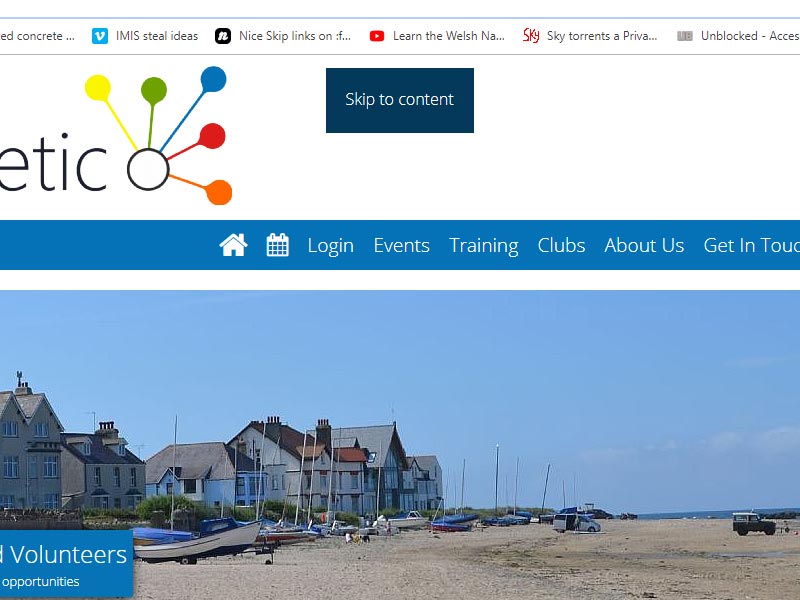
  • Keyboard accessible skip to content links that enable keyboard users and screen reader users to skip the menu and header portion of a webpage and get straight to the important stuff. Can you imagine how tedious it is to have to listen or tab through every navigation element on a webpage before you can read its content!
  • Correct description tags (alt tags) for all images
  • Improvements to link and button text by providing additional screen reader only text to give context to the link or button.
  • Making sure all password fields are marked as ‘new’, ‘existing’ or ‘repeat’ as they are often just labelled password.
  • Ensuring all webpages are accurately and uniquely titled and described.

Accessibility is often low on developers priority list, its understandable, the number of customers using assistive technologies is likely low compared to the numbers that do not. However the impact on those user that do, is enormous and by ignoring accessibility issues you are effectively blocking those users from accessing your content.

Although being able to access your website is a right for assistive technology users, and it is illegal to discriminate against such users, its also a positive process and a way to learn new skills, engage with a new audience and improve the intrinsic worth and value of your product.

Keyboard Accessibility

Keyboard navigation is perhaps the most important aspect of accessibility for websites. Navigating via a keyboard or something similar is employed by many users with mobility issues that cannot hold, move or control a mouse and also by many visually impaired users.

Keyboard users navigate through a website using primarily the tab key which focuses on item to item in the web page in the order it is served or in a specific order set by the website itself. Whilst focused on any element they can use keys such as the return key to activate the actions of that element, say a button to submit a form or to follow a link.

TeamKinetic enables keyboard navigation and all elements are focusable by the keyboard. There is a clear visual clue to which element is currently focused by the keyboard.

Menus

Its almost entirely universal that a website or application has a menu to quickly access different parts of a system. Its also very normal for the menu to have sub menus that are revealed when the mouse is moved over the heading (this is called a HOVER). As you can see below on the TeamKinetic menu the mouse pointer has been hovered over the menu heading and the sub menu is revealed.

But when a keyboard is used to navigate to the menu item the event is called FOCUS, not hover. If the website does not include the specific code for what happens when a menu element is focused by a keyboard event the user will not see the sub menu or any change in colour/appearance to indicate where in the menu they are.

TeamKinetic’s menus are now fully accessible by the keyboard with visual indicators of where the current focus is. When the focus is on an element with a sub-menu available there is a clear colour change and by pressing return the menu can be toggled on and off. Importantly, if the menu is not activated with the return key the user does not have to navigate through all the items of the sub-menu in order to reach the next item in the current menu.

Skip Links

Skip links are a very important and hugely convenient addition for accessibility. They are hidden links or buttons that a screen reader or keyboard user will expose that enable them to skip past all the header and navigation elements that are the same on every page.

The skip to content link only appears when using the tab key to navigate or when using a screen reader

Help ToolTips

Tooltips are little bubbles that pop up to give the user more information or context about a feature or action. Traditionally these have activated when the mouse is hovered over the target and the tooltip disappears when the mouse is moved away from the target.

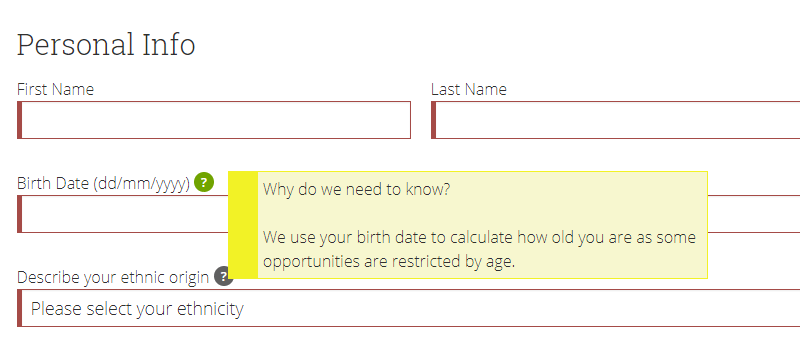
This is problematic for keyboard users that never fire the hover event, only the focus event (see above) that will never see the tooltip and also for users with reduced motor control. We have converted all our volunteer help tooltips into an accessible form that will fire when the question mark is clicked or when it is focused by a keyboard user. To dismiss the tooltip you move the focus either by pressing the tab key or clicking the mouse anywhere that is not the question mark icon.

importantly the new help tooltips are also labelled carefully with the appropriate ARIA tags so that screen readers are alerted to the presence of new information and are aware when they reach the question mark icon that this will reveal new information when activated and can map the

Improved form labelling

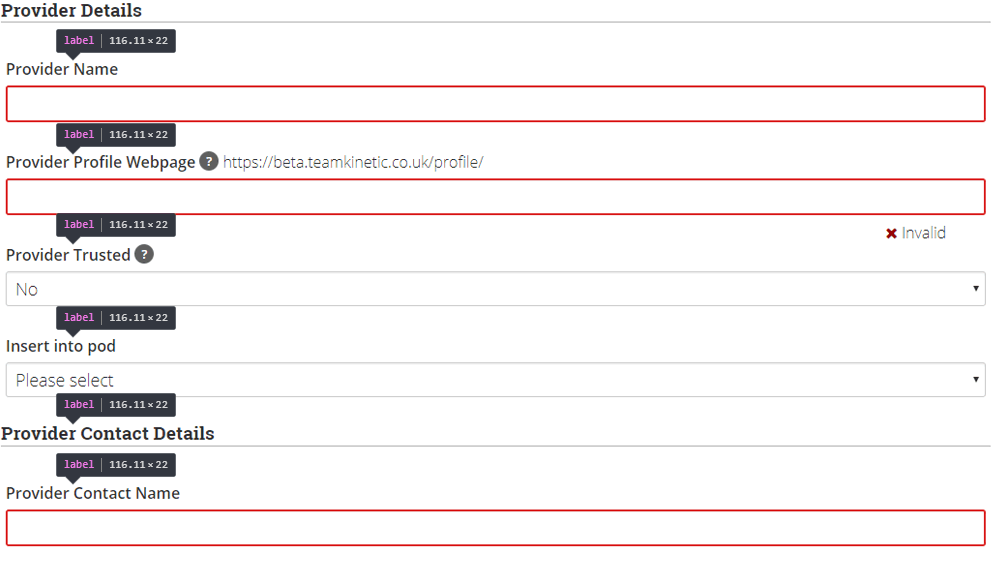
For screen reader users it is important that the context and purpose of all form elements, like text boxes, checkboxes and buttons is clear from the element itself. It is easy for a visual user to tell which question a form element belongs to as it will be group visually, or perhaps via certain colours, on the screen, but will not be apparent to a screen reader user.

Example form showing the correctly marked up labels for the form elements

We have redesigned all the volunteer forms to make sure that the extra context required for screen reader users is included. We achieve this through judicious use of the LABEL tag for describing form elements, by grouping associated elements in a fieldset with a legend and by improving the quality of link and button text by included hidden text that only screen readers see.

Extra Screen Reader Context

Using special styles, it is possible to hide text from visual users but expose it to screen reader users. This is great for adding additional context to buttons and actions that make sense visually but are indistinguishable for screen reader users.

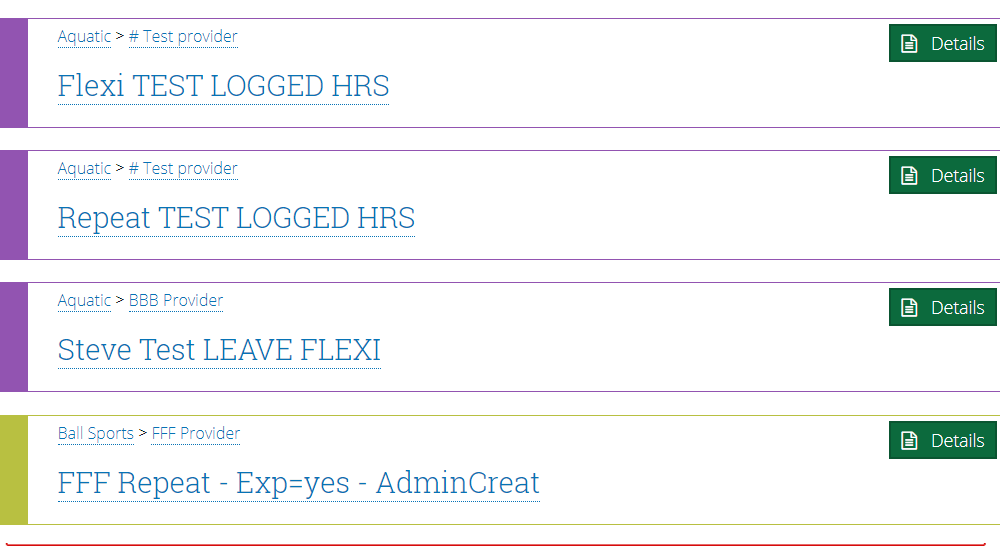
Imagine a long list of say opportunities, each with a button/link that says ‘More Details’ that you might encounter on the search page. It’s easy for a visual user to match the same identical button or link with the context of the opportunity you are currently looking at but not for a screen reader that will just list a long set of identical buttons.

Identical buttons that are easy to associate with the opportunity visually, but not so for a screen reader

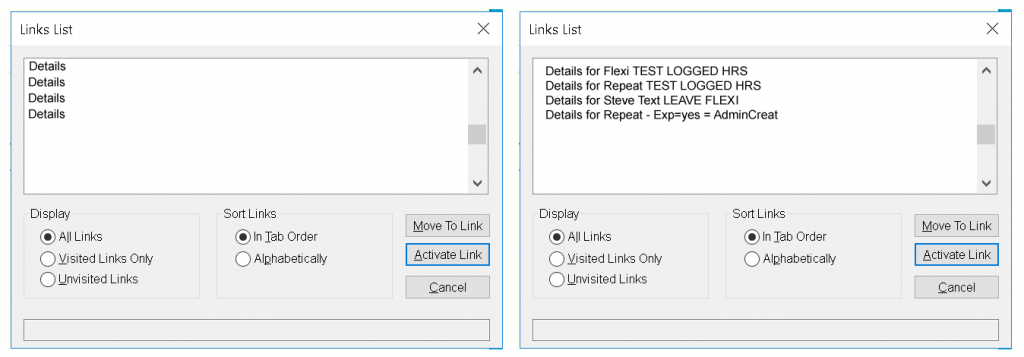
The addition of the contextual text means a screen reader user knows, in this case, which opportunity is linked to which button.

The appearance to a screen reader of the repeated buttons without and with added contextual text

What Next ?

Most of the work for this release has been focused on the volunteer’s portal, with some global changes, like the accessible menu applied across the application.

We will be auditing all the provider pages to perform the same changes as above and finally onto the administrator pages.

We envisage that we will be constantly improving accessibility as best practise evolves and we discover new areas that are not optimised for assistive technology users. If you are such a user we would love to hear your experiences and suggestions.

TeamKinetic v1.3 March 2019 Release

Hi there and welcome to the 1.3 release of TeamKinetic. We’ve got some great new time saving features this time round, the normal raft of small fixes and tweaks and a large dollop of accessibility improvement as we journey towards a fully accessible system for all users.

Headline Updates

  • Full screen layout for administrators and providers. We’ve removed the logo header bar to give more room for what matters
  • Brand new dashboard for administrators and providers
  • Universal search across volunteers, opportunities and providers is available right from the top menu on all pages
  • New mapping library which produces we think, better looking maps
  • Trusted status for providers
  • Upload your own custom areas for reporting and searching
  • Contextual help bar available anytime from the top menu
  • Keyboard accessible menus
  • Accessible forms
  • Accessible help tooltips
  • Accessibility layout improvements
  • Front page slider image controls improved
  • New application options
  • New POD functionality
  • Pause or end participation in a flexible opportunity without leaving the opportunity and losing hours.

New Dashboard

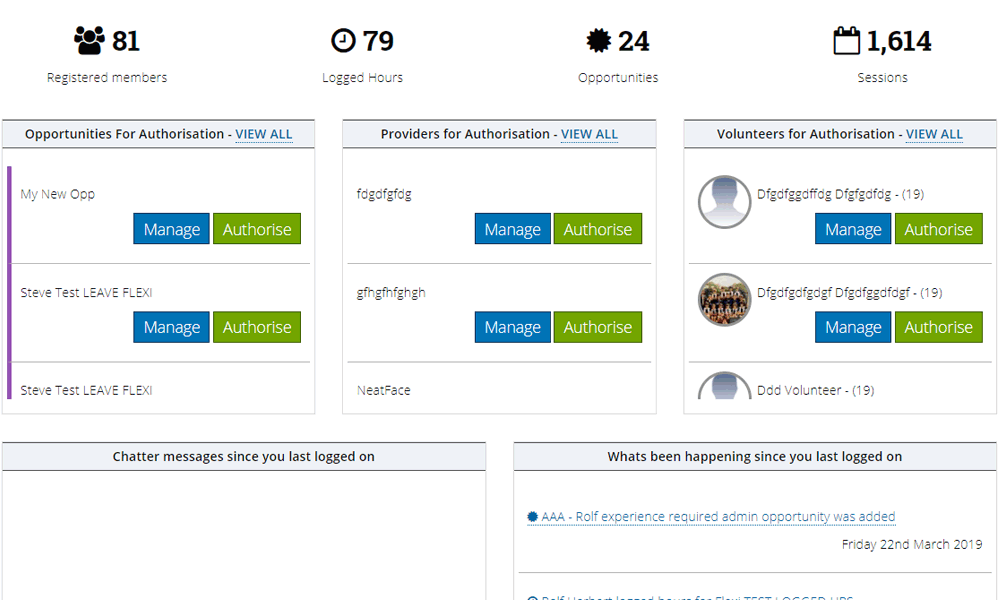
We’ve completely redesigned the dashboard for administrators and providers and it is now very much focused around helping you to get the tasks you need to do, done!

New administrator dashboard

Authorisations, latest chatter messages, logged hours since your last visit and lots more are displayed right there everytime you login. We’ve added some insight into your programme, like who is logging hours, which opportunities or providers are performing badly and suggested tasks to keep on top.

We think this new dashboard will be a real time saver.

Universal Search

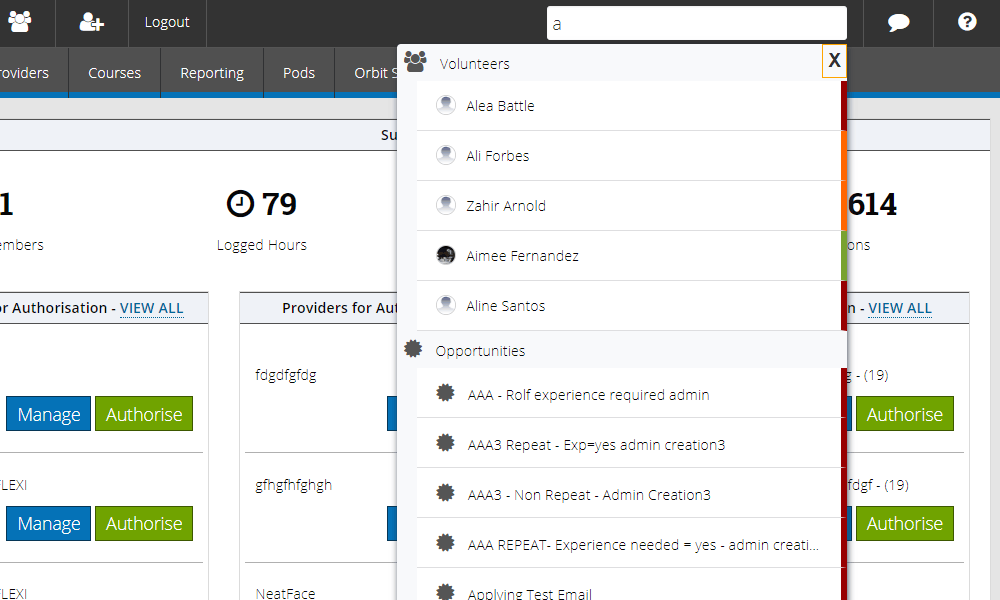
From the top menu bar you now have access to a number of new areas including the universal search. It’s a stripped down lookup service that will find matching volunteers, opportunities and providers.

Universal search and lookup

Its obviously not as fully featured as the specific search pages for volunteers, opportunities and providers, but its fantastic for navigating quickly between different things. It also gives you a little visual clue as to the status of each entity, red for access denied when a volunteer, unauthorised when a provider and closed when an opportunity and green for access granted, authorised and open respectively.

New Mapping Service

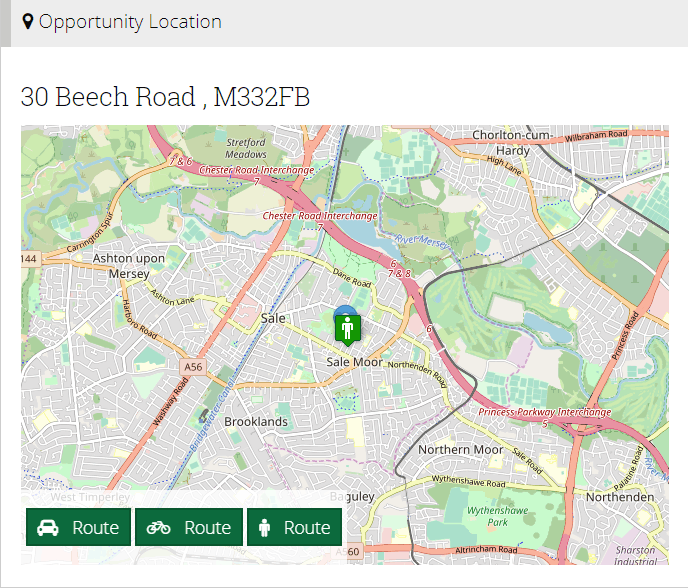
We are switching to Open Streetmap for our mapping service. This is a fantastic open sourced effort to map the world without the propriety nature and vagaries of being in the Google ecosystem. It also has we think more natural looking maps.

Open StreetMap

Contextual Help

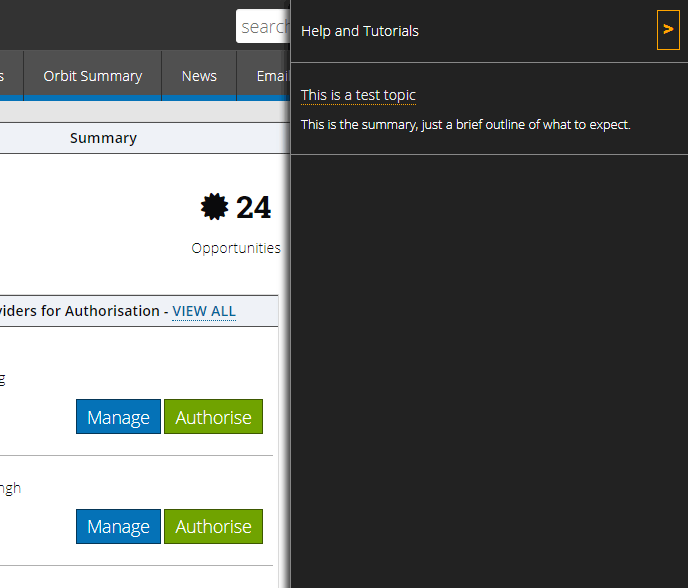
We have built a foundation for us to enable contextual help on every page. This will be accessible from the help icon in the top menu and will reveal all the help topics and tutorials for the page you are currently using. Both administrators and providers have access and we hope it will help new providers especially, get the most from TeamKinetic, and of course ask you less questions!

The slide out help menu available on every page

We are working hard to get help for as many pages as possible on launch but we’ll be adding them progressively and in response to questions that regularly arise. Let us know if there are any topics you’d like to see in the help menus to aid your users.

Accessibility

I’ve already blogged about the accessibility improvements we have coming in this release. This has been a really rewarding process and I’m looking forward to some feedback for how we can keep improving in this area. Most of the effort has been concentrated in the volunteer’s portal but there have been improvements throughout.

New Administrator Controls

  • Include the volunteer stats in the weekly email. We had some reports that volunteers that were interested in volunteering but hadn’t yet taken the plunge, we’re getting discouraged seeing zero stats every week!
  • Overlapping session booking option. Using this you can control if volunteers can join sessions which overlap or conflict. We are working on providing a further control to determine how close the sessions need to be in order to initiate the conflict. Volunteers are informed if they attempt to join sessions which overlap, on either the same or different opportunities. By default volunteers are not allowed to join overlapping sessions.
  • Require volunteers to upload a photo before they can join any opportunities.
  • Display nationally shared opportunities on your version of the native mobile applications. When enabled users will also be able to view and join nationally shared opportunities direct from their applications.

Ending Flexible Opportunity Attendance

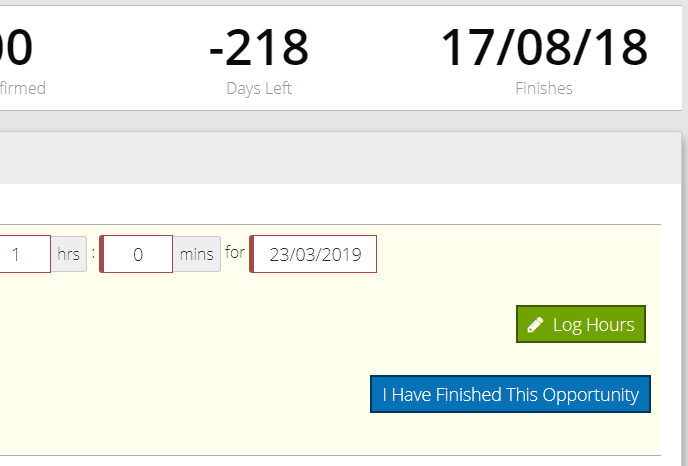
For very long running flexible opportunities its useful to know if volunteers are finished. Previously this was only really possible by asking the volunteer to leave the opportunity but that meant there was now a hole in the audit trail and information for that opportunity.

Volunteers can now click a button when logging hours to say they won’t be logging any more hours and have effectively left the opportunity.

Volunteers can now say they have finished with a flexible opportunity

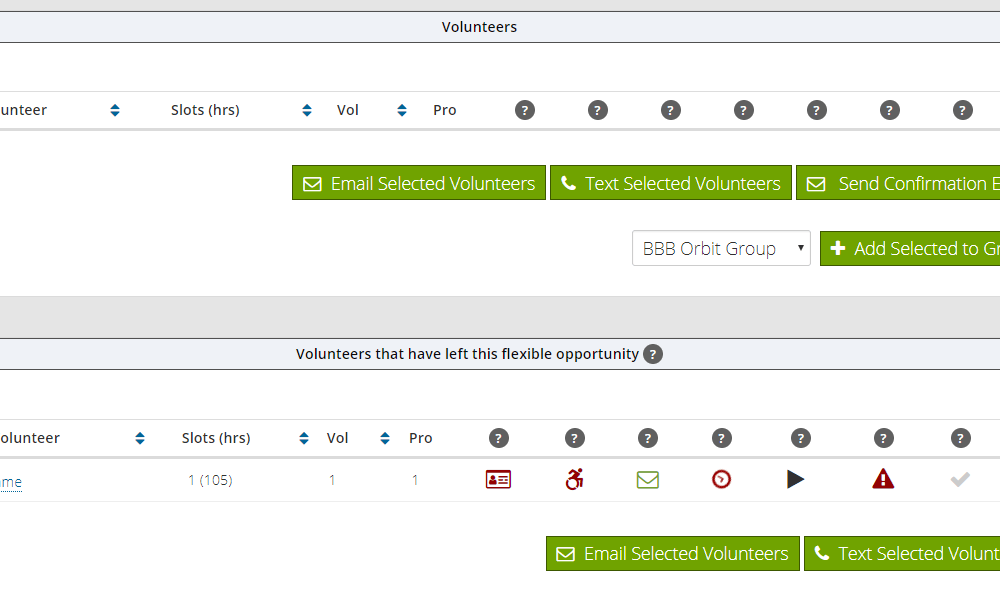
The same functionality is also available for administrators from the volunteer list on the opportunity management page. Just click the pause icon to flip the volunteer to the finished state and the play icon to flip the back. The volunteers that have finished are separated from the still active ones so you can easily keep track of your flexible volunteers.

Admin display separating finished and active volunteers on flexible opportunities

Launch Date

We’ve processed close to 200 issues for this release and there are many small improvements and bug fixes throughout the application and we are excited to be releasing 1.3 on March 31st.

Don’t forget you can test out all these features on the beta site using your regular administrator login. We’d love you feedback or review at Trustpilot.

Volunteer management software UK, Volunteering, Retention, Incentives, Volunteer system

Volunteer management software can better impact your volunteer retention rates.

The economic value of volunteering is at least worth £50 Billion to the British economy and has the scope to grow but that’s impossible if retention rates are low.

Volunteer retention rates are on a halt and that calls for strategic changes within organisations. Investment in technology is necessary if you want the same investment back from your volunteers. According to the National Council for Voluntary Organisations (NCVO) data shows that rates of volunteering have not changed. 38% of people reported they had formally volunteered at least once a year in 2017-18 a 1% increase from 2016-17.

The figures may seem minuscule, but how can we measure volunteer activity if things stay fixed and static across the country. However, you’ll be happy to know that technology is allowing nonprofits the ability to maximise efforts in volunteer retention solutions.

Volunteer management software UK, Volunteering, Retention, Incentives, Volunteer system
Volunteer Retention

Volunteer Management Software

Volunteer Management Software can provide the right tools for organisations to manage, recruit and retain valued volunteers. Nonprofits that devote time and money to a volunteer system are often astonished by the impact technology can have on their volunteer program.

Here are 4 ways that volunteer management software can aid organisations in volunteer retention.

Respond to Volunteers Quickly

Organisations that inform and respond volunteers quickly have a much a higher percentage of retaining them. It is key for volunteer managers to have regular communication in order to have a successful programme.

The issue volunteer managers face is the lack of time they have to give speedy responses. Having a volunteer management software means that your communication process becomes a lot more simplified by reducing the time spent on communication. We have the case studies to prove how a volunteer system can really make a better impact on your programme!

TeamKinetic make communication fast and simple through our feedback function that allows volunteers and opportunity providers to send each other feedback as well as opportunity chat rooms for that instant response! Our volunteer software also allows you to send out automated and customised notifications (Text, Email, Social) at a click of a button.

Utilise a Volunteer Database

Having a volunteer database can inform and guide you to make better organisational decisions that benefit everyone involved. The information can allow you to understand past and present volunteers making sure volunteers are placed into roles that suit them best.

Data can increase retention rates and allows you to understand the facts and figures not just what you think is right. Organisations that still manually input data into spreadsheets are at risk of losing historical data and also risk miss understanding key data due to the lack of visualisation.

A volunteer system makes interpreting data easy. It can allow you to group volunteers based on skill sets and demographics, highlights popular opportunities, and assists volunteers that need support. These are all contributing factors to understanding your volunteers better and making retention rates higher.

Volunteer Appreciation and Recognition

All humans need to be recognised in a meaningful way for their efforts. Volunteers give up their time to help organisations they are passionate and care about. So that same intention should be displayed by the volunteer manager.

A lack of incentive and appreciation for your volunteers is sure to make them lose motivation and belief in what you do. Organisations should be developing time and effort towards the happiness of their volunteers. How hard is it to say thank you? We have found that the most effective way to show appreciation towards volunteers is by incorporating a rewards and recognition system into your program.


TeamKinetic’s volunteer management software allows organisations to create a rewards and recognition scheme that will create a better impact on achieving goals and mission accomplishments. Administrators can track and edit recognition directly from TeamKinetic’s user interface.

Build Personal Relationships

Getting to know your volunteers on a personal level is a great way of making them part of your organisation’s community. Volunteers want to know who they are volunteering for. Building meaningful relationships isn’t easy when you have time constraints and project deadlines to meet, but it is one of the most important factors to consider when evaluating volunteer retention rates.

However, Volunteer Management Software can provide you with that much needed free time. A volunteer system allows administrators to communicate with registered volunteers through a number of functions such as opportunity chatroom, opportunity feedback, social media linking. Organisations we work with have saved hours by changing from manual procedures to a digital platform that allows them to carry out their daily tasks all in one place.

So if you’re having trouble with volunteer retention and feel like theres never enough time to get your long list of tasks complete, then maybe a volunteer management software is for you?

TeamKinetic helps to build better volunteer communities by providing great tools for volunteer managers that save time, make a better impact and improve insight. Our goal is to make volunteering easy for everyone no matter what. But don’t take our word for it, why not check out our customer reviews.

For more information on our Volunteer Management Software visit our website or contact one of our team members on – 01619145747

Understanding volunteer demographics to fill empty roles!

Many roles go unfilled… why is that? Do volunteer managers need to have a deeper understanding of volunteer demographics? Can we continue to assume that empty roles will fill up because they’re helping a good cause?

Unfilled volunteering roles

Having a good understanding of your volunteers and the roles you offer is key. Unfilled roles can have a negative impact on your volunteer management and make it difficult for tasks to be carried out.

Volunteers want to volunteer! Don’t make it difficult for them.

In many cases, unfilled roles occur when the role is just not appealing to the volunteer. This issue usually begins with how you describe the role and the commitment levels that come with it.

Roles need to be attractive to the volunteer; with a detailed description of what is required of them and positive outcomes of the role. Many organisations we work with do this well and provide quality volunteer experiences that lead to higher retention levels! 

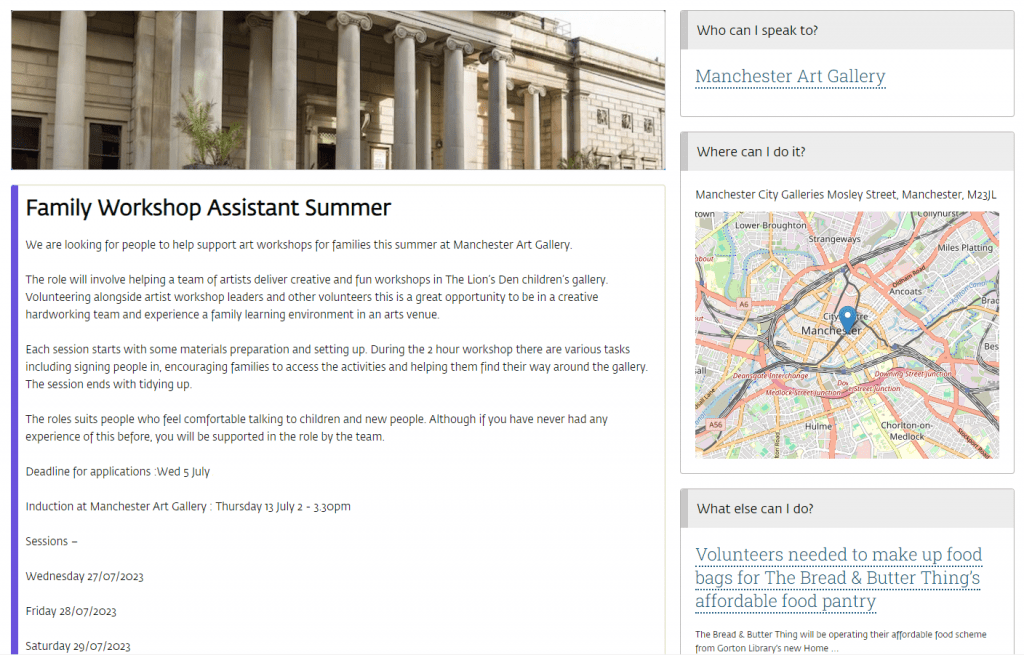
Example of an opportunity within TeamKinetic

All volunteer managers need to prioritise roles that are crucial to the organisation because they involve tasks that drive long-term goals to be met. By prioritizing the most important roles it allows you to focus the energy and time on the areas that are most likely to have a greater impact on the organisation and its development.

Knowing your volunteer capacity and demographic

The one-size-fits-all is approach has long past its expiration date. Knowing who volunteers for you is crucial for developing relationships, providing opportunities and understanding who to target when recruiting volunteers. Volunteer trends are always changing and adapting, with volunteers being much more diverse. Here are some demographics to consider :

Age

The idea that only older people volunteer is diminishing. Today students in higher education regularly volunteer and are part of the most likely groups to volunteer. Different age groups will have a variety of skills they can utilise in their volunteer work.

Gender

The gender gap has become almost even with more men getting involved in volunteering than ever before. Women consistently volunteer in all areas, whereas men are typically more likely to volunteer in sport. It’s important to consider how your operations could be improved to create a more gender-inclusive environment for your volunteers.

Location

There are countless organisations offering ways to volunteer. This has created a great spread of opportunities contributing to better communities across the country. Within your organisation, you might consider mapping your volunteers to understand your key areas. Then you can ensure your opportunities are easily accessed by these areas.

Socio-Economic Background

However, those from lower socio-economic groups are more likely to say they have never been involved in volunteering. And those who have volunteered in the past are less likely to be in leadership or representative roles.

Studies show higher levels of austerity among communities in the north of England and the local authority spending has fallen nationally by half since 2010. The lack of resources and inequalities mean many people are excluded from taking part in certain opportunities

Research conducted by our good friends at Jump highlight that a lower proportion of volunteers come from lower SEG (42%) compared to the representation of that group in the national population (50%).

Some of the barriers faced by lower SEG to volunteer include health barriers (illness or disability), caring responsibilities, and age constraints.

More information on Jump’s work and their report on “Why is volunteering biased towards higher socio-economic groups?” can be downloaded on their website.

So how can we help you fix these problems?

TeamKinetic is centralised around providing volunteer managers with resources to create accessible, easy-to-find opportunities for their volunteers.

Our volunteer management software works to eliminate issues such as filling roles and allows for a greater understanding of your volunteer base.

Advanced Search Functionality

Volunteers can search for opportunities with our search functionality which includes searching by location, opportunity name, and categories. This allows volunteers to find the nearest opportunities available to them without searching the whole internet.

Map Volunteers & Opportunities

Volunteer managers can view the number of opportunities and volunteers through a map format. This is useful in decision-making and creating opportunities according to your volunteer demographics.

Reports and Analysis

You can gain insight into the success of your volunteer programme by evaluating your volunteer sign-ups (including those who are active and repeating), the number of opportunities you have created and other demographic information.

These functions can help with providing suitable roles and ensure opportunities are filled.

Data is only recorded if your volunteers agree to provide you with the information. GDPR frequently asked questions for TeamKinetic’s volunteer management system can also be found here.


For more information on the Volunteer Management Software visit our website or contact one of our team members on 0161 914 5747

You could also start a free 30-day trial of our system to take a look around. If it’s not for you, no problem.

You can find TeamKinetic on social media and listen to our podcast:

Twitter       Facebook       LinkedIn       YouTube       Instagram       Podcast


Have you enjoyed using TeamKinetic? If you could leave us a review on Capterra, we’d really appreciate it! We’ll even send you a little thank you.

Page 8 of 10

Powered by WordPress & Theme by Anders Norén