Category: TeamKinetic Features Page 9 of 10

There are a wide array of TeamKinetic features, that’s why we try to explain what each area of the system does, why you use it, and how to use it most effectively.

If there’s something we haven’t covered, let us know!

TeamKinetic Academy: TeamKinetic Chatter, Online Chat Rooms for Opportunities

TeamKinetic is pleased to announce that the latest version of TeamKinetic Volunteer Management Software has arrived, bringing with it many new tools and features.

Now available is TeamKinetic Chatter that provides isolated chat rooms for opportunities that volunteers, providers and admins can use. It is a secure platform for volunteers and opportunity providers to communicate without the use of external instant messaging services.

TeamKinetic understands the importance of being able to have a communal area for volunteer and opportunity providers to be able to share their thoughts and comments on an opportunity. It enables those essential messages to be communicated to all volunteers without the formalities of an email or the cost of a SMS text.

In developing this functionality, the option to develop an API that connects Whatsapp or Facebook Messenger was considered. However, this feature would be limited as not all volunteers have the same access or use technology to the same extent as others. Factor in the inadequate control over how the data is shared following the acceptance of terms and conditions for using an external application and developing an internal function became more appealing. To help achieve GDPR compliance, it is in the best interest of TeamKinetic and our clients to reduce any opportunity for data to be shared unnecessarily.

TeamKinetic felt that by using our own chat engine it enables the opportunity providers and administrators to control the room’s tone, message and comments using the profanity filter and comment approval and deletion features.

TeamKinetic hopes that this new feature will continue to help develop the community aspect we want all of our voluntary organisations to share with its volunteers.

We look forward to showing how to use more of our functionality in the future.
TeamKinetic’s data policy can be found here

To try out TeamKinetic Chatter please follow the instructions below:

For volunteers,
Step 1 join an opportunity

Join an opportunity

Step 2 – using the left-hand navigation bar, click onto ‘chat room’

using the left hand navigation bar, click onto 'chat room'
Step 3 – enter any comments into the type area and click ‘add’


For opportunity providers,
Step 1 Using the navigation bar, hover over ‘opportunities & provider’ and on the drop-down menu, click ‘Opportunities’.

Using the navigation bar, hover over 'opportunities & provider' and on the drop-down menu, click 'Opportunities'.
Step 2 Find the opportunity you wish to add a comment to

 Find the opportunity you wish to add a comment to
Step 3 Using the left-hand navigation bar, click on the ‘chat room’ button

 Using the left hand navigation bar, click on the 'chat room' button
Step 4 Enter any comments into the type area and click ‘add’

 Enter any comments into the type area and click 'add'

If you have any further questions or would like to share your thoughts, please get in touch with our team.

TeamKinetic Version 6 – New Events and Provider Layout

This is one in a series of posts where I will be discussing the new features and changes we have built into version 6 of our volunteer management software TeamKinetic.

We often get asked how providers can tell volunteers a little about themselves and promote their organisation to the volunteers. Previously the provider profile has been limited to a few words and a logo.

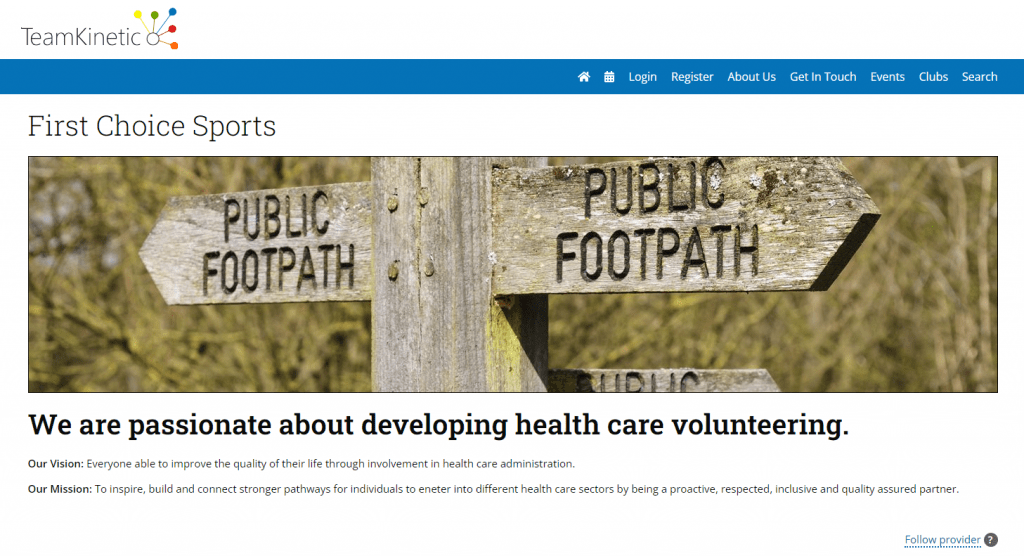
In TeamKinetic Version 6 we have improved the look and feel of the provider profile immensely. Providers can now add a large background header image, overlayed with their logo and organisation name. There is also a WYSIWYG* text editor where they can complete their profile text, choosing their own colour scheme and font sizes.

You take a look at First Choice Sports‘ profile on our demo site.

We have also added a similar layout for the events pages which advertise and promote an event and the opportunities and roles available within that event. In addition, the events home page lets you add documents for the volunteers to download.

We think these changes will greatly enhance the visual experience for the volunteer and hopefully lead to more volunteer signups for events.

*What you see is what you get – A text editor that allows you to see exactly how your text will appear to the end user.


You can find TeamKinetic on social media and listen to our podcast:

Twitter       Facebook       LinkedIn       YouTube       Instagram       Podcast


Have you enjoyed using TeamKinetic? If you could leave us a review on Capterra, we’d really appreciate it! We’ll even send you a little thank you.

TeamKinetic Version 6 – Accreditation

This is one in a series of posts where I will be discussing the new features and changes we have built into version 6 of our volunteer management software TeamKinetic.

accreditation_badge

Some of our larger customers regularly run very large national events that may involve hundreds of volunteers across many roles. We already provide useful downloads listing all the volunteers on events and which sessions they are signed up for. What we didn’t have was any sort of accreditation service.

TeamKinetic Version 6 sees the release of our first stage in our accreditation process, the creation and printing of volunteer identification badges. This allows you to specify the text of the badge title, a general information section and an access area box. The badge comes complete with the volunteer’s profile picture, their unique ID and your organisation logo.

Once you are happy with your text, you simply select the opportunity or event you wish to create badges for and a PDF document will be automatically generated containing a single volunteer on each A6-sized page. This document is ready for printing in-house or sending out to your preferred print shop.

We think this will be a great time saver, and even if you do not need a specific ID card for your event or opportunity it’s a good method of giving your volunteers a sense of belonging and building that team mentality.


You can find TeamKinetic on social media and listen to our podcast:

Twitter       Facebook       LinkedIn       YouTube       Instagram       Podcast


Have you enjoyed using TeamKinetic? If you could leave us a review on Capterra, we’d really appreciate it! We’ll even send you a little thank you.

TeamKinetic Version 6 – Fairer Rating System

This is one in a series of posts where I will be discussing the new features and changes we have built into version 6 of our volunteer management software TeamKinetic.

From version 2 we have included a feedback system for both volunteers and providers, where they can leave a star rating out of 5 and some comments of their experiences.

TeamKinetic Version 5 saw the arrival of an admin approval system where, if they choose to, the administrator would approve each feedback before either the provider or volunteer could see it.

Volunteers could see their average feedback rating, how they were doing compared to the rest of the volunteers and the individual comments that providers had left.

We never wanted to demotivate the volunteers but our and other’s research showed us that by ranking the volunteers we risked just that. The star rating also skewed the data as providers when faced with very many volunteers to rate and comment on would often just leave the rating at the default value.

feedback

TeamKinetic Version 6 introduces a whole new rating system based on thumbs up or thumbs down. This binary system is much simpler and clearer to both the volunteers and providers. Volunteers will only ever see their thumbs-up comments, the very rare thumbs-down comments will be directed to the administrator so they can try to resolve any issues and action accordingly.

We have also removed the overall ranking from the volunteer’s homepage, just giving them their total thumbs-ups so far. We think this will help to keep the volunteer motivated and their overall feedback will not be susceptible to skewing by a rogue single-star rating that was usually a mistake or by lots of default 3-star ratings.


You can find TeamKinetic on social media and listen to our podcast:

Twitter       Facebook       LinkedIn       YouTube       Instagram       Podcast


Have you enjoyed using TeamKinetic? If you could leave us a review on Capterra, we’d really appreciate it! We’ll even send you a little thank you.

TeamKinetic Version 6 – More Email Customisation

This is one in a series of posts where I will be discussing the new features and changes built into version 6 of our volunteer management software TeamKinetic.

It’s always important the Volunteers get the right information at the right time. Whilst version 5 enabled administrators to customise some emails, such as the new registration emails, TeamKinetic Version 6 extends this ability to more email types and improves the structure of the emails allowing key information to always be merged into the emails whilst still allowing the administrators to customise the main portion of the email.

email

We achieve this by splitting the email into fixed prefix and suffix areas with a customisable content section.

For instance, the session signup email that is sent to a volunteer when they initially join an opportunity will contain helpful information regarding the opportunity they have signed up for in the prefix and the session list they are currently signed up for in the suffix, which obviously changes every time the email is sent.

You can see in the image above the areas that are replaced when the email is sent, they are all enclosed between *| |* tags like *|PROVIDER|* or *|OPPNAME|*.

The main content section is then editable by the admin via a WYSIWYG* text editor and can contain any combination of font sizes and colours they wish.

*what you see is what you get – This means how you lay out the text on the screen is how it will look to the end user.

We believe you will find this is a big improvement over the previous system where if you choose to customise the email you would lose the specific tags that were replaced when the email was actually created.

You can find TeamKinetic on social media and listen to our podcast:

Twitter       Facebook       LinkedIn       YouTube       Instagram       Podcast


Have you enjoyed using TeamKinetic? If you could leave us a review on Capterra, we’d really appreciate it! We’ll even send you a little thank you.

TeamKinetic Version 6 – Age Restricted Registration

This is one in a series of posts where I will be discussing the new features and changes we have built in to version 6 of our volunteer management software TeamKinetic.

age

Although we have always provided the ability to block access to opportunities based on age, there was never any restriction on registering; a new volunteer could be any age.

We wanted to maintain easy access to the opportunities for younger volunteers but also give the administrators some control over what happens to younger volunteers and how they are registered.

In TeamKinetic Version 6, administrators can set the age at which registrations must be verified. If a volunteer registers who is equal to or younger than this age then they will be taken to the age verification screen. Here they are asked to provide the email address of their parent or guardian.

The parent or guardian will receive an email asking them to follow a link to confirm that they give permission for the young person to join the site and access all suitable opportunities.

Until the volunteer has been verified they will not be able to join any opportunities, though they will still be able to search and browse the current opportunities and hopefully be enthused enough to ensure their parent or guardian verifies them as soon as possible!

If you have questions or issues around age verification please feel free to get in touch.

You can find TeamKinetic on social media and listen to our podcast:

Twitter       Facebook       LinkedIn       YouTube       Instagram       Podcast


Have you enjoyed using TeamKinetic? If you could leave us a review on Capterra, we’d really appreciate it! We’ll even send you a little thank you.

TeamKinetic Version 6 – Session Calendar and Schedule

This is one in a series of posts where I will be discussing the new features and changes we have built into version 6 of our volunteer management software TeamKinetic.

calender

In TeamKinetic Version 6 there is a volunteer calendar that is available to both the volunteer and the admin. This shows all the volunteer’s sessions in blue and all available sessions in grey. This is a great way of quickly checking out what sessions you have coming up and also deciding if you can attend sessions on other opportunities.

In addition, there is a printable list of the volunteer’s sessions underneath the calendar which can be ordered by date or opportunity.

We’ve found that the calendar feature is especially helpful for those volunteers who are attending multiple roles at an event. These volunteers can plan their day more effectively with a visual representation of when and where their sessions are.


You can find TeamKinetic on social media and listen to our podcast:

Twitter       Facebook       LinkedIn       YouTube       Instagram       Podcast


Have you enjoyed using TeamKinetic? If you could leave us a review on Capterra, we’d really appreciate it! We’ll even send you a little thank you.

TeamKinetic Version 6 – Applying for Opportunties

This is one in a series of posts where I will be discussing the new features and changes we have built into TeamKinetic Version 6 – a volunteer management system that will make your life easier.

As the size of the events TeamKinetic is being used for have increased, so have the complexities involved in making sure there are enough volunteers for all roles and that they are suitably qualified.

We have introduced a number of new features to aid administrators and providers in choosing their volunteers, such as:

  1. a new experience field for each opportunity
  2. the recording of a volunteer’s movements in and out of sessions on an opportunity.

we have also introduced an entirely new sort of opportunity.

Previously it was always assumed that when a volunteer joined a session they were accepted on that session unless they were told otherwise. For large events, this led to an over-subscription to certain sessions as volunteers could not indicate which sessions they were able to do but were joining the sessions they wanted to do. Now administrators have the ability to set an opportunity to be an application opportunity.

When a volunteer looks at an opportunity that is set to in “application” mode they are informed that they should indicate all the sessions they are able to do. Once the administrator has organised volunteers into each session they can mark that opportunity as confirmed.

At this point, all the volunteers are informed which sessions they have been allocated to. If a volunteer is unable to attend a session the administrator has the history of that session available and can quickly select a volunteer that indicated they could do that session but was not allocated to that session in the first draft.

This is a major new feature that will aid immensely in improving communication between the administrators and the volunteers and reducing the time it takes to even out the available volunteers across an entire event or opportunity.


You can find TeamKinetic on social media and listen to our podcast:

Twitter       Facebook       LinkedIn       YouTube       Instagram       Podcast


Have you enjoyed using TeamKinetic? If you could leave us a review on Capterra, we’d really appreciate it! We’ll even send you a little thank you.

Launch of TeamKinetic Administrators Forum

We are very excited to announce the release of our new online Administrators Forum aimed at helping our users get the most out of their system.

Administrators can access the forum anytime from within the system by going to HELP>COMMUNITY from the upper menu. Once you have entered your username and password (which is the same as your normal administrator login details) you will have access to a large library of information to assist you with all aspects of the system from how to use specific functions to tips and tricks from other administrators.

2014-10-08 14_32_34-Admin Community

Quick Start Guide

If you are a new user you can quickly get started on the system by working your way through the Quick Start Guide. The section takes you through the basic setup options to get you up and running, this is followed by a step-by-step guide to creating your first opportunity.

User Guide

Whether you are using the system for the first time or whether you are a Volunteer Kinetic guru, there is some great information within the user manual to help you get the most out of your system.

Knowledge Share

If you are an experienced user of VolunteerKinetic then we would really appreciate it if you could share your knowledge with other administrators via the Knowledge Share section of the forum.

Whether your tips are system-related or simply how to get more volunteers on your system, your experience will benefit other administrators with their volunteer programmes.

System Updates & Bug Fixes

A detailed description of what system changes have been applied with each update, including step-by-step guides to utilising new functionality.


You can find TeamKinetic on social media and listen to our podcast:

Twitter       Facebook       LinkedIn       YouTube       Instagram       Podcast


Have you enjoyed using TeamKinetic? If you could leave us a review on Capterra, we’d really appreciate it! We’ll even send you a little thank you.

TeamKinetic Version 5.2 Update

You will be glad to hear that the geek squad (developers) have managed to do it again by squeezing out a final TeamKinetic Version 5.2 release before the much-anticipated Version 6 release. 

TeamKinetic Version 5.2 offers a couple of very useful updates for administrators and volunteers in regards to custom fields and search functionality (see below).

The geeks have since been sent back down into the basement with a celebratory glass of diluted Vimto and a Sega Mega-drive with a simple instruction…..Complete version 6 and you will also get a game.

Version 6 Coming Soon…

Additional Custom Fields

1

For those of you who are now familiar with the custom fields, they allow administrators to add customised questions to the volunteer’s registration screen.  This was originally limited to questions which required a TEXT, NUMERIC or YES/NO answers.  This latest update allows you to also add questions that require the following types of answers: Drop down fields, Selection Fields.

Drop down fields allow the administrator to add questions which require the volunteer to select a single answer from a set list of answers.  And selection fields allow the volunteer to select none, one or multiple options from a set list of answers.

Administrators can add custom fields by going to SETTINGS > CUSTOM REGISTRATION FIELDS from the menu.

All questions are editable and viewable by both volunteers and administrators, but please try to keep your custom fields to a minimum as the more fields you add, the more likely volunteers will be put off by the length of the registration form.

Volunteer Search Function Update

When volunteers search for opportunities using a keyword the system now also searches provider names.

For example if a provider called Nottingham Netball Team create an opportunity called referee, and the volunteer searches for opportunities using the word ‘Netball’.  The updated function will now search opportunity name and also provider names for the word ‘Netball’.

The search function has also been optimised to speed up the return of your search results.

2

 
Version 6 Coming Soon…

That is all in terms of changes, but please let us know if you come across any issues with the functions mentioned above, and as always we will be delighted for any feedback.


You can find TeamKinetic on social media and listen to our podcast:

Twitter       Facebook       LinkedIn       YouTube       Instagram       Podcast


Have you enjoyed using TeamKinetic? If you could leave us a review on Capterra, we’d really appreciate it! We’ll even send you a little thank you.

Page 9 of 10

Powered by WordPress & Theme by Anders Norén