Hi all and welcome to another TeamKinetic release, this one is a biggie! We don’t have as many new features as normal in a major release, but the ones we do have are BIG.
For a while now, Roles have been the backbone of your onboarding for opportunities. It offers a quick and easy way to record the various steps you need to check off before a volunteer was ready. But you need faster, you need more integration, and you need more automation!
Meet Flows
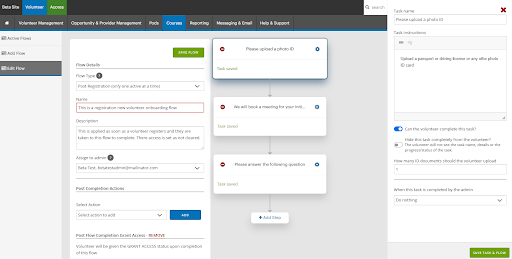
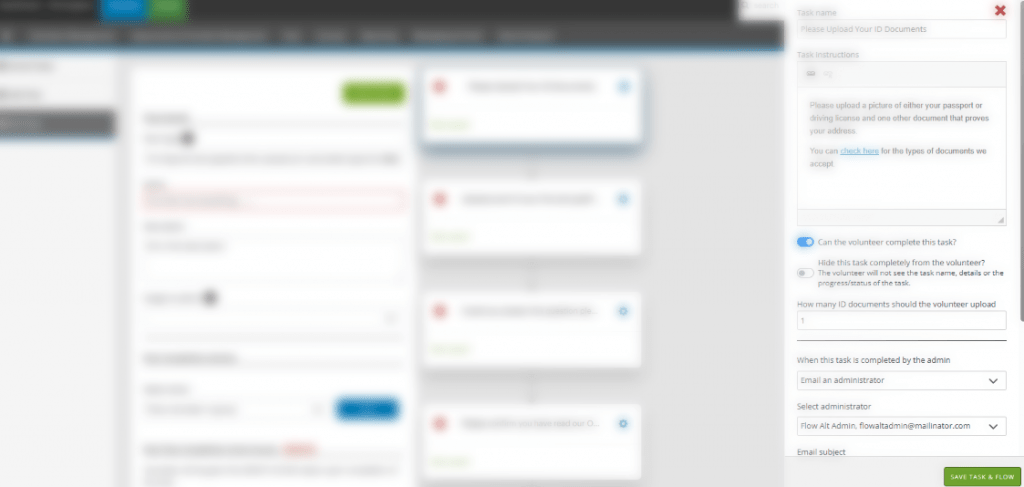
Flows are a flexible, automated way to gather information and onboard volunteers. Instead of jumping between screens, you can now build a custom path for your volunteers to help move them from interested to engaged in the shortest path possible.
Flows include steps for:
Automatic ID Uploads & Checks
Integrated Meeting Scheduling
Reference Gathering
Custom question completion
Profile images
Once a Flow is complete, the system does the heavy lifting for you. It can automatically add the volunteer to a group, grant them system access, create a ToDo task for yourself or a colleague, or send HTML emails with attachments the volunteer or your team.
The very best bit? Admins can manage every single step from one interface. No more chasing. No more friction. Just a smooth flow from sign-up to participation.
We’ve calculated that a well-built Flow can save up to 25 manual steps per volunteer. That’s more time for you to focus on the people, and less on the paperwork.
One Opportunity, Unlimited Locations
If you manage a regional program, you’ve felt the pain: creating thirty different opportunities for thirty different community centres or postcodes. It’s repetitive, it’s messy, and it’s hard to track.
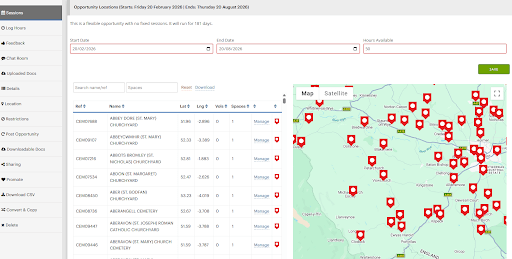
We’re changing that. Our new Multiple Locations update allows you to attach unlimited locations to a single opportunity.
Live Capacity Tracking for Admins: Map pins are colour-coded based on volunteer spots
Green: Full capacity, great news.
Orange: Partially full.
Red: Empty =(
Interactive: See every site on a live map, track occupancy at a glance, and manage slots without breaking a sweat.
The Volunteer Experience: Volunteers see a beautiful, searchable map. They can find the site closest to them and join multiple locations with just a few clicks.
Scale your impact without scaling your workload.
Sharing is Caring
Allow your volunteers to find their friends.
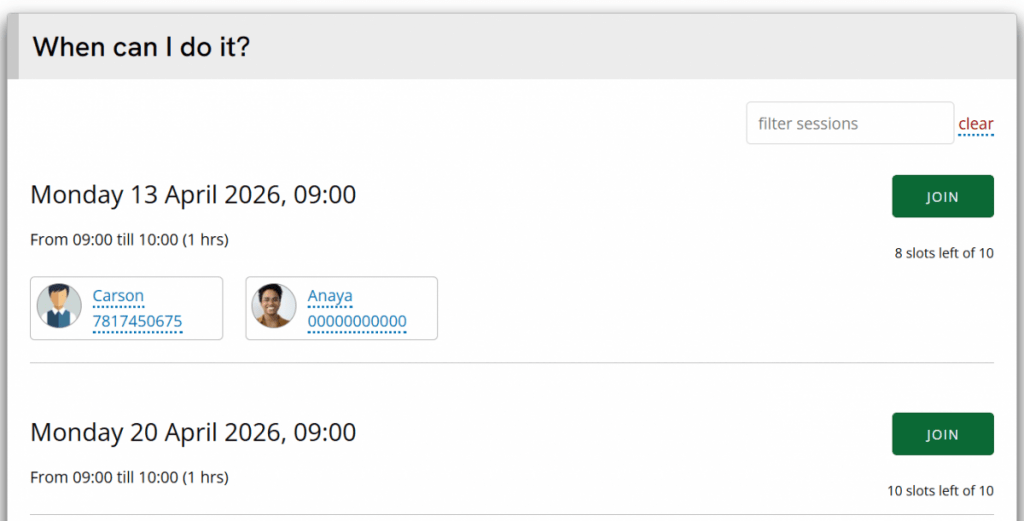
Volunteers want to buddy up with their friends. To do this they need to see who else is on a volunteering session.
This feature allows a volunteer to see other volunteers on each session, and you decide what information they are privileged to see.
As administrators you decide which opportunities volunteer information is shared on, and what information is shared.
The minimum that is shared is the volunteers name and profile picture, but you can also elect to share their contact number and allow other volunteers to message them directly.
Volunteers are opted out by default and are asked to opt in the first time they join a sharing opportunity.
Volunteers can update their preference at anytime from their dashboard.
As always, there are many smaller and quality of life improvements including;
Session filtering and searching on opportunity pages for volunteers
Improved performance and speed across the board
Editing of provider users for administrators without the need to impersonate the provider
Extra actions in the ⋮ menus, like impersonating a volunteer directly from the opportunity volunteer list
Improved expense module with extra fields for administrators to store information like budget or activity codes
Additional filters for volunteer and opportunity searching
Extra permissions for controlling administrator access
Extra options eg switch on or off AI features
TeamKinetic 2.7.0 is now live so you can try all these extra features out right away.
If you manage a regional program, you’ve felt the pain: creating thirty different opportunities for thirty different community centres or postcodes. It’s repetitive, it’s messy, and it’s hard to track.
We’re changing that. Our new Multiple Locations update allows you to attach unlimited locations to a single opportunity.
Live Capacity Tracking for Admins: Map pins are colour-coded based on volunteer spots
Green: Full capacity, great news.
Orange: Partially full.
Red: Empty =(
Interactive: See every site on a live map, track occupancy at a glance, and manage slots without breaking a sweat.
The Volunteer Experience: Volunteers see a beautiful, searchable map. They can find the site closest to them and join multiple locations with just a few clicks.
Scale your impact without scaling your workload.
You can try the new features for yourself on our Beta site.
For a while now, Roles have been the backbone of your onboarding for opportunities. It offers a quick and easy way to record the various steps you need to check off before a volunteer was ready. But you need faster, you need more integration, and you need more automation!
Meet Flows
Flows are a flexible, automated way to gather information and onboard volunteers. Instead of jumping between screens, you can now build a custom path for your volunteers to help move them from interested to engaged in the shortest path possible.
Flows include steps for:
Automatic ID Uploads & Checks
Integrated Meeting Scheduling
Reference Gathering
Custom question completion
Profile images
Once a Flow is complete, the system does the heavy lifting for you. It can automatically add the volunteer to a group, grant them system access, create a ToDo task for yourself or a colleague, or send HTML emails with attachments the volunteer or your team.
The very best bit? Admins can manage every single step from one interface. No more chasing. No more friction. Just a smooth flow from sign-up to participation.
We’ve calculated that a well-built Flow can save up to 25 manual steps per volunteer. That’s more time for you to focus on the people, and less on the paperwork.
You can try the new features for yourself on our Beta site.
Why your current roles and volunteer onboarding might be hitting a ceiling.
We are all familiar with the onboarding dance.
A volunteer signs up, then you email them for an ID.
Then you wait.
Then you realise you forgot to send the link for the induction meeting.
Then you have to manually move them into the verified column in your spreadsheet or update their status in your CRM once they finally send that photo.
It’s disconnected, manual, frustrating and prone to error and missed opportunities. Just as importantly, it’s one more time barrier to engage with your volunteers; they get bored, they change their minds, and you lose them and their potential!
It’s a lot of chasing, and frankly, a lot of friction.
We’ve been listening to our power users, and it’s clear: the way we manage the journey from “Interested” to “Active” needs to evolve. We’re working on something that turns that zig-zag process into a straight line.
No more disconnected processes, no more time-consuming checks, just straightforward, integrated actions that take your volunteer journeys from step 1 to completion in one place.
Keep an eye on this space. “Roles” as you know them are about to get a lot more… fluid.
If you’re not a TeamKinetic user but you’d like to be kept up to date with TeamKinetic updates, email alex@teamkinetic.co.uk and we’ll get you on our mailing list!
Volunteer managers often know the difference their organisation makes — but struggle to evidence it in ways that funders, trustees, and partners trust.
This practical masterclass explores how volunteer-led, community organisations can move from stories and activity counts to clear, credible evidence of impact — without over-complicating things or becoming an evaluation expert.
Drawing on real examples from community organisations, the session will show how better impact evidence can strengthen funding applications, increase confidence in conversations with partners, and support smarter decisions internally.
The focus is on practical, proportionate approaches that work for small and medium-sized organisations where time and capacity are limited.
Who are Patchworks?
We help community organisations (local VCSE) to produce independent evidence of their impact.
Using a process called Covaluation – coproduced evaluation – we codesign outcomes around how you work, help you collect the data needed to prove them, and produce a brilliant report that will help you improve services and raise more funds.
Most of the organisations we work with have volunteers at their core, and measuring the social value of their contribution is crucial.
PatchWorks is the creation of Paddy Hanrahan, an experienced leader in the UK volunteering space.
Join our next masterclass to find out why volunteer recognition is so important, and what it can do for your organisation. We’ll be going over how to use TeamKinetic and its integrations to successfully reward and recognise your volunteers.
Reward and recognition are essential to a healthy, sustainable volunteer programme because they acknowledge the time, skills and emotional labour volunteers freely give. When volunteers feel seen and valued, they are more likely to stay engaged, perform at their best and act as ambassadors for your cause, strengthening both community impact and organisational outcomes.
‘Most of us like to be appreciated and recognised for what we’ve done. This doesn’t mean that people are consciously looking for thanks, rather that it becomes noticed if it’s never given. Probably, the most important thing that can be done in order to continue a relationship with volunteers is to make sure they know that they and what they do are valued.’
Grotz & Leonard 2022
What You’ll Achieve in This Masterclass
Discover some reasons reward and recognition is important that you might not be aware of
Learn about feedback and how to encourage it
The importance of logging hours
Custom award badges
Creating HourTrades and how to enable them
TeamKinetic integrations for rewarding volunteers
You can download the full course materials from our repository and also find more details and watch the latest video from your HELP & SUPPORT > TUTORIAL VIDEOS area.
Not a TeamKinetic user? No problem, you can still join us to get some tips and tricks via these meeting details:
Masterclass – Spread the love, reward and recognition Wednesday, 7th January · 10:00 – 11:30am Google Meet video call link: https://meet.google.com/iyd-szgu-xpo
Re-engaging lapsed volunteers is one of the fastest, most cost-effective ways to boost your program’s capacity—far easier than convincing someone brand-new to take the leap. In this practical, strategy-packed masterclass, Tobi Johnson will teach you how to design and launch a targeted volunteer “win-back” campaign that rekindles interest, rebuilds connection, and inspires past volunteers to return with renewed energy.
You’ll discover how to blend email nurture sequences with thoughtfully personalised outreach to speak directly to your volunteers’ motivations, experiences, and past contributions. Instead of generic recruitment messages, you’ll craft tailored “return invitations” that feel human, respectful, and genuinely compelling. You’ll also learn how to turn common volunteer objections into opportunities—surfacing insights that strengthen your messaging and improve your results.
In this session, you will …
Create “win-back” messaging that differs from regular recruitment calls to action
Use volunteer objections to strengthen, not weaken, your appeals
Get fresh ideas to connect with lapsed volunteers in new ways
NOTE: To get the most from this workshop, bring a list of 3-5 of the most common objections you hear from past volunteers when asked to return.
You will get …
Win-Back Campaign Messaging Workbook
Slide Thumbnails for Note Taking
Speaker: Tobi Johnson, MA, CVA
Tobi Johnson, CVA is an internationally recognised expert and advisor in volunteer engagement, known for her practical, evidence-based strategies and innovative, “big hat” thinking on supporting and activating volunteers. She is President of Tobi Johnson & Associates, a consulting firm that helps nonprofits and professional associations strengthen volunteer engagement and build high-performing volunteer programs. In 2015, she founded VolunteerPro, an online training and networking community for volunteer leaders, and she hosts the Volunteer Nation Podcast. Tobi is currently writing a book for volunteers who lead, to be released this year.
With over 30 years of hands-on experience, Tobi has designed, led, and scaled programs across arts, youth development, healthcare, senior services, employment, and advocacy, working with non-profits, government agencies, and professional associations. She chaired the Certified in Volunteer Administration (CVA) Job Analysis Task Force and leads the annual global Volunteer Management Progress Report, tracking engagement trends in over 36 countries.
Join the Masterclass
TeamKinetic users can reserve their space the usual way, via Help & Support → Masterclasses & Training.
The TeamKinetic 2.6.1 Minor Release is coming soon, and we want to tell you all about what to expect when the update drops.
This is the largest update to our user features so far in our release history!
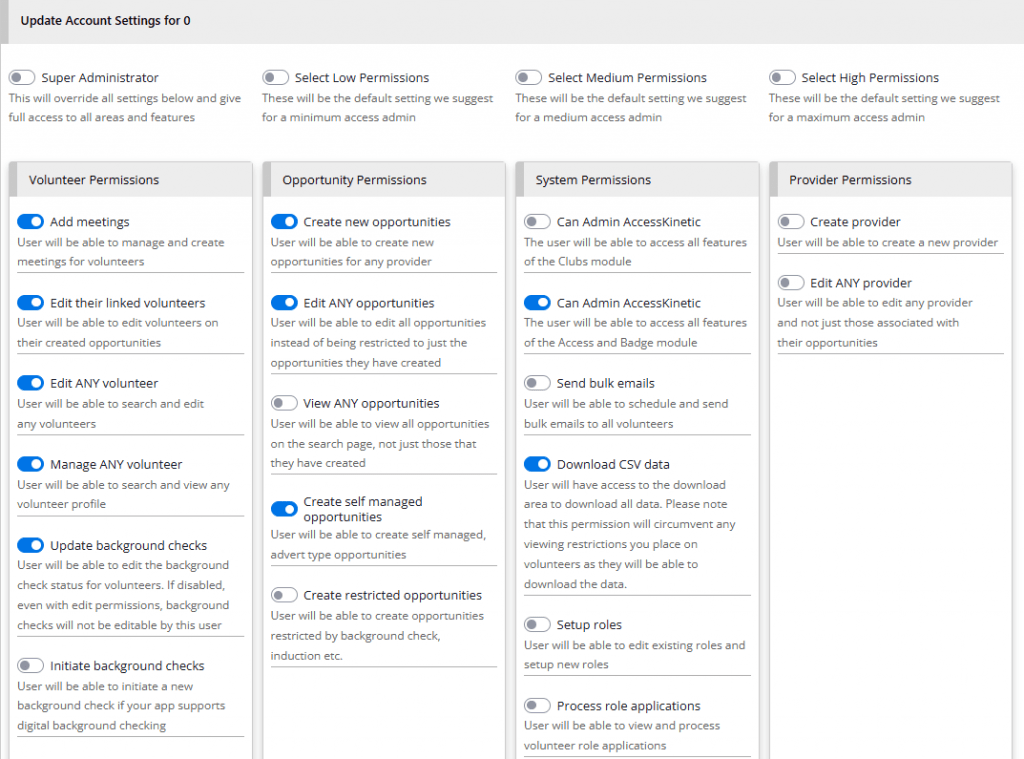
Granular Permissions
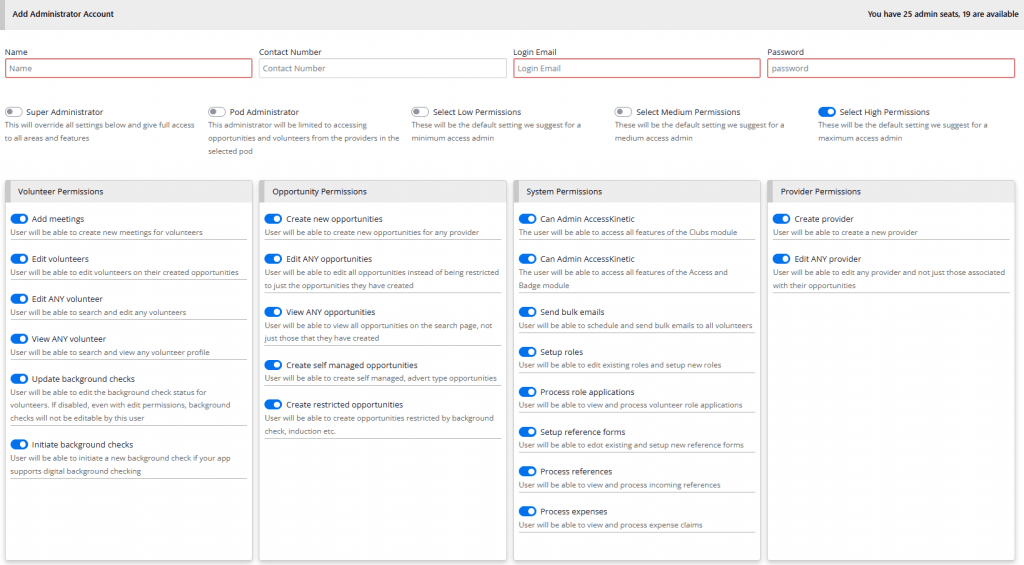
Super admins can now select granular permissions for all your administrators. Permissions are split over the four areas of volunteers, opportunities, providers and system. Each administrator can have their own bespoke permissions set. There is also a handy set of presets for low, medium, and high-level permissions.
All your current administrators will have all permissions enabled EXCEPT the system permissions, and should experience very little difference to their current mode of operation.
POD administrators will still behave as before, but their limited access to opportunities and volunteers within their pod can be overwritten by the edit all opportunities and volunteer permissions. Any existing POD admins will have those permissions disabled so that the existing POD rules are still enforced.
Of particular note are the new system permissions that allow selected administrators to edit role and reference definitions as well as process role applications and submitted references. This is the first time that Super Admins can assign some roles that were previously Super Admin-only to general administrators.
The opportunity assignment options, as detailed in the next section, can be used to define which opportunities can be accessed by administrators without the edit all opportunities permission. In these cases, any opportunity that is created by an administrator or has been assigned to an administrator is viewable and editable by the administrator.
You can refine and update all your administrators from the Super Admin Menu > Admin Accounts.
Super administrators can now assign individual administrators to particular opportunities. This has two effects.
Firstly, it enables the administrator edit access to the opportunity when they don’t have the edit all opps permission enabled.
Secondly, all enabled administrator email communications will be directed to both the assigned user and the regular central app email.
Administrators and providers can also assign a provider user to the opportunity, which affords no extra access but direct email notifications to the selected user in addition to the central provider email address.
Finally, you will notice that there is a nominal contact email box available to providers and administrators. Here, you can add any email address which will also be added to the email communications for this opportunity.
This has the advantage of not being connected to an existing user, so you could use mailing lists or group emails. Please take care not to use unauthorised emails that could enable some leaking of details to non-authorised contacts.
This nominal email feature can be optionally disabled to prevent the risk of data leakage.
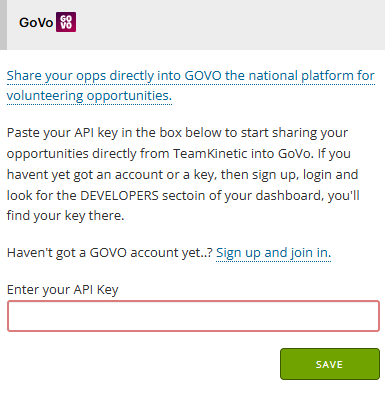
This is great news as the GOVO platform is gearing up and people are starting to talk about it.
Available from your super admin menu > setup > integrations page you simply have to add your API key to start sharing your opportunities directly to your account at GOVO.
You can either choose to share when adding an opportunity or when editing an existing opportunity. GOVO supports remote/at home opportunities, flexible and sessional and any interested volunteers that find you on GOVO will be redirected back to apply on your TeamKinetic platform. Exciting times.
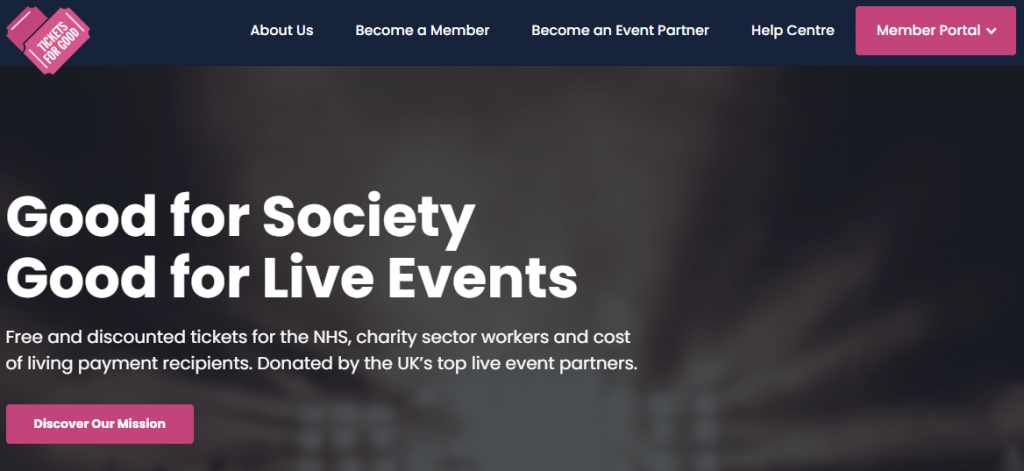
Tickets For Good – Another great way to reward your volunteers
We’ve teamed up with tickets for good to enable your volunteers that have logged hours to get their hands on free or heavily discounted tickets to a huge selection of top events. There is always a small booking/ticketing fee to pay and all tickets are on a first come first served basis.
We have to pre-authorise your organisation to make sure it meets the criteria Tickets for Good set out. If you are interested pop along to the super admin menu > setup > integrations to start the ball rolling.
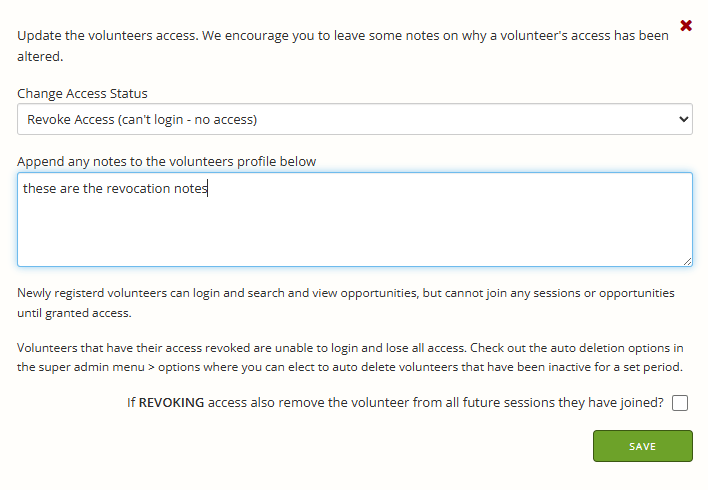
New status options
As part of the revocation options, you can now elect to remove a volunteer’s future sessions when revoking access. This means that their names will no longer show up on opportunities for future sessions, so they should not be expected or allowed to participate.
New Font – What do you think
We have updated the admin system header and body fonts, we think the titles are more readable now. Hope you like it.
Did you know you can use the CSS editor in your super admin setup area to set your own custom fonts for your volunteer pages..? Open a ticket if you want to know how.
New search filters
It’s always difficult to filter out who is active, inactive, available etc, not least because what those words mean is not standardised and they can mean different things in different contexts.
In terms of reporting and hours the TeamKinetic definition of active is always on a session OR logged hours between the filter dates. However when referring to volunteer auto deletion active also includes a login event; a volunteer that has joined no opportunities but has logged in, will not be auto deleted as they are considered active.
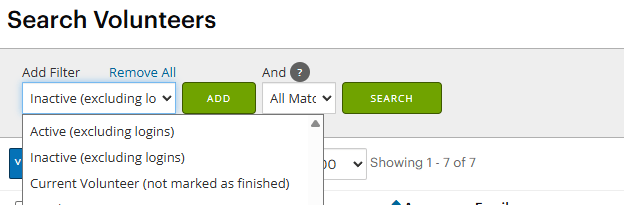
To help, we have added some new filters to handle these different situations.
The filters have some extra text so you know exactly what the filter includes and we’ve added a new filter that will pull up all volunteers that were on any opportunity in the period selected where they were not marked as finished.
Changes to log all hours page
The log all hours page has had some changes after talking with out Wildlife Trust customers who had some good ideas to make it more useful.
We have added a provider filter so you can look for specific provider’s outstanding hours, adding some more details on what the rules are when bulk logging hours.
A little checkbox to filter in/out those sessions where some, but not all, the available hours have been logged by a provider/administrator. Usually if less than the maximum hours have been logged, it’s for a reason and you don’t want that to be overwritten by the maximum.
A total can now be found at the bottom of the results and we have excluded the flexible max hours number as it was confusing and doesn’t add anything as when bulk logging flexible hours it copies the volunteer log history if it has more hours than the provider/administrator log history.
New SMS sending rules
This is actually a sort of backwards development! The rules around unsolicited text messages have been tightened up and they now prevent us from using any sender ID we wish when we send text messages. We now have to provide details on the sender ID, what it will be used for and other details, plus a regular monthly cost.
So for these reasons, we have suspended the sender ID options in the account profile area and all SMS messages are sent with a TeamKinetic sender ID. Apologies for those that have got used to having the old Sender ID flexibility.
Auto-suggest timing for typing to speed up results
You may have noticed when using the universal auto suggest search (still the best place to look for individual volunteers, providers or opportunities!) that it doesn’t attempt to search until you pause your typing. So if you type the characters S I M O N in quick succession without pausing, it will search once for ‘simon’ it wont search for ‘s’ then ‘si’ then ‘sim…..’.
This same technique has now been applied to the volunteer auto suggest searches when adding volunteers to sessions, adding meetings and everywhere else you see that volunteer search dialogue.
It reduces the time it spent searching and helps prevent timing issues with the appearance and fading of the list of auto suggested names.
In order to get the best out of the reporting and engagement data TeamKinetic can offer its important to stay on top of logging hours.
We know this can be a laborious process, so we’ve got a bunch of ways to log hours, all the way from a single button press to log everything, everywhere, to logging different hours for individual volunteers and sessions.
This masterclass will explain the difference between a volunteer and a provider/administrator logged hours, why that is important and every method of logging hours in TeamKinetic.
By the end of this Masterclass you will be confident in bulk logging and individual logging, understand the effect of bulk logging hours and what rules it follows and the importance of trying to accurately log flexible hours.
We know we have been talking about this new feature for many months but now we are thrilled to share a sneak peek at one of the most requested updates we’ve built: Granular Admin Permissions.
Managing your volunteers, opportunities, and providers is about to become more powerful and flexible than ever. Our new permissions system gives you total control over who can do what within your TeamKinetic platform – from creating opportunities and editing volunteers, to managing providers, background checks, and system settings.
You’ll be able to: ✅ Assign tailored access levels to match every role in your organisation ✅ Mix and match permissions to suit your workflows for every user ✅ Confidently delegate tasks without compromising data security ✅ Scale your admin team with precision and peace of mind
This update marks a huge step forward in making TeamKinetic even more adaptable for organisations of all shapes and sizes. Whether you’re a national network or a local volunteer hub, you’ll soon have the tools to customise admin access with unprecedented detail.
Take a look at this clip from our conference where we introduce this feature, along with Flows:
We’re putting the finishing touches on this release and we can’t wait for you to try it out.
Stay tuned for the full rollout announcement, feature deep dive, and training resources soon.