
Hi all and welcome to another TeamKinetic release, this one is a biggie! We don’t have as many new features as normal in a major release, but the ones we do have are BIG.
For a while now, Roles have been the backbone of your onboarding for opportunities. It offers a quick and easy way to record the various steps you need to check off before a volunteer was ready. But you need faster, you need more integration, and you need more automation!
Meet Flows
Flows are a flexible, automated way to gather information and onboard volunteers. Instead of jumping between screens, you can now build a custom path for your volunteers to help move them from interested to engaged in the shortest path possible.
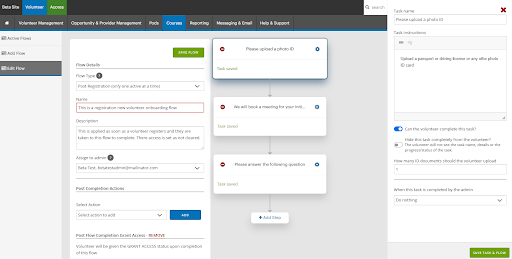
Flows include steps for:
- Automatic ID Uploads & Checks
- Integrated Meeting Scheduling
- Reference Gathering
- Custom question completion
- Profile images
Once a Flow is complete, the system does the heavy lifting for you. It can automatically add the volunteer to a group, grant them system access, create a ToDo task for yourself or a colleague, or send HTML emails with attachments the volunteer or your team.
The very best bit? Admins can manage every single step from one interface. No more chasing. No more friction. Just a smooth flow from sign-up to participation.
We’ve calculated that a well-built Flow can save up to 25 manual steps per volunteer. That’s more time for you to focus on the people, and less on the paperwork.
One Opportunity, Unlimited Locations
If you manage a regional program, you’ve felt the pain: creating thirty different opportunities for thirty different community centres or postcodes. It’s repetitive, it’s messy, and it’s hard to track.
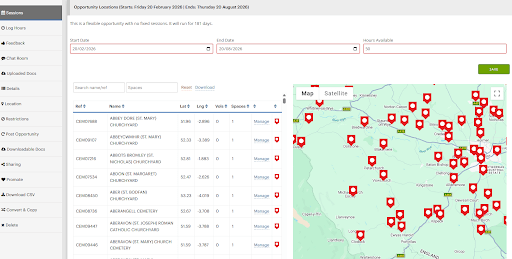
We’re changing that. Our new Multiple Locations update allows you to attach unlimited locations to a single opportunity.
- Live Capacity Tracking for Admins: Map pins are colour-coded based on volunteer spots
- Green: Full capacity, great news.
- Orange: Partially full.
- Red: Empty =(
- Interactive: See every site on a live map, track occupancy at a glance, and manage slots without breaking a sweat.
- The Volunteer Experience: Volunteers see a beautiful, searchable map. They can find the site closest to them and join multiple locations with just a few clicks.
Scale your impact without scaling your workload.
Sharing is Caring
Allow your volunteers to find their friends.
Volunteers want to buddy up with their friends. To do this they need to see who else is on a volunteering session.
This feature allows a volunteer to see other volunteers on each session, and you decide what information they are privileged to see.
As administrators you decide which opportunities volunteer information is shared on, and what information is shared.
The minimum that is shared is the volunteers name and profile picture, but you can also elect to share their contact number and allow other volunteers to message them directly.
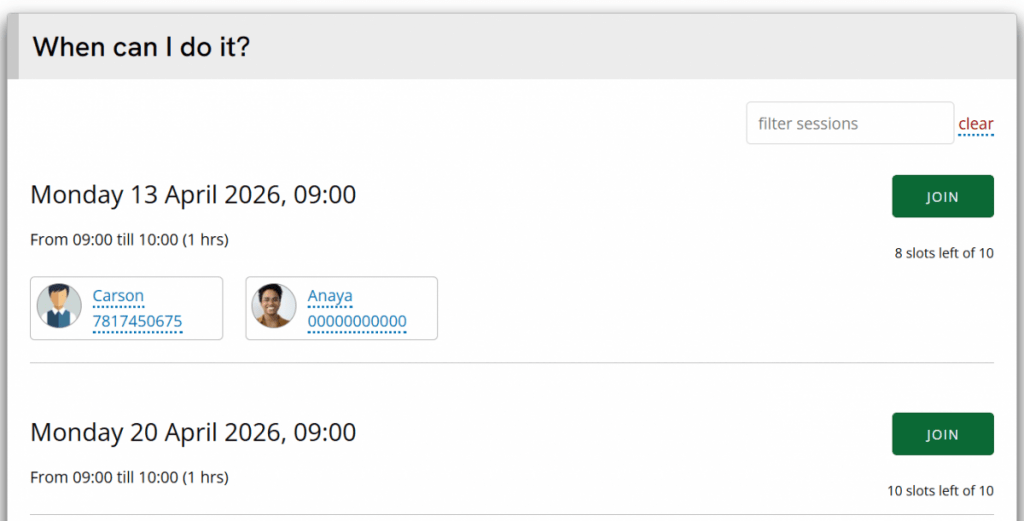
Volunteers are opted out by default and are asked to opt in the first time they join a sharing opportunity.
Volunteers can update their preference at anytime from their dashboard.

As always, there are many smaller and quality of life improvements including;
- Session filtering and searching on opportunity pages for volunteers
- Improved performance and speed across the board
- Editing of provider users for administrators without the need to impersonate the provider
- Extra actions in the ⋮ menus, like impersonating a volunteer directly from the opportunity volunteer list
- Improved expense module with extra fields for administrators to store information like budget or activity codes
- Additional filters for volunteer and opportunity searching
- Extra permissions for controlling administrator access
- Extra options eg switch on or off AI features
TeamKinetic 2.7.0 is now live so you can try all these extra features out right away.
Be sure to join the Masterclass on Monday 13th at 14:00 (see your dashboards) or check out the handbook for the new features.
Enjoy, and let us know what you think.
Leave a Reply