Category: TeamKinetic Features Page 7 of 10

There are a wide array of TeamKinetic features, that’s why we try to explain what each area of the system does, why you use it, and how to use it most effectively.

If there’s something we haven’t covered, let us know!

FAQ: TeamKinetic’s New COVID-19 Features

These are all the questions asked during our webinar. To find something more easily, try pressing ‘ctrl’ and ‘f’ on your keyboard then typing a keyword.

Can I watch the Webinar again?

You can see the webinar we did on Friday 3rd April at 2:00pm below.
If that doesn’t work click this link.

You can see the webinar we did on Friday 3rd April at 4:00pm below.
If that doesn’t work click this link.

Where can I see/test these features out?

You can try out the task management on our demo site.
Use the login details:
Email = info@teamkinetic.co.uk
Password = password
You can view and download the volunteer app here.
Use the login details:
Email = kangarolf@yahoo.co.uk
Password = password

Is this free to organisations/groups?

We are offering TeamKinetic Advanced for free to community groups for 3 months during this crisis. More formal organisations such as volunteer centres can access special pricing on our Enterprise addition if required. To get started, go to our website.

Do the mutual aid groups count as small community groups?

Yes, though if they require our enterprise edition there may be a small fee.

How do I switch these new features on?

Watch this short video that shows you how to set this up on your system.

Can we import existing volunteers via CSV or from another system?

There is no automatic way to import volunteer details, although it is possible, there would be a charge incurred for migrating the data. Alternatively, you can INVITE them via a CSV file and the system will track if they sign up.

This is often better as the information is up to date and you will know that you have captured all the relevant information. (When you migrate data there are often gaps in the information where we now require information that was not captured in the first instance.)

Is this all GDPR compliant?

Privacy by design is central to our development process. The new features comply with GDPR and you remain the data controller for your data.

On the front page, instead of using the words ‘volunteering operations’, why not ‘volunteer tasks’ since the app is called a task?

You will see in the latest version, once you switch on these features you have a box for ‘Tasks’.

Will existing volunteers have to register again as COVID-19 volunteers?

No, but you may have some new processes that they need to complete before you allow them to be a COVID-19 volunteer (e.g. upload their ID).

Do all existing volunteers get to see these opportunities?

All existing volunteers that have access granted to your current application (i.e. they have been cleared after registering) can access the new COVID application.

They will see opportunities whose criteria they meet (criminal check required, etc.) in distance order from either their current location (if given) or from the location entered in their profile.

They will only be able to see these new tasks via the COVID app, they are not visible on your main website.

Can we have custom fields?

You can not currently add custom fields to TASKS, but this may be something we explore in future development.

Can the text on the landing page be made clearer?  People have ‘registered’ and assumed they are volunteering. But they have not joined/ applied for an opportunity.

We will look at the wording on the landing page.

We strongly encourage you to look at your current post-registration email and make sure you are being very explicit about what you want your new volunteer to do next.

We also know that some organisations have had some very good results by emailing all volunteers who have registered but not as yet gone on to join a volunteer opportunity. Hit those volunteers with some
direct messages via email and SMS text explicitly telling them to sign up for a task or an opportunity. To do this watch the video below.

Is this standalone or can it be linked to an opportunity already in existence?

‘Tasks’ are standalone right now, this was done for speed of development and the unique situation this crisis presents. Looking to the future this will be something we will be looking to integrate into the normal TeamKinetic App.

Can you set age limits on tasks?

No.

Does it automatically add the volunteer hours and feedback?

Not currently, as these opportunities don’t necessarily convert very well to an hours metric. Though we will explore some other methods for tracking these Tasks.

In the ‘Search Volunteers’ filters, how do I filter volunteers I have already emailed?

You cannot directly search by volunteers you have never emailed. It is possible though to filter by those volunteers that have not joined an opportunity and/or that registered before or after a set date. So you can
every month use the NUMBER OPPORTUNITIES JOINED in conjunction with the REGISTRATION DATE to select everyone in that month that has registered but not joined an opportunity and email them.

Does it use ‘Push Notifications’ via the app or are volunteers updated by email?

Not currently Push Notifications, but it is on our roadmap. Volunteers can be contacted by email and SMS text and via the chat function within Tasks. Push notifications are difficult to set up and are not consistent between iOS and Android. We will be looking at adding in-app notifications in the short to medium term.

Is there a safeguard in place in relation to the number of hours a task has been assigned before it’s completed?

The age of the Task is displayed in hours and days on the Task details. There are no reports or warnings yet around tasks that are beyond their target date by a given interval. They will, however, always appear at the bottom of the unassigned list.

Some of the referrals we’re getting through may be urgent in nature, is there a RAG rating on the tasks?

We don’t have a RAG (traffic light) rating on tasks. You could use words like urgent in the title for now.

When we have tried this in the past we find the system quickly becomes diluted as provider, given the choice, selects urgent!

Can you request certain volunteers do certain roles, i.e. if they are in Aldi already getting the volunteer to pick up multiple shops at the same time?

Volunteers can be assigned multiple Tasks by an Admin or a Provider user or they can also self-assign multiple tasks. So they could join multiple tasks which involve picking up food allowing them to complete multiple tasks in one shop.

Is there a place where people can record money changing hands?

As you can imagine, money is involved, there are significant risk factors to take into account, so it is not the type of feature we would want to rush, but it is something that we will look to tackle in the next few weeks.

Can we upload photos of shopping receipts?

This is a great idea for a feature and we will add it to the road map.

Is there a diary linked to this?

Not currently, though we have taken note of this and will be looking at different user interface options as we continue the development of the application.

Is there a word count on the notes area for example, where shopping lists are very long?

The word count will be sufficiently large to allow quite detailed notes.  If you find it is insufficient please raise a support ticket and we will look at extending this.

Who will be putting the information on? Is it Volunteer Centre staff?

We envisage Tasks being added by both Admin users and Providers depending on the organisation, but mainly providers.

Who are the ‘Providers’?

A provider is someone/an organisation who advertises a volunteering opportunity.

Does it connect into local voluntary and community groups who are coordinating various volunteer activities?

Yes, this new TASK functionality will allow these community groups to register as a provider and manage their volunteers via your system.

Who can add tasks – any provider? Approved providers?

Admins can either allow ALL providers, only TRUSTED PROVIDERS, or SPECIFIC (handpicked) providers to add tasks.

Can we hide the ‘community tasks’ from some providers?

Yes.

How will it be coordinated with Local Authority contact centres?

We know the landscape varies across the country, so we are trying to build these features to be as flexible as possible. We have examples of the Task system linked to other systems within the council and examples of council staff being established as providers so they can add Tasks directly or via some sort of upload function.

Some centres are not managing volunteers directly, such as PAVS.  But we see that this might work for our providers, it would be useful if a little “how-to?” could be produced for us to disseminate to the groups.

Watch this short video and feel free to share this with all your providers using the link: https://teamkinetic.fleeq.io/l/pgbsc87ymu-29lkrp5kir

I think this would work for mutual aid groups, but it’s not our job at VC to do this – I think this is functionality for providers not for us. Mutual Aid groups in Gwynedd have already got systems set up – I don’t think they would move over onto a completely new system now.

We are not forcing anyone to use this system and appreciate you may have a solution that is working locally.  As mentioned there may be the ability to link alternative systems together as we are doing in Greenwich, but this will involve a cost and some additional work.

The functionality is mainly aimed at providers, and specifically, community volunteer coordinators who don’t have access to tools to manage their volunteers.

Who actually checks the volunteers? Is it us Admins within the volunteer centres that approves the volunteer?

The on-boarding of the volunteers remains the same with regards to TeamKinetic. The volunteers still register the same way they did previously, you may decide locally that your process has to change to deal with the particular issues of this situation. But there are ‘flags’ against each volunteer to be ‘Cleared’, ‘Inducted’, ‘Criminal Check’, and ‘ID Verified’ which can all impact volunteers’ access to tasks. So if you specify that a task requires volunteers to have shown their ID, then it will only allow these volunteers to join the task.

What is being done around volunteer identification?

We have included the ability to mark a volunteer as having ID, and restrict tasks to ONLY volunteers who are marked as having submitted their ID.

If the volunteer isn’t assigned to a group/provider, who validates them and checks them?

Volunteers will appear to the Admin as they have previously, waiting to be cleared.  You may wish to enforce additional checks or required documents such as picture ID or proof of a criminal record check.  You may also wish for the volunteers to include a picture of themselves for example, which can be locked so they can’t change it after it’s been checked.  These features can all be enforced via the Super Admin area.

Some customers are using text messages, requesting the volunteer upload the appropriate ID documents. They have set up a template text message that they send to the volunteer once they have agreed to do a task which has our organisation name and phone number on so that they can upload the appropriate documents.

Most of our existing volunteers don’t have ID on the system. Does the system stop them taking a task if they haven’t proved their ID on the system?

We have added a new flag for volunteers so admins can start to mark volunteers having provided ID. We will be adding this flag as a filter to the tasks presently. It will be a decision for each organisation if they want to go back and historically flag volunteers and use the ID restriction on tasks. We will be able to help with identifying volunteers with uploads, please get in touch via support ticket.

The lock feature you mentioned available on Downloadable Documents is not available on my system? I am a superuser and have been using Downloadable Documents all week.

Downloadable documents are different from the documents that are uploaded to a volunteers profile. Downloadable documents by their nature cannot be affected by a volunteer. It is possible however to upload a document to a VOLUNTEER’s profile and disable the volunteer from being able to remove it. 
Locking documents is covered in the ‘Adding Volunteer Documents’ video above.

How do you record who has DBS checks?

These checks are recorded in the same way as previously in TeamKinetic.  Here is a short video on how you can do this.

DBS can only be added by an Admin user.  These details are visible to providers via the volunteer profile.

How will Providers know if the volunteer needs to have had a DBS check? How will you be able to check that the volunteer has really had that?

Criminal records checks can be recorded in TeamKinetic by Admin users only.  Tasks and Opportunities can be limited to those volunteers that have a valid check in the system. 

There is a tool on the DBS website that can help providers and admins determine whether a DBS is needed – https://www.gov.uk/find-out-dbs-check

This will depend on some extent to some support and training from the Admin users for the Providers.

I thought the DBS/criminal record check function was turned off for Volunteering-Wales.net?

The criminal check sections of a volunteer’s profile are always available. So you can always record a criminal check against a volunteer. There is also a super admin switch (which is currently switched off for Wales) that controls if the criminal check restriction is available when creating new opportunities.

It was switched off for PROVIDERS as many providers were saying that the opportunity required a Criminal Check, but the volunteer couldn’t join the opportunity as they didn’t have a criminal check against them in the system.  But it is always available for administrators to add a criminal check to volunteers.

One of the issues is around managing these tasks. Many volunteers are doing these tasks on an ongoing basis and will agree with an individual as and when they’re required to go shopping.
How will this work with the app?

We are already working on a solution to this issue, with tasks that are ongoing and require more than one volunteer and we expect to see those functions soon. We are looking into FOLLOWING A PROVIDER which could send an email to volunteers who are FOLLOWING, to inform them that they have recently added a task.

Is there an option to confirm ‘task completed’ and all satisfied?

Yes, see the short video below.

If new volunteers sign up for a task, how can providers provide them with code of practice/ safeguarding info appropriate to the task?

Can we build in Volunteer training/ guidelines as they sign up?

You can continue to use the Document Hub in the Super Admin area for both Volunteer and Providers, see the video below to see how you add documents.

Further Guidance from WCVA will be shared with our Welsh customers as it becomes available.

Can you assign tasks directly to someone who has not applied? I already have people on a waiting list?

Yes, below is a quick tutorial –  how to assign a volunteer to a task.

How does the volunteer join their local support team (community group) on the site?
Can our ‘Street Champion’ role only be open to volunteers accepted on that opportunity?

Right now that is not possible, but we are exploring the ability to be ‘linked’ to a provider for a future update. So a provider may have a group of local volunteers that they know and want only to engage with rather than other volunteers from the system, that they may not know. 

Please can we as admins have the function to authorise these tasks? We don’t want volunteers taken advantage of and we don’t want the private data being passed into the wrong hands.

We are trying to add a pre-approval process by admins for all provider created tasks. We will endeavour to have this ready for release or soon after. You will always be able to DELETE unsuitable tasks until we can complete this change.  It is a balancing act between not requiring administrators to get involved with every task transaction, but giving them enough control to be able to identify tasks that should be removed.

Can individuals register their requests for support (for example shopping requests)? Or the group admin has to record these individual requests of the system?

The admin or Provider can add tasks. At the moment if a person requires support they could either register as a Provider or contact an existing Provider or administrator so the task can be added to the system on their behalf.

This task app may work well if you add an ‘Ask’ session where the public can ask for support, then we can create a task from their ask… is this possible? we have people contacting to inform us about needs in the community for example.

It’s a great idea and one we will look at if people think there is an appetite for this. 

How soon will the ID function be available? Can any individual that registers on the site print out a volunteer ID? Are we assuming that everyone will be a safe volunteer?

On the ID function and approval of it. WCVA is discussing at a Wales-wide level to get Police others buying in and support for the approach. We will update all hopefully next week on how those conversations have gone and how this feature may develop based on what the police state they require.

When we set up a task, can that task be saved as a template task so we can use it quickly to set up the next task? E.g. automatic upload of saved or previously typed words/data.

Not at the moment,  there is only one field (Task Title) which may be a similar form task to task, and we have already added an auto-suggest functionality to this field.  The other fields will be different from task to task (e.g. recipients address, or shopping list).

We will also explore CSV uploads and an API link where appropriate with clients to do so.

Can you download the documents uploaded by Volunteers in CPD & Documents area? We’re considering the most secure way to share images of say DBS checks with providers.

Yes, you can upload and download copies of documents.  Though sharing Criminal Records Check information may have significant GDPR considerations as this is sensitive data.  It would be our suggestion that you share the DBS number and direct your providers where necessary to check those numbers on the DBS website.  Alternatively, you can check the number for them on the DBS site.

Is this new section of Volunteering Wales bilingual?

We will be working towards a bi-lingual interface, but initially, we will develop the English version as we know speed is paramount at this time, once we have an interface that is relatively stable we will look to add the Welsh language elements.

Are you going to have a limit on how far a volunteer can travel to apply for a volunteering role?

Opportunities are filtered initially by proximity and it is the assumption that people will be looking to help out near home.  We have no intention of adding an arbitrary distance currently but if this becomes an issue we will be happy to revisit.

Is there a report built that shows things such as average time for completion, etc?

There is little reporting right now, but this is something we are aware of and will be thinking a little more about as we get more data.

The tasks need to clearly state who the provider is.

We are open to this type of feedback and we will see what we are able to do, to improve the user experience.

Does this mean that ‘Informal Groups’ COVID-19 Neighbourhood and Mutual Aid Groups are now able to register themselves as Providers, not just the usual formal (registered charities/Groups etc)?

Our usual minimum requirement to register a provider is a volunteering policy and insurance. Which may not be appropriate for those small groups, as we don’t know most of these groups how do we know they are legitimate?

If you know the people running these opportunities and Tasks then they are probably ok to be approved. Most are well-known people in communities and local councillors. It is open to local discretion.

Could the informal groups be registered as COVID-19 providers and keep them away from the main section of the site? Maybe only COVID-19 providers should be able to see COVID-19 tasks.

This is not currently available but is certainly something that could be considered in a future update.  We will add it to our development road map.

Once a volunteer selects the task, is it no longer open to others, i.e. can more than one volunteer select one task giving the provider a choice of who’s best suited?

Not currently, but it has been talked about for a later version of the app.

If there is something already in use in a county can the function be turned off so volunteers aren’t trying to sign up to tasks that won’t exist?

Yes, this is an optional feature set that can be switched on and off as required by the Admin. You can see a short video on how to do that below. We are also allowing you to use these features on a provider by provider basis.

Do you have any publicity that would help us with promoting this new function, please? Coming from WCVA/WG seems to help us locally and is seen as more ‘official’.

We are working with the Welsh Government and other partners on this.

How are you going about promoting it to the community groups?

We need your help, please feel free to share TeamKinetic with other organisations or community groups you think might benefit.

What is the URL for the TeamKinetic blog? Will the comments be available on the blog as well?

Yes, and now you’ve reached the end of our FAQ section! Feel free to browse our other blogs by clicking here, or visit our website.

Still Have Questions?

Send us your questions via Facebook, Twitter, LinkedIn, or on the YouTube videos at the top of this blog post. We’ll try and respond ASAP and we’ll add them to this post or everyone else to see! 

You can also call us on 0161 914 5757 or email us at info@teamkinetic.co.uk.

TeamKinetic 1.4.1 Release Notes

We have been slowly pushing out our 2020 Q1 interim changes for v1.4.1 and this will be complete by 7th February 2020.

You’ll have noticed a few differences already but these are the highlights, along with many bug fixes.

Improved Accessible Universal Search

The universal search is super useful but we know some customers are having trouble with the time delay used before searching and focusing the mouse on the results box.

This was done to improve its accessibility because without that switch of focus to the results window users of assistive technology and keyboard only users, would find it difficult to access the results.

We have listened to the feedback and have completely redesigned the universal search so that it is now even more accessible without annoying mouse users by switching focus.

The same results panel will appear but it now captures keyboard inputs so that using up and down, escape and return will enable keyboard users to navigate the list without ever switching the focus from the search box.

In addition all the correct ARIA attributes have been added and an additional assertive announcement for screen readers that will let the user know how many results have been returned and how to navigate them.

Login With Social Media (Single Sign On)

You’ll see a change to all login pages shortly; admin, provider, and volunteer login pages will have additional buttons for logging in with Google, Facebook, and for providers and admins, LinkedIn.

Your registered emails will have to match of course but if they do and you are already logged in with Google, Facebook or LinkedIn, you’ll get bumped straight to your dashboard just by clicking one of the social media sign in buttons. The first time you do this you may be asked to give TeamKinetic permission to receive your email address, we have to get that in order to match your account.

New Search Behaviours

We have adjusted the way the search filters are added to make them more accessible. Previously when you selected the type of filter it would be added automatically to the search. This renders it unusable for keyboard only users as they are not able to skip through the available filters without triggering their addition. So we have added a physical button you use to add the filter and some other improvements to make the search accessible.

New Search Filters

We have added some new filters to opportunity, provider, and volunteer searches, and also rearranged some others.

The new TYPE filter now contains multiple types of opportunity you can filter by, sessional, flexible, applying, and requiring references. We will be adding more as we test them.

For volunteer search we have added date FIRST and date LAST joined an opportunity along with a LINKED TO filter for finding which volunteers are linked to which providers.

Improved Reporting Text

We have updated the help tool tips on the reporting page to better explain what data is being shown. In particular around what is meant be converted, new, active, etc.

Universal Search Updates

The ordering of results has been changed so that older, less active volunteers, opportunities, and providers are less likely to appear in the top 5 results that are shown if there are many matches.

Dashboard Updates

We’ve altered the open opportunities display to remove the open/closed status (because of course they are all open!) and switched in a text category status which is also an accessibility improvement as the category is not communicated solely with colour.


There are lots of other smaller improvements, like adding more notifications to the top left notification area when actions are taking place, standardising button behaviour, harmonising more user interface elements and generally cleaning up!

Enjoy. 

TeamKinetic 1.4 – Post Release week two. Gifting owed hours.

Next in our on-going FaceBook Live sessions for TeamKinetic 1.4 we will be talking about gifting hours and how TeamKinetic approaches the whole idea of  hours and rewards.

Usually a volunteer attends a session or a flexible opp and logs their hours which are then also logged and approved by administrators or providers.

Occasionally however volunteers might have done extra hours, or you want to incorporate hours from historical projects that you know the volunteer deserves.

For these situations you need to gift the volunteer owed hours.

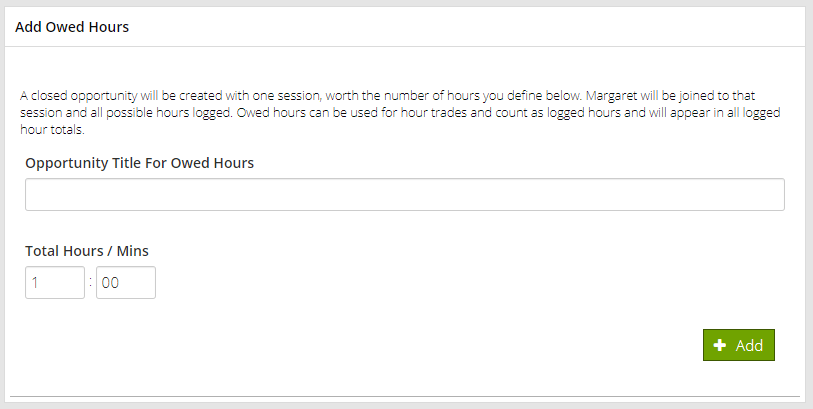
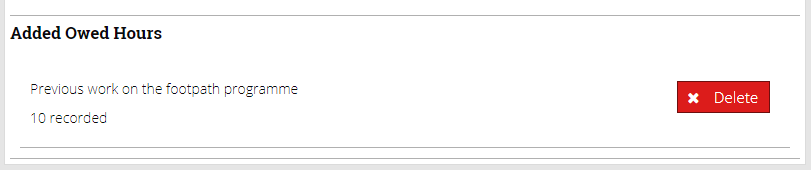
Just pop along to the volunteers management page and find the HOURS tab on the left. Within that section you’ll see an area called Add Owed Hours. Here you can add a title or reason for the owed hours, say ‘Previous work on the footpath programme’, then enter the total hours and minutes the volunteer will be credited with.

These gifted hours are treated exactly like hours earned on opportunities and will show up in your KPIs and reports.

If you mistakenly add owed hours you can remove them at anytime.

When owed hours are added the full hour total is added to the volunteer and provider, so the totals are kept in balance.

Join our Facebook live session on Tuesday 19th November to find out more about owed hours.

TeamKinetic 1.4 – Post Release week one. The document hub.

I hope you are all settling into TeamKinetic 1.4 and enjoying the new features.

We’ll be continuing our weekly Facebook Live sessions over the coming weeks till we have covered all the new functionality and questions that have come up about the new release.

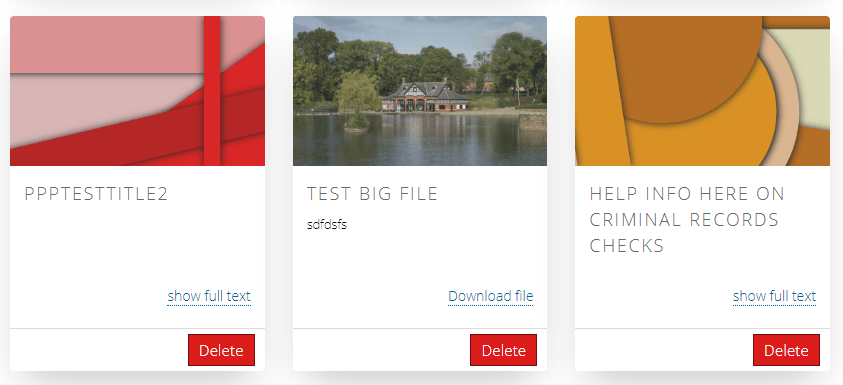
This week it’s all about the Document Hub that lets you create a repository of documents, links, and text that is accessible online by your volunteers and providers.

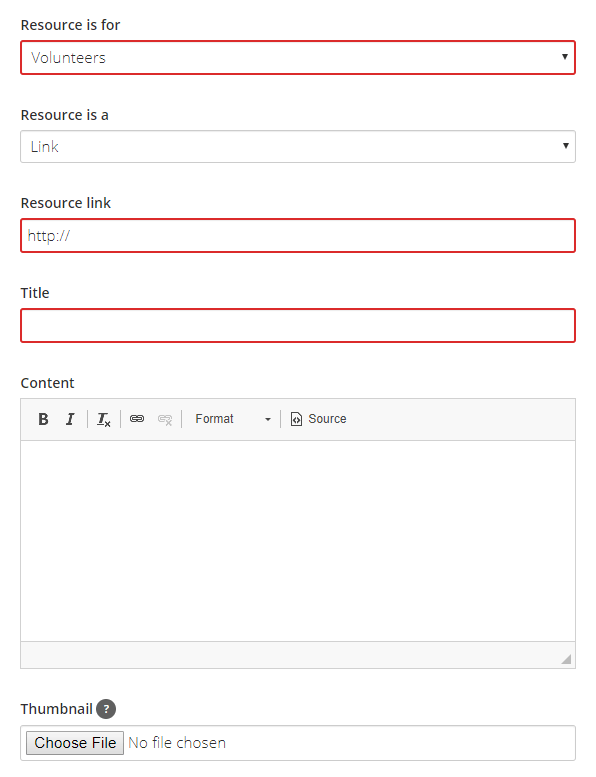
The document hub is available from the super admin settings menu (only visible if you are logged in as a super admin). From there you can add a resource for a volunteer or provider and create one of the three types; link, download, or just a plain text information resource.

For volunteers the resource area is available straight from their dashboard.

For providers it’s available from their help and resources menu.

The document hub is a great way to communicate your policies to your volunteers and providers, as well as to provide initial help and guidance for their first few experiences.

Join our Facebook live session on Tuesday 12th November to find out more about getting the most out of the document hub.

TeamKinetic 1.4 – Release week ZERO. It’s release week!

This is it… the release date is upon us and on November 5th the next version of TeamKinetic will be appearing on your desktops.

This Facebook Live session will cover the excellent filtering and searching options that we have added to the volunteer, opportunity and provider search. We will also be talking a little about the release schedule and what we will be doing to try to ensure a smooth transition.

The new filtering selection allows you to add multiple filters easily without having to scroll up and down, we’ve also included custom fields where applicable.

You can add or remove filters automatically and the results will update each time.

The navigation bar allows you to scroll through the results, change the displayed number of rows, and tells you how many results in total we have found.

You can also download all the results to a CSV, this will create a file with a copy of every row, not just the ones you are viewing at the time.

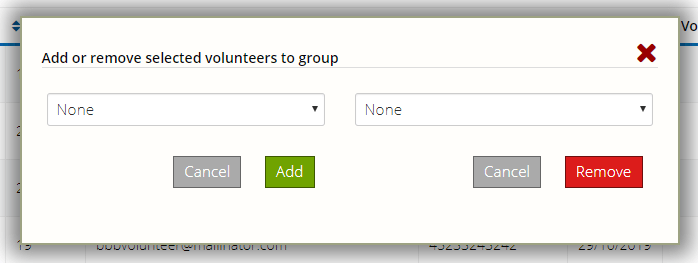
If you select any of the results using the checkboxes in the first column the bulk task options will appear at the bottom of your screen.

The available options will alter depending on which search you are performing, but in each case, a window will pop up where you can confirm your action and provide any further details.

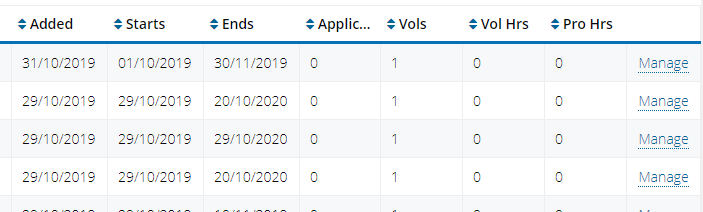
If there is only one action available for a row it will just be a simple text link at the end, this is also the case when searching for opportunities.

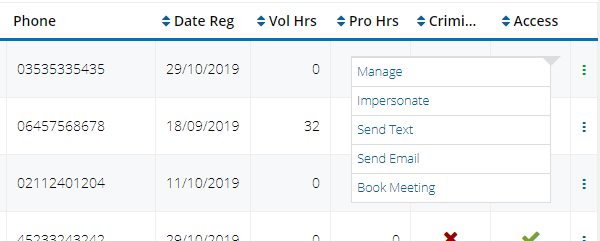
If there are multiple actions you’ll see the triple dot icon that you can click to bring up the actions, these are things like impersonate, email, manage etc.

You’ll start to see this table search and filtering pattern turning up throughout TeamKinetic, we think its a vast improvement and we hope you’ll think so too.

Join our Facebook live session on Tuesday 5th November to find out more about getting the most out of the application process.

TeamKinetic 1.4 – Pre-release week five

In our final pre-release Facebook Live session we are going to be looking at the opportunity application process and how to get the most out of applying opportunities.

Many of our customers have specific on-boarding processes for specific opportunities or types of opportunities. These checks take place before a volunteer can join a session on an opportunity.

Unlike requirements like inductions and criminal checks, the application process is specific to the opportunity and so all volunteers are required to complete the on-boarding before being allowed to join an opportunity.

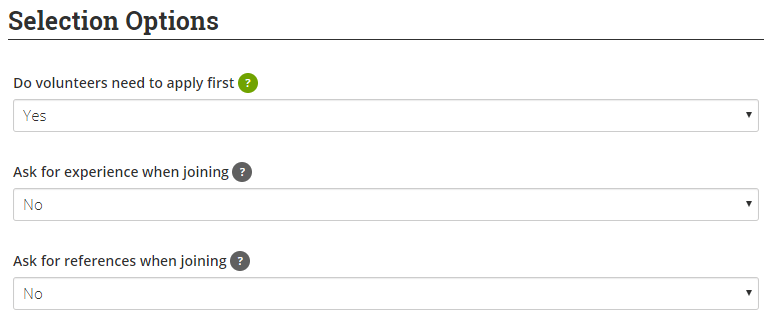
When creating an opportunity look out for the selection options and from there you can choose to create an applying opportunity and also specify some of the other pre-requisites like references.

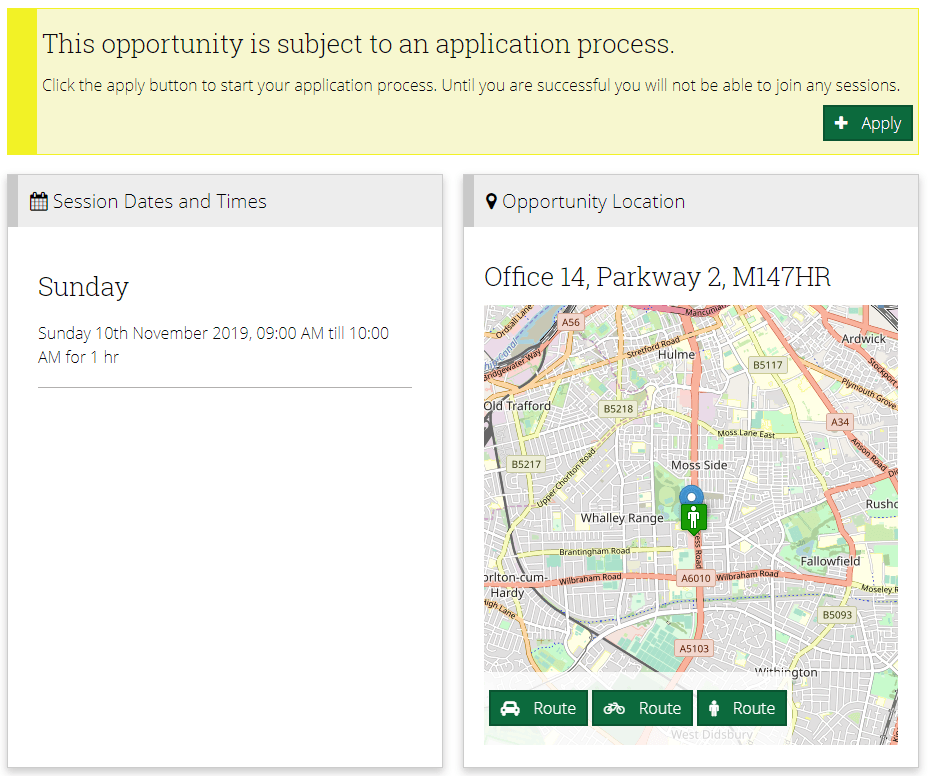
When a volunteer finds this opportunity they will be presented with an option to apply and will be asked to complete all the pre-requisites.

They provider and volunteer will each receive an email letting them know the application has been received.

The provider or administrator can manage the applicants from the regular opportunity management page. From the applicants tab they can view all the current applicants, approve or deny applicants and download the applicant list.

Once approved the volunteer is sent an email confirmation with a link to the opportunity and can then go ahead and join sessions in the normal way.

If the opportunity is a flexible opportunity the volunteer is automatically joined to the single session that represents the length of the flexible opportunity.

It’s important to remember that when an application is received, the volunteer is not yet on the opportunity, their application must be approved AND they must choose their sessions (if the opportunity is session based).

In summary the application process looks like this;

  1. Create an APPLICATION opportunity
  2. Wait for volunteers to apply
  3. Process your applicants on the opportunity management page applicant tab
  4. Continue to manage the volunteers that have joined your opportunity after having their application approved

Join our Facebook live session on Tuesday 29th October to find out more about getting the most out of the application process.

TeamKinetic 1.4 – Pre-release week four

This week we will be discussing a much requested new feature, that will give you far more control than ever over the communications TeamKinetic sends to volunteers and providers; customising automated emails.

TeamKinetic keeps your volunteers and providers up to date, with notifications about opportunity activity, chat room messages, applications, registrations and many other actions and events.

We have default content for all these messages but now you can edit and customise over 30 messages.

Its dead simple to edit a message, just click the edit button to bring up a window like below.

Each message has its own set of replacements you can use which will be replaced when sent, like opportunity title, opportunity link or the volunteer name. Just click on any of the blue replacement buttons in the right column and they will appear at the current position in your custom message.

You can also now attach files to these messages!

Join our Facebook live session on Tuesday 22nd October to find out more about customising your own messages.

TeamKinetic 1.4 – Pre-release week three

For week three we will be discussing a new feature whose beginnings you may have spotted and wondered about in our last release; trusted providers.

Trusted Providers

Trusted providers have an elevated set of privileges compared to your regular providers. The could represent for instance, providers that are internal to your organisation, or those that have received extra training.

To add the trusted status just use the button in the provider management page. You can also use the new provider search pages to change the status of multiple providers in one go.

What are Trusted Providers?

Trusted providers have some extra abilities over your regular providers;

  • Their new opportunities are auto authorised
  • They can add criminal check and induction required status to their opportunities
  • They can add any volunteer to a session, not just those that have already joined one of their sessions or that is linked to them

Join our Facebook live session on Tuesday 15th October to find out more about the trusted provider features.

TeamKinetic 1.4 – Pre-release week two

Welcome to week two of our pre-release introductions to the new features coming in TeamKinetic 1.4.

This week we will be focusing on the new features in the add opportunity page and when searching for opportunities.

Adding a New Opportunity

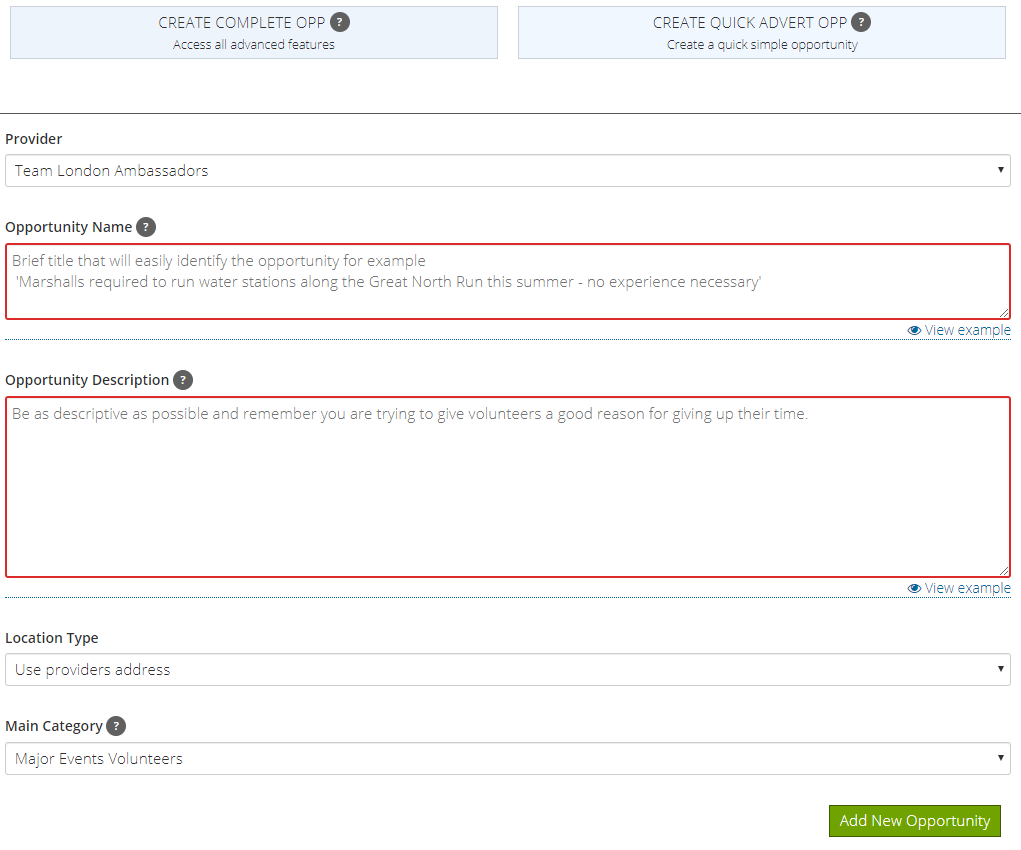
When your admins or providers add a new opportunity they will now be given an immediate choice of whether they wish to create a complete or a quick advert opportunity.

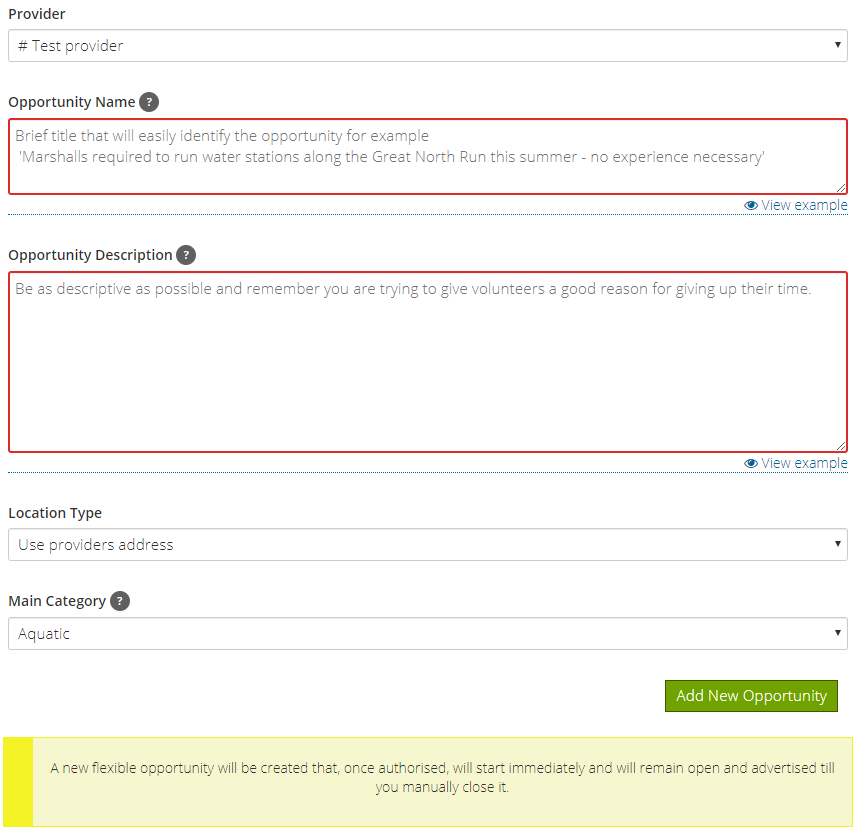
If they choose the quick opportunity type they will be presented with a much reduced option list for the opportunity. This is aimed at people that either don’t have much idea of what the final opportunity details will be, but want to get on and start recruiting, or for those organisations that will probably be managing the post sign up process themselves.

The resulting opportunity will be a flexible opp that is set to start immediately and will run continuously.

Once created the provider and admins will have full control over the opportunity and can add further details, or convert to a session based opportunity at anytime.

We have also updated and we hope simplified adding sessions to an opportunity. We’ve taken out some of the confusing language around the types of opportunities you can add and instead just asked them to make a choice between an opportunity with sessions and a flexible opportunity without sessions.

If a user picks the session based opportunity they can then choose a recurring session structure or can add the sessions individually.

Searching Existing Opportunities

For 1.4 we have a great new set of features for searching and filtering opportunities.

You’ll notice straight away that this is very different from our previous opportunity search page!

You can now page through the results, add filters, download the results and perform bulk actions on the opportunities by clicking the checkboxes at the start of each row.

This type of search table will be appearing throughout the application in future version and is already implemented for volunteer and provider searching complete with custom field filtering.

We will be running a Facebook live session at 2pm on Tuesday 8th October going through these new features and answering questions.

TeamKinetic 1.4 Release Notes

TeamKinetic v1.4 will be released on November 5th, there will be fireworks and parties all across the UK!

1.4 is a big release where we have brought together many requests for new features and also importantly we have made big steps towards unifying the interface to create a consistent experience everywhere.

1.4 will probably be our last new feature focus release for a good while. The next few releases will be focused on continuing the unifying process, improving the foundations, continuing our accessibility improvements and tidying all those loose ends up.

So head over to our Beta site and login with your regular administrator details to take our next version for a spin.

New Feature Highlights

Customising Automated Emails

We have added a brand new email editor so that you can customise over 30 of the TeamKinetic automated emails.

New Searching for Volunteers, Providers and Opportunities

Completely rewritten search pages for volunteers, providers and opportunities. Much clearer and cleaner layout with row and bulk actions, paging, and filters.

Search for Volunteers by Custom Field

Custom fields are included in the filters, so you can filter and search for volunteers by all the profile and registration fields you have added.

Ability to Customise Your Genders & Ethnicities

Add, remove,re-order and re-map your gender and ethnicity results. These custom lists will also be reflected in the reports and downloads.

Collect ‘other’ Ethnicity and Gender

If registering volunteers select OTHER from the gender or ethnicity list they will be presented with a text box where they can enter their self identified gender or ethnicity.

You can use the new custom gender and ethnicity management shown above, to view, add and map these other entries.

Trusted Providers

Providers can now be marked as TRUSTED, this means that they will have additional privileges including: 

  • Ability to add ANY volunteer to their opportunities (not just the providers limited cohort of volunteers).
  • Only allow trusted providers to create opportunities which require CRIMINAL RECORD checks.
  • Trusted provider opportunities can be auto-authorised.

Set Maximum Volunteers PER SESSION

When creating or editing opportunities you are now able to set a maximum volunteer limit on each session independently. When creating repeating opportunities each session will default to the same maximum but you can then adjust these session by session if required.

Define Time Gaps Between Sessions

Need to define a minimum gap between session that a volunteer can join? Now you can!

If you are hosting an event you may want to enforce a time limit gap to prevent a volunteer joining two opportunity sessions with not enough time to get from one to the other. You can now define the allowable time gap between these sessions. For example, if you define 30 minutes then a volunteer will not be able to join a session that ends at 1:00 pm AND a session that starts at 1:15 pm.

Improve Page Layouts

  • Courses page
  • Find Volunteers Page
  • Find Providers Page
  • Find Opportunities Listing Page

Parental Consent Phone Number

When a volunteer registers who requires parental consent, it asks for their parents email and in addition for their parents contact number. This information is held against the volunteers profile so the parents can be contacted by telephone if required.

Inviting Volunteers

Administrators and providers can now invite volunteers to your system from their main menu. Volunteers are invited by entering their email address OR uploading a list of email addresses.

Administrators can see the list of all invited volunteers and we have also improved the messaging you receive when duplicates are added.

Volunteer & Provider Downloads Include Custom Fields

When you export your volunteer or provider data it now includes any custom fields.

Volunteer Note Improvements

Providers can now record private notes on their volunteers.  These can be used for recording conversations or additional information related to the volunteers personal needs.

Both administrators and providers can now add and remove discrete dated notes creating a history and audit trail for notes.

Improved Interface For Uploading Images

There is now the ability to move and crop images when uploading them to either the front page, providers profile page or the events page.

Registration Captcha Updated To Simpler System

The Google Captcha v2 (the image picking one) has now been thoroughly defeated, which means we are making it harder for people to register but not any harder for robots, so we have removed it.

We now protect your applications from bogus registrations with a number of discreet features that will not get in the way of your volunteers registering.

Improved Interface For Applicants

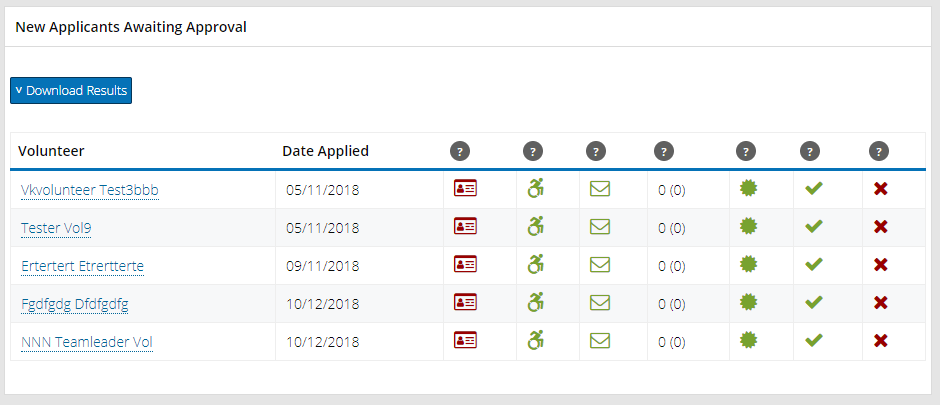
We have added some notification reminders and visual clues if an opportunity has unprocessed applicants.

If there are any applicants that have not yet received a decision your home page will list them and if you manage the opportunity, the applicant tab will be highlighted and a notification appears in the summary area.

In addition we have improved the default email that is sent to providers when a new application is received to help clarify that difference between an application and a joining event.

Creating Quick Opportunities

The new opportunity screen can be daunting for new users and for those providers that have little or no training. It also assumes that providers wish to manage the entire volunteering life-cycle within TeamKinetic, which is not always the case.

We have added the option when creating a new opportunity to choose a quick opp. This gives a much reduced option list to the provider and allows them to quickly create an open ended flexible opportunity that starts as soon as it is authorised.

Combined Linked Volunteers and Volunteers Searching

Providers can now search for both their active volunteers and linked volunteers from the same search page. They can unlink volunteers directly from the search results and no longer need the separate linked volunteers page.

Pause Emails means PAUSE EMAILS, but not Brexit!

We have changed the pause emails button to pause all emails including when a volunteer is removed from the opportunity or session. When completely removing a volunteer you are given the option of sending the removal email.

Simpler Interface for OWED HOURS

If you have a volunteer who has done some volunteering outside of your system it is now easier than ever to record those hours within you system.

Always Accessible Super Admin Menu

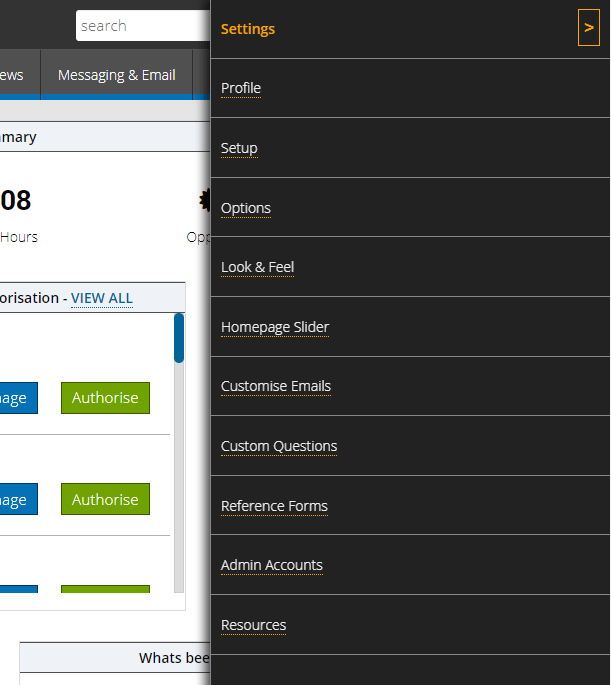
The Super Admin menu is now located on the top right of your screen making it faster for the user to access.

Providers See More About Their Volunteers

We have increased the amount of information that a provider can see on volunteers who join their opportunities, this should help them in identifying who is best suited to particular roles. (NOTE: This also includes external volunteers).

Improved Interface When Copying Opportunities

We have changed the way you copy opportunities, you are now asked ‘what the new start date is?’ and the system will move all associated sessions accordingly.

Adjust The Size Of Your Logo

You can now adjust the displayed height of your logo when uploading.

Page 7 of 10

Powered by WordPress & Theme by Anders Norén