
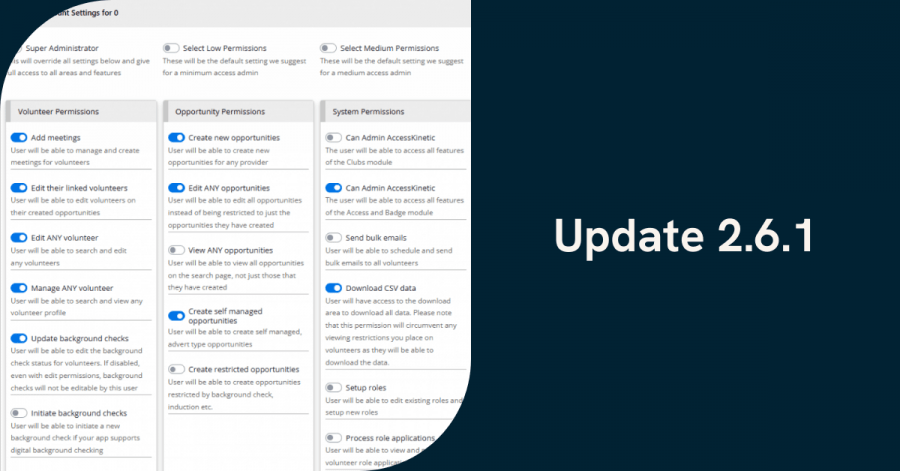
Our recent masterclass walked through the new features in the TeamKinetic 2.6.1 update. While this might be a smaller release in name, it’s packed with improvements that lots of you have been asking for.
We’ve pulled together a full summary of everything covered, including questions raised during the session. And you can watch the recording below:
Granular Permissions
Follow along in the recording from 01:32
What are granular permissions?
They allow you to configure administrator access far more precisely than before. Instead of choosing between super admin and standard admin, you can now specify exactly what each admin can see and do.
What new admin roles can I create?
Examples Steve showed during the session included:
- Super Admin: unchanged, full access including configuration.
- View-Only Admin: can view volunteers, opportunities and reports, but cannot edit anything.
- Task-Specific Admin: e.g. someone who can only process expense claims.
Can providers get extended permissions too?
This was a common question. The direction of our current roadmap is to give you the ability to downgrade administrators rather than upgrade providers. The long-term aim is to let organisations convert some provider users into limited admins, where appropriate.
Can admins be limited to only certain opportunities?
Yes. Granular permissions already allow you to restrict which opportunities an admin can access.
Is this the first version of granular permissions?
Yes. More options will be added over time based on your feedback – so make sure you give us plenty via Support Tickets!
Account Assignment
Follow along in the recording from 09:38
What is account assignment?
A new feature that lets you assign additional people to receive communications about a specific opportunity, beyond the main provider email.
You can now assign:
- A specific administrator
- A specific additional provider user
- Any email address (optional custom field)
Why is this useful?
It supports real-world workflows such as:
- Job-sharing providers (e.g. one manages Mon–Wed, another Thu–Fri).
- Admin-led recruitment followed by provider-led delivery.
- Providers who need multiple colleagues to receive join/leave notifications.
- Organisations with central oversight teams or mailing lists.
Can I assign more than one additional provider user?
Right now, one additional provider user can be selected. Multiple users may be considered in future if there is demand.
Can the “assigned email” be anything at all?
Yes, it can be any address, such as:
- A mailing list
- A shared inbox
- A finance team member who must see expense-related emails
Do opportunities have to be linked to a provider for this to work?
Yes. Provider users only appear in the dropdown if the opportunity belongs to their provider.
What if all opportunities are created centrally (not under the provider)?
You can still use the custom email box to send notifications to additional people. If you’d like to restructure your set-up, the support team can help.
Can provider users from other providers be assigned?
No, only users attached to the same provider as the opportunity.
Tickets for Good Integration
Follow along in the recording from 18:23
What is Tickets for Good?
A platform offering free tickets (volunteers pay only a small booking fee) to events such as:
- Concerts
- Cinema
- Sports
- Cultural events
Volunteers simply need to have logged at least one hour.
How do we enable it?
Go to:
Super Admin Settings → Setup → Integrations → Tickets for Good,
then follow the “Get Started” link.
Is the Tickets for Good integration available across all UK nations?
The expectation is that it is UK-wide, but availability depends on participating venues. TeamKinetic will confirm finer details with Tickets for Good.
Is this automatic for all organisations?
Most charities and non-profits will qualify, but some organisations may not meet the criteria. Approval from Tickets for Good is required.
GoVo Integration
Follow along in the recording from 19:33
What does the GoVo integration do?
Allows you to publish your TeamKinetic opportunities directly to the Royal Voluntary Service’s GoVo platform, increasing visibility and reach.
How do I connect it?
Add your Go API key via:
Super Admin Settings → Setup → Integrations → GoVo.
What opportunity details carry across?
Supported fields include:
- Title and description
- Flexible and session-based opportunities
- Start/end dates
- Sessions scheduled
Images currently cannot be transferred. GoVo supplies a default image.
Can we use our existing GoVo account?
Yes, simply retrieve your API key via your GoVo dashboard.
Log All Hours: Improvements
Follow along in the recording from 22:41
What’s changed?
A few upgrades:
- The “maximum hours” column has been removed after feedback that it caused confusion.
- You can now filter by provider, allowing you to focus on organisations that need support logging hours.
- A new checkbox lets you preserve part-logged hours on sessional opps, preventing them being overwritten by accident.
Why is this useful?
Admins can now easily mass-log hours for specific providers, especially helpful where providers don’t keep up with logging.
Questions Answered During the Session
Can providers be given the ability to update ID or criminal record checks?
Not directly. The plan is to move providers into “limited admin” roles over time so they can carry out tasks like ID and DBS updates with appropriate permissions.
Will the update affect how we currently receive notifications?
No. Your existing setup remains. You now have additional options, but nothing changes automatically.
How many admins can we have?
As many as you need. Admin accounts are one of the few paid-for elements in TeamKinetic, but there is no system limit.
How many provider users can an organisation have?
Unlimited. Provider users remain free.
Final Thoughts
We hope this TeamKinetic 2.6.1 update brings meaningful improvements. With this update, we aim to make day-to-day volunteer management more flexible, more transparent, and easier to share across teams.
From granular control of admin privileges to smarter communication and enhanced external integrations, we hope this release adds value for your organisation.
If you have any questions, feedback, or configuration challenges, our support team is always here to help. And please don’t hesitate to send us new feature requests via support ticket!
Connect with TeamKinetic: