Category: Volunteer Management Page 9 of 13

TeamKinetic has over a decade of experience working in the volunteer management sector. In these blogs we offer our insight and hope to shed light on new tips for volunteer managers everywhere.

With a main focus on digital solutions, we’ll take you through best-practice advice for volunteer management and operating in the third sector as a whole.

Why Charities Should Be Using Technology To Manage Volunteers…

Having a strong pool of volunteers is absolutely crucial for charities; and technology can be the solution to effectively recruit new volunteers. We’ve seen recently just how much technology has connected us, bringing people together – exactly what charities are looking for.

The National Council for Voluntary Organisations (NCVO) have recommended that charity organisations move to digital outputs in order to become as accommodating for potential volunteers as possible. We want to cut through current barriers stopping people from volunteering.

Managing volunteers on a digital platform builds a community, and improves communication, not just between organisations and volunteers, but between volunteers themselves too! You’ll find that everyone will be more focused on your organisation’s cause.

Richard Cooper, Director of Programmes at the Technology expresses that one of the biggest issues in charities is the lack of understanding on how technology can help. Well, we can help with that!

Why Technology/Digital?

So, why digital? You can find the right volunteers for you. With constantly changing volunteer pools, digitally advertising your opportunities gives you new options. When you promote your opportunities, you’re able to tailor your language to the volunteers you’re looking for. If you already have a good volunteer pool, you can use them as a reference… How would you promote them? What tone would you use? 

By having a digital sign up/application process, you have all the information you need on a volunteer’s profile, in one centralised system. By registering online, volunteers can instantly gain access to your opportunities, and start volunteering as soon as possible! 

If your charity has an onboarding or training process that volunteers have to complete, you can transfer this onto volunteer management systems too. Your processes are now streamlined and you can attract more people than ever; a digital initiative by Age UK a has amassed a 50% increase in their sign up conversions.

Perfect your Two-way Communication:

You might think that it’s all well and good having volunteers sign up, but for charities human connection and having that relationship between one another is crucial. So how do we achieve that online? 

Communication between a volunteer and organisation should always go two ways: it’ll help you keep attracting and retaining volunteers. With digital systems, that communication is always open. You can build a relationship through email, chat box, or even SMS text all from one place. 

This not only shows your support but can also be used to recognise volunteers. For example, within TeamKinetic’s system you can leave feedback (on both a volunteer and organisation side) thanking the volunteer in question for completing the opportunity. The Charity Retail Association (CRA) has expressed how showing appreciation can really motivate a volunteer – and we agree! 

Digital systems also offer new ways to recognise and reward your volunteers too! To come back to TeamKinetic, you can create custom achievement badges such as ‘volunteer of the month’ or enable ‘HourTrades.’ HourTrades are vouchers that volunteers can swap their logged hours for. This gives them a reward (the reward is up to you!)

Has the Pandemic moved technology forward?

It doesn’t seem a surprise that the pandemic has thrown volunteering into a more digital design. Using digital platforms throughout the pandemic to work and volunteer have doubled compared to pre-pandemic rates (82%). This has meant that volunteering through the pandemic was able to continue, with new digital systems improving service accessibility by 45%. Technology has been able to improve the ease of access towards volunteering over the past 18 months, and if we look more into the future, digital platforms are here to stay.

One of the concerns surrounding moving to digital, is the lack of skills paid staff had. Yet over the past 18 months to 2 years, there’s been an increase of 73% of required staff increasing their level of digital skills. It seems the pandemic has only increased the rate at which charities are moving online and taking a more technology based approach. This is reminiscent of the work towards Volunteer Passporting, which we wrote a blog all about too!

The processes of time-consuming and complex processes are a thing of the past, streamlining your volunteer management digitally offers a comprehensive service, for your managers and your volunteers.

Want To Know More?

Here at TeamKinetic we can get you set up quickly and efficiently, so you can start to recruit, retain and realise the potential of your volunteers… 

Start a free trial with TeamKinetic here. Or alternatively email chris@teamkinetic.co.uk or call on 0160 914 5757.

How to Increase Volunteer Retention (and keep it!)

Now that life is returning to normal – or as normal as it can be – you might be wondering the best practice when it comes to volunteer retention.

Over lockdown you might have lost volunteers. Research suggests the number of volunteers in charity shops fell by 20% as a result of the pandemic. These people might have moved into full-time work, they might not feel comfortable coming back due to health/personal reasons, or maybe they just no longer have time to give anymore. 

But don’t worry! There are many ways to recruit new volunteers and make sure you retain them too.

Here are our top tips when it comes to solving the issue of poor volunteer retention rates.

Keep Volunteers Happy

A happy volunteer is a motivated and loyal volunteer. But what makes them happy? Well that’s a hard question to answer. Everyone is different but the key fundamentals should give you a good start: 

Good Communication

If you consider volunteers to be essential to your organisation, remember to check in with them regularly. Their opinions matter and can help you improve your volunteer programme, leading to increased recruitment and better retention rates.
Many might communicate with volunteers through things like WhatsApp and Facebook groups, but have you considered alternatives? Any good volunteer management system will allow you to communicate with your volunteers in a range of ways all through one medium. For example; emails, SMS Texting, Social Media sharing, and opportunity chat rooms are all possible in TeamKinetic.

Be Flexible

These options are available when creating an opportunity on the TeamKinetic system

If you’re experiencing a lot of absences from your volunteers, maybe it’s a sign of unhappiness and/or stress. Giving them flexibility (i.e. multiple shift times & dates and/or an option to work from home) could be a way to improve this. Giving volunteers a range of ways to help out can make them feel valued. You’re not just trying to fill a position – you actually appreciate the work they’re doing for you. Which brings us to our next point…

Show Appreciation

Even though they’re giving their time for free, it’s still nice to be acknowledged every so often. Showing appreciation doesn’t just stop at sending them a thank you card, it can also involve how they’re treated on the job. Ensure volunteers feel valued in their positions, give them good quality training materials and empower them.

Access to Good Quality Opportunities

An example of an opportunity on the TeamKinetic system

Firstly, make sure all information about your opportunities (and ways to apply) is easy to access for your prospective volunteers. Making opportunities easy to find means that you’re increasing the amount of people you could reach. This could in-turn increase the quantity and diversity of people who want to volunteer for you.

Secondly, making the opportunities you’re offering of a good quality. Giving volunteers good work means they’ll actively want to keep giving you their time and you’ll both get much more out of the whole experience. However, not only do your opportunities have to be worthwhile, but the way you describe them does too. Provide as much information as possible, including all the key details (times, dates, location, etc.) as well as highlighting the skills they can develop.

Upgrading Your Volunteer Management Solution

Perhaps you’ve read these tips and want to use them, but implementing them may seem like a mammoth task. Well, have you thought about volunteer management software? It may seem like an extra expense you don’t need, but the tools you’ll receive access to will improve your volunteer programme and save you massive amounts of time! 

With features that fulfil everything mentioned in this article, why not give it a try? You can start a free trial with TeamKinetic now. Once you’re up and running with a trial site, we’ll contact you to ask if you’d like a demo with Chris. This will give you a personalised, in-depth look at the system and all its capabilities.

With no obligation to pay anything until you’re sure our system is right for you it seems like a no-brainer.

Should you still be working with online volunteers post-covid?

Now we’re heading back to ‘normal’, should you still be working with online volunteers? YES! By recruiting online volunteers from quite literally anywhere you’re expanding your reach. When it comes to volunteering: the bigger your reach, the better! Virtual volunteering slots here perfectly. 

In today’s blog post, we’re outlining the ways you can make sure your virtual opportunities stand out from the rest. 

Making Your Opportunity Stand Out

Your Opportunity Title. When creating your opportunity, make sure your title is compelling and attractive. A volunteer is more likely to join an opportunity that instantly excites them, so having a strong title is key. It’s also worth mentioning somewhere in the title that the opportunity is remote. 

Opportunity Description. Simply, don’t post the full list of details. Searching volunteers are likely to be leading with emotion – and a long description of there duties isn’t going to entice them. We suggest giving snippets of their duties but focus on explaining the impact they’ll be making.

Jargon. For a number of volunteers, this is their first time volunteering. Any specific language or acronyms should be left out. It’s most likely going to confuse potential volunteers, so keeping it as simple as possible will get more interest from new volunteers.

Calls To Action. Give potential volunteers the ‘next steps’ for joining an opportunity. Your opportunity should always have contact details too, for any other questions or support they might require. 

Image Use.  The use of imagery taps into volunteers’ emotions. Using the right image can trigger mirror neurons in the brain, so the volunteer feels the emotions portrayed in an image. Your images can also show that your organisation is inclusive to all. It’s important that your imagery is right, and sends the right signals to those browsing. 

Checking Your Posting. Once your post is complete, make sure to double check it. Go through and check that all the information is correct as well as looking out for any spelling/grammatical errors. It’s also worth, once posted, looking at the opportunity through a potential volunteer’s eyes – do they have everything they need to join? 

Are You Screening Your Volunteers?

Now that you’ve perfected your opportunity listing, and you have a set of virtual volunteers, the screening process can begin! What should you be considering when it comes to your volunteering screening process? 

At the outset, you need to find out where your volunteer will be working. Are they going to be in a pace that’s quiet and private, or will they be in a busy environment? The key thing is that they are able to volunteer effectively in the place they’ve set up. 

To ensure your volunteer is working effectively, are their any supplies or training required? Ensure that your volunteer has completed their training steps, and can access everything they need to start volunteering; this check makes sure there can be a smooth process into the opportunity, because there’s no stop/starting as a volunteer doesn’t have access to something important. 

Volunteers will be interacting with a number of different people – let them know the basic information on how they should interact. This can help build up a volunteer’s confidence, so they interact with the organisation and those it helps more. 

Make sure that you’re frequently staying in touch with those who virtually volunteer, over email, chat or video call. You can touch base weekly or monthly, building up a relationship that keeps them returning to volunteer. Establishing this relationship is important, volunteers want to feel seen and heard, like they aren’t just on the outskirts of the organisation. 

Volunteer Motivations

You can also match volunteers with other opportunities you think they might be interested in. One way you can do this is through understanding your volunteers motives. VolunteerPro teaches a lot about a set of motivations a volunteer is likely to have, and how they can be applied by volunteer managers. Their motivations are: 

  • Values: Where in which volunteers take something meaningful from the hours they spend volunteering. 
  • Careers: Opportunities open doors for volunteers to advance in their careers or network with likeminded people from their industry. 
  • Social: Volunteers can find themselves in emotional and supportive environments which they can also benefit from. 
  • Enhancement: Volunteering gives leadership development to volunteers and changes their perception of power to some extent. 

Volunteers that are open and motivated are most likely to have more than one goal in mind, rather than running on one single purpose. For some, they might not yet realise what those goals or motivations are, but they want to help in any capacity. 

Think it’s time to invest in volunteer management software?

You can start a free trial of TeamKinetic on our website. This will let you check out all our features for 30 days. If you like what you see, contact us to book a demo and see how we can help your organisation manage your volunteers!

How to get young people volunteering at heritage sites…

The HistoricScot Youth Forum was established to understand how to get young people volunteering and involved in the heritage sector. Historic Environment Scotland (HES) have been involved with Young Scot, in a 24 month partnership to help expand the engagement, participation and involvement of younger generations from different backgrounds to influence their activity and decision-making processes.

In previous conversations, there has been a multi-generational issue, especially regarding younger generations. Over the past 18 months, Young Scot have been tackling this problem of the lack of young generation involvement. Their results are presented in this report and contribute towards the Historic Environment Scotland 2019-22 corporate plan.

The report is spilt into three key themes: Community and Schools, Volunteering and Work, and HES sites all with a focus on future engagement of young people within the heritage sector. These recommendations are based off results from surveys.

Community and Schools Responses

For many, school is the first time people will engage with the historic environment. It’s highly likely that those who engage with historic environments as an adult have had experiences as a child, so ensuring sites are engaged with schools is crucial. 

The majority of young people nowadays find their information through online social media platforms, so if they aren’t connected to HES platforms, they aren’t going to be engaged with it. For 32% of respondents, they didn’t have a connection to historical places around Scotland, despite 47% expressing interest. 

Through their research, Young Scot have created these recommendations for the future: 

  • Start discussions with marginalised communities about how their heritage can be represented. 
  • Create history resources that are widely accessible for young people to learn and connect with. 
  • Develop relationships with schools and spread awareness of HES in classroom settings. 
  • Facilitate and engage with schools who have decided to visit sites and keep them engaged afterwards. 

Volunteering and Work Responses

Volunteering can be an important factor for individuals entering employment into the sector. Survey results show that 3/4 of respondents hadn’t considered a career in the historic environment but 60% of people wanted to know the ways work opportunities can engage them. Currently, the heritage sector attracts volunteers that are male around the age of 35 (according to Young Scot research). 

Lack of awareness towards employment, partnered with minimal advertisements are just two of the barriers which stopped people volunteering. If no one can see the opportunities, your pool of volunteers are significantly reduced.

In regards to young people, offering roles in areas they’re passionate about provides them with purpose and will help younger generations gain interpersonal skills they need. It’s especially vital now that these generations have lost time for social encounters due to the Covid-19 pandemic.

For Volunteering and Work, Young Scot had the following recommendations:

  • Create an online space for young people to showcase who they are and their skills for quicker sign up or applying opportunities. 
  • It’s imperative that those with or without the internet have equal access to opportunities
  • Start promoting your volunteering opportunities on the platforms where young people are, such as Instagram and Twitter.
  • For new volunteering roles, tailor the opportunity’s advertisement to a diverse group of young people through language, tone and imagery.

HES Site Responses

Currently, heritage sites host a number of opportunities for specific demographics and it’s mainly families. Due to this, there is still work to be done in engaging young people. For many heritage sites, this age range is forgotten, when they should be included.

In Young Scots’ survey, they found that if sites became more technology based, or held more events, then visits would be more enjoyable for younger generations. In a separate matter, over a quarter of respondents cannot access all parts of heritage sites due to the lack of accessibility provided.

Based on the information from the survey, Young Scot highlighted gamification as a way to engage young people within heritage sites. Gamification is applying elements of games to other activities, normally completed as an online technique to keep people engaged. Heritage sites can use this as a technique to interest young people into engaging with their content.

The report created a number of recommendations for heritage sites: 

  • Make sure that all facilities are accessible to everyone, without this, there is a barrier against those with disabilities from accessing the heritage environment. 
  • Design new events, exhibitions and educate young people of the cultural changes within society.
  • Host events to celebrate minority groups and their heritage in Scotland’s history. 
  • Make improvements to the website and the types of content it provides: specifically where people can go to learn more. One way to do this is to create hubs for different age groups. This, along with the introduction of gamification, creates an online community where young people can meet other, like-minded people.

Conclusions…

From Young Scot’s experience with engaging in the sector, there is a disproportionate underrepresentation of those from a variety of backgrounds. Heritage sites don’t reflect the diversity of the sector, the organisation, or Scotland as a whole. This barrier in particular needs to be overcome to make HES as accessible as possible for all young people.

The introduction of the latest technology can engage audiences at a younger age; paired with a strong relationship with schools, the historic environment can recharge younger generations of their love for Scotland’s culture, past and present.

Young Scot is hoping the recommendations made throughout the report can start conversations within HES on the future of younger generations in the sector. They encourage HES to continue involving young people in future plans to make a real impact. 

Want to start engaging with your volunteers more? 

Calling all heritage sites! We’ve worked with Volunteer Organisers Network and Historic Environment Scotland to create the Make Your Mark Portal, which can promote your heritage opportunities to new audiences and helps you with your volunteer management. You can find out more about Make Your Mark here. 

If you’d like to know more about us here at TeamKinetic, and how we can help you manage your volunteers, you can access our website here.

How to get your volunteers to log hours

Volunteering at its core is an entirely selfless activity completed by people with no expectation of acknowledgement. Despite this, we believe volunteers deserve to be rewarded for their hard work. But how do you do this without them logging hours? 

Why is logging hours so important?

In short, data. This data is key to your organisation to:

  • Measure success. Logged hours can represent the amount of work your volunteers are doing for their community or particular cause. 
  • Track your audience. Knowing which volunteers are continually volunteering and which ones aren’t could be incredibly insightful. Is there a particular demographic volunteering more than others? Is there a demographic that is hard to retain? This data could uncover aspects that need to change, leading onto our next point…
  • Make improvements. No volunteering programmes are perfect, but the best ones regularly review and make changes to improve. If there’s a particular demographic that isn’t returning, why?

So how do I persuade volunteers to log their hours?

  • Show them how easy it is. Showing volunteers how quickly they can log hours might help them 
  • Incentivise! Offering rewards can be a great way to get volunteers logging their hours. However, the best way to do this is to offer low-value rewards as often as possible. 
  • Intrinsic vs extrinsic motivation. Imagine this: you offer one big prize (e.g. a hoodie), after a volunteer has logged 100 hours. They log hours as a way of reaching that prize, but once they reach those 100 hours they lose motivation to log future hours – or worse, return at all. (Extrinsic motivation)
    However, if you offer small rewards such as thank you messages they will be consistently motivated by the positive way the act makes them feel. (Intrinsic motivation)

Intrinsic motivation is all about making your volunteers continually feel good about the work they’re doing and the difference they’re making, rather than working towards one particular reward. 

So how do you keep up this motivation? Giving them nice feedback is a great place to start! This will show how much you value them and will mean more to them than you may think. 

Utilising TeamKinetic to Incentivise Volunteers

Leaving Feedback

TeamKinetic allows you to leave feedback when logging a volunteer’s hours. If you forget or don’t have time to personally thank your volunteer at the end of their session, this section gives you the chance to do so. It also lets the volunteer log their own hours and leave feedback about the opportunity they joined.

Ask anyone who has volunteered – receiving feedback is a great feeling and can push volunteers to return and continue volunteering for you.

Achievement Badges

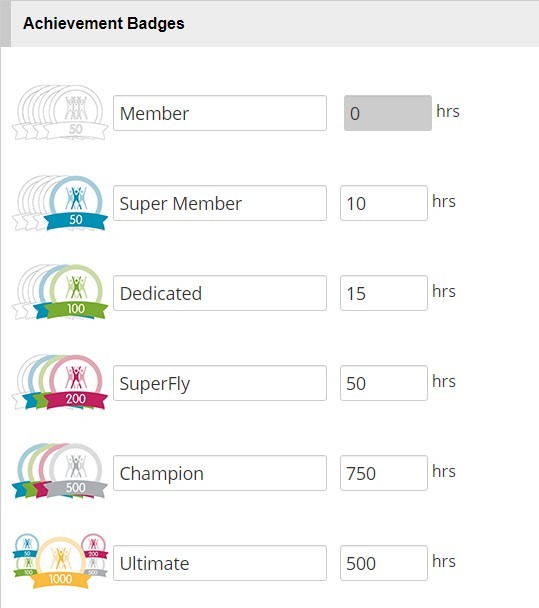
This incentive is a great way to push your volunteers to log more hours. Once a volunteer logs their hours, they will add together to create their total volunteer hours. A small way to help increase volunteers’ hours is to have achievement badges when they reach certain hour milestones.

TeamKinetic has achievement badges automatically built into the system. The achievement badge pictures and names can be customised. These badges are a great way to incentivise volunteers and get them to keep on volunteering so they can reach the next milestone.

Custom Badges

Have you ever thought about starting a ‘volunteer of the month’ award? To give your volunteers an extra incentive to volunteer more or make them feel appreciated? Yes? Keep reading, you may like what you see…

TeamKinetic allows you to create custom award badges for your volunteers. These could be ‘volunteer of the month’ or ‘volunteer of the year’. They can be absolutely anything you want and look however you want, with the fully customisable option! Once you have assigned the award to a volunteer, they will receive an email with the award in it to congratulate them. Again, this recognises the efforts your volunteers put in, helping you to retain more volunteers and hopefully gain more.

Logging hours with TeamKinetic

Logging hours with TeamKinetic is easy – as it should be on any volunteer management system. See below for the full process laid out in less than 25 seconds!

And if that’s not clear enough you can check out our full tutorial videos on logging hours as an opportunity provider and logging hours as a volunteer

Think it’s time to invest in volunteer management software?

You can start a free trial of TeamKinetic on our website. This will let you check out all our features for 30 days. If you like what you see, contact us to book a demo and see how we can help your organisation manage your volunteers!

You can find TeamKinetic on social media and listen to our podcast:

Twitter       Facebook       LinkedIn       YouTube       Instagram       Podcast


Have you enjoyed using TeamKinetic? If you could leave us a review on Capterra, we’d really appreciate it! We’ll even send you a little thank you.

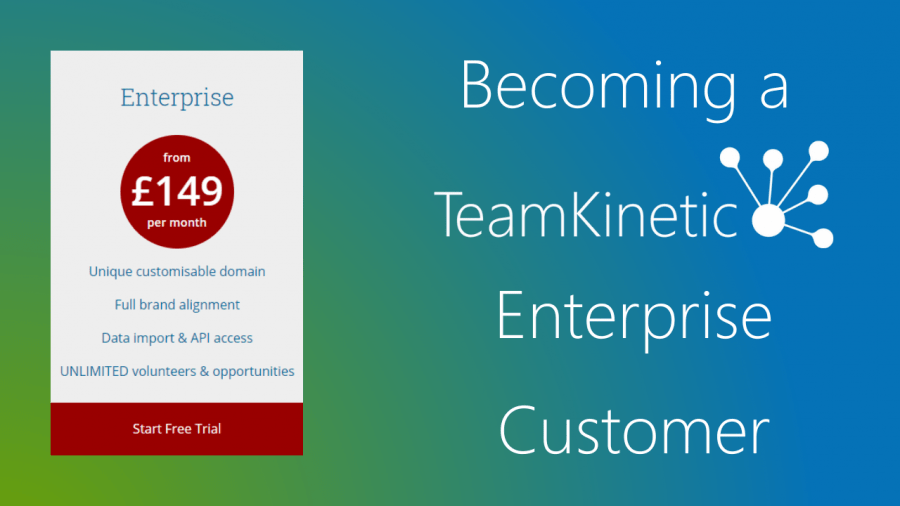
Becoming a TeamKinetic Enterprise Customer

Welcome to the family!  Its great that you are about to join hundreds of other organisations that use TeamKinetic to manage their volunteers.  We have put together this short blog that tells you what happens next and how to get ready to launch your site.

Once we have your contract signed we can have you up and running in no time, this blog outlines the steps to get your site ready and the pit falls to avoid.

Trial Site

If you already have a trial site up and running, you can get started playing around and getting to know the TeamKinetic service right away.  We have a simple to follow “Getting Started” lesson program for you to follow.  Just click here and follow the 10 quick and easy lessons.  If you get stuck just drop us a support ticket or a chat message direct from your help menu.

If you don’t have a trial or demo site set up yet, just let your TeamKinetic contact know and they will have that sorted out for you in no time.  This will help you get acclimatised to the product and give you a good idea of how you might like to use the service.

We’d love your feedback on our Getting Started lessons, so if there is something we can do to make it easier for you please let us know.

Getting set up on our implementation management system.

To help make your implementation go super smooth we use a service that ensures you know what you have to do and what we have to do.  This system provides you with detailed information on how you undertake each task and lets you record what you have done, when you are ready to pass things back to us and if yo have any questions you can ask them really easily.

As soon as the contract is signed we will invite the key members of your project team to join us on the task list and you can get going right away with your tasks, getting your site ready to go live.

Choosing A URL

As an enterprise customer, you get to choose where your TeamKinetic powered website will live or what URL you want to use.  There are a few options available to you.  It has a tendancy to get a little technical here so my apologies in advance.  The options are:

  1. You can set up your TeamKinetic powered site as a “Sub-Domain” of your existing website.  That means you can have something like https://volunteer.YourOrgNamehere.org
  2. You can have a new domain that no one else has yet.  To choose a new domain use a service such as NameCheap.com and see what’s available.  

What ever you choose, your TeamKinetic implementation advisor will help you with the technical aspects of getting your trail site moved onto your new URL.  You wont lose anything you have done up to this point if you don’t want to, or we can always delete the data and let you start again, its completely up to you.

Setting up the ‘Look and Feel’ of your TeamKinetic site

You can start this process as soon as you have your trail or demo site set up, it is actually part of the 10 steps mentioned above in the ‘trial site’ section of this blog. 

All settings and changes to the look and feel of your site will be copied over when your site is moved to its final website address.

To make changes to the look and feel of your site, first click on the cog in the top right of your screen which will display the super admin menu.  

(NB. If you can’t see it, you may not be a Super Admin, don’t worry drop us a quick message and we will get you sorted!)

This menu is where you find all the settings for your site and its where you go if you want to change the colours, fonts, messages and images on your site.   

From here you can change all aspects of the site as you require.  Some of the more advanced options can require a little technical ability, but we are here to support you through the process.  There is lots of detailed help to support you and we are always at the end of the phone or available on live chat if you get stuck.  

You can read the help documents for customising your website at the top right of the screen as shown below.

All this is covered in your training and implementation support but if you want to get started there is nothing stopping you.

Getting your site working the way you want it!

TeamKinetic offers so many options and choices to make sure you can manage your volunteers in the way that works for you and them.  Many of these options you only really need to think about once.  

Again, in the Super Admin menu you have choices that cover Profile, Set Up and Options.  If you want to start to have a play around with these then feel free. 

We have this (really long, sorry!) video that walks you through each option and what impact they might have on how you choose to use TeamKinetic.  Break it into manageable chunks and start to make your way through the menus until you have the setting you think will work for you.  Again, we will go through all this with you in your training, but there is nothing to stop you having a play around as you get to know what TeamKinetic can do.

The default settings are fine for a lot of our customers so don’t worry too much about investigating them all straight away.

Training

As soon as your contract is signed we will be looking to get your training booked.  This is normally delivered online over two half day sessions, though there is lots of flexibility and all this can be adjusted to meet your needs. 

We want you to get the most out of these sessions, so if you have followed the instruction in this blog and had a play around you will come to that first session with lots of questions that we can help you with. 

If you are a little nervous, please don’t worry.  No matter what your technical ability we will have you up and running in no time. 

Go Live!

Once you have got your site set up as you want, and you have started the process of adding your opportunities to the site, you are almost ready to tell the world about your new system.

Our implementation team will work with you on a plan to make all this happen and will provide advice on how to link up your TeamKinetic powered portal with your existing web site.

We are often asked how long this takes, and its a tricky one to answer, as it really depends upon how quickly you are able to get through the set up tasks and how many providers and opportunities you need to add.  We have had customers up and running in less than a week and others who have taken 3 or 4 months.  The key consideration is that you are comfortable with the system and how it works and that it has lot of interesting opportunities for your volunteers to look at.  

Remember, we are with you every step of the way, its really difficult to break TeamKinetic so don’t be worried or sacred about having a play around and good luck on your first step in taking your volunteer management to the next level. We look forward to working with you.

Before we go

Keep up to date with everything TeamKinetic by following us on the following social media channels where you will find useful content, support and access to offers and discounts you will not want to miss.

YouTube for great interviews and how to videos.

https://www.youtube.com/TeamKinetic

LinkedIn to read our latest blogs and thoughts (TeamKinetic) https://www.linkedin.com/company/15082852/admin/

Twitter for the inspirational quotes and funnies (@TeamKineticUK) https://twitter.com/TeamKineticUK

Facebook to talk with our other volunteer managers and to join our master class sessions. (TeamKinetic) https://www.facebook.com/TeamKineticUK/

We want you to help us grow this community.

See you all soon

Chris and the Team

3 Reasons Why You Don’t Use SMS Text Messages

If you are reading this, you might not be using SMS text messages to manage your volunteers. And you will have your reasons as to why you feel that SMS text messages would not benefit you, your organisation, or your volunteers. This is where we come in. We’re here to debunk some of the common reasons why organisations think they don’t need text messages to manage their volunteers.

1) You don’t know how to use them

If you have never bought them before, then of course you’re not going to know how to use them. But, it is very easy to pick up. In fact, we have created a video that shows you exactly how to turn text messages on, how to set up automatic messages, how to send texts to specific volunteers, and how to send texts to the volunteers on a specific opportunity. Sending text messages to volunteers has never been so easy!

2) You don’t know the Impact

So, you think your organisation doesn’t need SMS text messages. But, do you know about the impact?

It will make you wonder why you didn’t use them earlier. Here are just a few ways it can ompact your volunteers:

  • You can automatically alert your volunteers by text when they have a session coming up, if their criminal check is due for renewal, or even when one of the providers they follow adds a new opportunity. Not only does this help engagement and encourage volunteers to attend sessions, it also makes your life a lot easier. 
  • Our SMS text messages function has been proved to be a more effective way to reach people and ensure they read your message over email. No longer will you have to worry about people not receiving your email because it either got lost in their inbox, they rarely check their emails, or it just went to spam; sending texts gives a higher chance of volunteers seeing your message.
  • You can easily text groups of volunteers, individual volunteers, or all volunteers on a particular opportunity, and give them the information they need. Alternatively, if you enter a valid mobile number as the reply-to number, volunteers will be able to text you back and continue the conversation. Or you can provide a short name that will let volunteers know where the message has come from, but they will not be able to reply directly. This makes communication a lot easier for both the volunteer and the volunteer manager.

Let’s look at some scenarios for example:

3) It costs too much money

You may worry that using text messages is just another ongoing expense for your organisation, and it is, but, it’s all the brilliant benefits, like the ones mentioned above, that makes it worth the expense.

We also have an offer available for a short time, which may help your organisation if one of your reasons for not buying SMS messages is money. Currently, for every 2 messages you buy, we give you one for free. So when you buy 500 texts, you get 750 and when you buy 1000 texts, you get 1,500. Meaning, the more you buy the more money you save! Perfect for communicating with volunteers, both when in a lockdown and when out of a lockdown. 

So, should I use them?

After reading all through the reasons why you thought you didn’t need SMS text messages, you might be thinking there could be benefits after all. So why not check out our SMS text offer? After all, it is saving you money in the long term. Take a look at our video below which explains how to do this:

Should I Be Using SMS Text Messages?

Yes, yes and yes. That is the first thing you see when you Google ‘Should I be using SMS text messages when managing volunteers?’. And the research isn’t wrong, using texts as a form of communication to your volunteers is incredibly beneficial. Not only does it improve communication, but it can also increase engagement and volunteer return rates. And let’s not forget the speedy responses that come from sending text messages, perfect for those time-sensitive situations.
However, the one thing you don’t really see when you Google this question is how beneficial SMS texts are from someone who is currently using them.

This is where we come in. If you are considering using SMS text messages but are still a bit unsure, hear from Claire at Halton and St Helens Volunteer Centre about her personal experiences using them.

Halton and St Helen’s Volunteer Centre

First, a little bit of background. Halton and St Helens is an organisation that provides advice, information and development support to voluntary, community, non-for-profit, faith organisations and volunteers in the Boroughs of St Helens and Halton. Here, Claire spoke to us about her experiences using SMS text messages in her TeamKinetic system.

1) When did you start using the SMS text message feature?

So, we started to use the text message feature fairly early on into the first lockdown of the pandemic. It was also around the same time that we first launched our TeamKinetic portal. 

In addition to this, it was around March/April that we had quite a substantial funding grant come through, which allowed us to buy a great big text bundle. And I already knew of the texts and how they worked from the work we have done with TeamKinetic before.

2) How do you use your text messages?

Initially, we used text messages for our volunteers who were supporting local residents during the pandemic with the community tasks. We would use the function to send a text to show they are a verified volunteer for us, this was pre the ID cards. It was a quick and easy way for us to give them something that was mobile that they could show the person they were working for that they were a verified volunteer. 

When the ID cards came into play on the community task dashboard, we started to use the texts to message our ‘Street Champions’ about ongoing tasks that hadn’t been picked up that needed to be done. I’d say that is the main way we used them now.

3) Do you find the SMS text messaging feature helpful in communicating to and engaging volunteers?

Yes, definitely. Between that and emails, we can have more of an impact in terms of communicating straight away with volunteers. And it’s that instant impact that is important for us particularly when there is an urgency in terms of volunteer support.

Recently we have also used them with our vaccination volunteers. For example,  when volunteers have dropped shifts and we have then asked other volunteers to quickly log in and see if they can pick up a shift. So, that’s been really helpful as we’ve now had full commitment and maximum volunteers throughout our vaccination programme which is great.

4) How have you benefited from the SMS text message feature compared to a time when you didn’t use them?

For me, it’s just an added bonus in terms of being able to communicate quite directly with that we’re not always in connection with and we don’t see physically. It wouldn’t even matter that much when we’re back into the ‘new normal’ after COVID-19 and we do see people on a regular basis. This is because the text messages would still be a massive benefit in terms of that quick turn around and communication with volunteer around shift patterns etc.

For example, we have worked with the TeamKinetic portal for years at Warrington Hospital, and we have never used the text message feature with them. This is mainly because we have never had the funding to be able to do that. But, again with some added funds, we have been able to out a little bit of a bundle on there too. So, we have now used it for when we have needed to contact our away finders, when there’s been an urgent need for people to support the vaccination centre, or when we’ve needed a quick turnaround on support. I think we could probably do that again going forwards, even when we start to bring our volunteers back, it will be a great tool.

We also use them differently in the Hospital in terms of the communication that we do in Halton and St Helens through the Volunteer Centre. So, with the Hospital it’s linked directly to a phone number which helps that two-way communication. With the Volunteer Centre, we actually just link it to a name so they understand it’s just from us and there’s no response from that.

5) What would you say to another organisation that is considering using the SMS text message feature but is still unsure?

For me, it’s a great way of quickly communicating and getting action from volunteers very quickly too. Particularly if you have got an event on for example or you are providing urgent response support;  it’s a great way of supporting that quick action of volunteers to get engaged, get involved, and get moving.

Thinking About Buying SMS Texts

If after reading this, you realise SMS texts would benefit your organisation and your volunteers, then check out this video explaining how to take up the offer!

Managing Micro Volunteering

Micro-volunteering is the idea of volunteering in ‘short bursts’. This means volunteering in short and convenient ways, at times and places which suit everybody’s schedule. What makes micro-volunteering different from standard volunteering is that it can be done online or face-to-face, and doesn’t require any long term commitment. This means that the volunteer also doesn’t have to go through an application or training process first. Micro-volunteering is perfect for both volunteers and organisations! It has the potential to attract a wider diversity and greater number of people, including individuals who wouldn’t have got involved otherwise due to conflicting schedules. 

Examples of micro-volunteering include:

  • Delivering supplies to those isolating from covid-19
  • Signing online petitions
  • Writing blogs
  • Retweeting and posting relevant content to social media
  • Two minute litter pick
  • Buying a homeless person food or a hot drink
  • Researching and completing online surveys
  • Donate old clothes and goods to a charity shop

Remember this..?

Going Beyond the Ice Bucket Challenge | Ipsos

Remember when the ALS Ice Bucket Challenge went viral in the summer of 2014? Where everyone, including big celebrities like Mark Zuckerberg, would tip a bucket of ice water over their head to raise awareness of Amyotrophic Lateral Sclerosis (ALS).

Well, this was a perfect example of micro-volunteering. While this wasn’t classified as your ‘typical’ volunteering, it engaged people all over the world and encouraged them to donate their time and resources into raising awareness of ALS. This viral challenge raised $116 million over two years from people engaging in this challenge who previously might not have got involved if it wasn’t for micro-volunteering.

How has COVID-19 impacted this?

The rates of micro-volunteering will have naturally increased from COVID-19. This comes from people having too much spare time and wanting to use their time to help others during such a negative time.

COVID-19 has made the majority of the population go into self isolation to protect themselves and to protect others. This then meant many volunteers had the suspend their volunteering duties- this is where micro-volunteering comes into play! Micro-volunteering has allowed volunteers to continue their contributions whilst isolating at home. For example, VolunteerScotland has seen 60,000 people come forward as a response to COVID-19, prepared to help in the most difficult of times- and this is just Scotland!


The future of micro-volunteering…

Micro-volunteering is only going to continue to grow, especially considering the current climate, and this is something we need to encourage. It’s simple, without micro-volunteering there would be less people volunteering their time- especially during COVID-19. 

One of the biggest barriers to volunteering is people not having the time. Work commitments is the biggest barrier at (49%), with people ‘doing other things with their spare time’ closely following (35%), and child commitments following at (23%). Micro- volunteering allows people to contribute to volunteering around their schedule. This can even be sharing something on social media to raise awareness.

With COVID-19 now also causing volunteering barriers, micro-volunteering has come to the rescue. Micro-volunteering has allowed volunteers who are self isolating to continue to contribute to a cause from the safety of their home. This could prove to be the future for many volunteers who may not feel safe to return to face-to-face volunteering for a while. This then allows organisations to continue to receive volunteer support, despite the current COVID-19 situation.

How can you encourage micro volunteering with TeamKinetic?

During the peak of the COVID pandemic, we added an entirely new feature set around micro community volunteering. It includes a new admin and provider management page. Your volunteers also have access to their own progressive web app, allowing them to join micro volunteering tasks and record their progress using their phone.

Step 1 – Enable the community tasks feature from your super admin options menu

As you can see above, there are a few options available. Remember to give access to your volunteers and allow them to download the web app in order to access your community tasks.

Step 2 – Add your community tasks

Select ‘Community Tasks’ from the ‘Opportunities & Providers’ menu. Once you have enabled them in the super admin options menu.

Hit the big GREEN plus button to add your first community task.

There are some important things to know when adding your community tasks;

  1. All the data you add in the red section is visible publicly to your volunteers.
  2. The first set of data in the yellow section headed ‘Private Data’ is never revealed to volunteers.
  3. The second set of data in the yellow section headed ‘Data Shown to Assigned Volunteers’ is only revealed to the volunteer that applies and is accepted for the task.

You can describe the task here and provide a location for the recipient. This is as well as restricting which volunteers have access to see and pick up these tasks. You can restrict by their ID check, criminal check status, and whether they are linked to the assigned provider or not.

All your volunteers that have logged into the web app will receive notifications when new tasks are added. This will either be in the app for Android/Chrome devices or via email for iOS devices.

Step 3 – Get your volunteers completing the tasks

By enabling access to volunteers in the super admin options menu, your volunteers can login at ICanHelp.teamkinetic.co.uk. Additionally, by switching on the relevant options, you can also select to advertise the web app to your volunteers when they login on their dashboard.

When they login they will see a familiar mobile app interface and can search and select community tasks and apply to join.

Once they have applied you will see their application in your admin community tasks management page. From there you can assign them to the task. The volunteer will receive a notification that they have been assigned a task and can then view the full details in the app. Once they have completed the task, the volunteer can then update the status within the app.

It’s a super easy and fast way to encourage participation with those small micro-volunteering activities in your community. This will also help to build lasting connections.

Don’t hesitate to get in touch or open a support ticket if you need more help setting up your community tasks. You can chat to us through our website or directly email us at chris@teamkinetic.co.uk.


“Volunteer Management Software for non-profits? I don’t need that!”

Volunteer Management Software. A scary term which sounds completely crazy to those who have religiously used Excel to manage their volunteer workforce. So, I get it, it can be frightening going from years of working on hundreds of excel sheets to just one piece of tech. But, what if I showed you how easy it can be? 

So let’s take a look at some of the most common sayings non-profits have when talking about volunteer management software. 

What even is volunteer management software?

Volunteer management software is an online system which allows your organisation to manage all of your volunteers in one simple space. With TeamKinetic, our system allows you to recruit, manage and retain volunteers through various methods. You can create volunteer opportunities, events, rewarding systems and much more. 

I’m no good with technology!

With volunteer management software you don’t have to be tech savvy! Most software nowadays is very straight forward and is made to be user friendly, otherwise, no one will use it. So, there is no need to be nervous about using this particular software. TeamKinetic have easy to read tutorials which guide you through your site to help get you started and understand the different areas. We also hold training sessions so you and your staff can gain an advanced knowledge of the software. 

We have a limited budget!

We understand this so we offer not only a free trial but also a free version! This allows organisations with limited budgets to use our software and have unlimited active opportunities and unlimited volunteers. Giving your organisation the chance to manage your volunteers FREE of charge!

We don’t want to change!

Change can be hard but sometimes it’s for the best. Today, many young people are becoming more interested in volunteering, especially for non-profits. The youth and technology go hand in hand so in order to attract the younger generation you will need to start heading down the tech route. But don’t fear TeamKinetic is here. Research shows our software is effective at recruiting younger volunteers. This could be down to our digital tools that let you share to social media or the fact the younger generation prefer that digital approach. This is a great way to start building up a variety of volunteers whilst still retaining past volunteers. 

Other departments take priority when it comes to new software!

Every non-profit relies heavily on their volunteers, so, having a good system to allow for the proper management of your volunteers must be a big priority. However, we understand that perhaps you feel you don’t have the time to set up the software and that your time could be better spent doing other things. That’s fine! We understand – that’s why we try to make the setting up process as easy as possible! At TeamKinetic we have tutorials which can be followed when setting up a site and even training with our team to help configure that new system to meet your organisations requirements. 

We are a small organisation – We won’t need it!

No matter how small, organisations need this type of volunteer management to be able to better manage their volunteers. Having a system which ultimately runs itself means less time creating and maintaining Excel documents and more time promoting your volunteer service and helping volunteers. TeamKinetic is host to many small organisations, so we know our volunteer management software is flexible for all companies. 

TeamKinetic for Non-profits

At TeamKinetic we want to ensure that your organisation is reaching their full potential when it comes to volunteer management. You can recruit and retain volunteers, create opportunities and events, give rewards and gain feedback, and many other features. Our software gives you the chance to have all of your volunteer management in one convenient space. And for a limited price. 

We hope that your hesitations about trying out volunteer management software have disappeared, but, if they are still lingering call us on 0161 914 5757 we are more than happy to talk you through our software in more detail! 

Alternatively, take a look at our website to find out more and start your FREE trial today! Or, read through our social media pages for more tips and tricks – Twitter, Facebook, LinkedIn and YouTube

We hope you enjoy our system!

Page 9 of 13

Powered by WordPress & Theme by Anders Norén